In 2015, geneticist Guy Reeves was trying to configure a free software system called Galaxy to get his bioinformatics projects off the ground. After a day or two of frustration, he asked members of his IT department for help. They installed Docker, a technology for simulating computational environments, which enabled him to use a special version of Galaxy that came packaged with everything he needed — called a container. A slight tweak to the Galaxy settings, and he was “done before lunch”.
Reeves, at the Max Planck Institute for Evolutionary Biology in Plön, Germany, is one of many scientists adopting containers. As science becomes ever more data intensive, more software is being written to extract knowledge from those data. But few researchers have the time and computational know-how to make full use of it. Containers, packages of software code and the computational environment to run it, can close that gap. They help researchers to use a wider array of software, accelerate experiments and promote reproducibility.
The Linux Foundation offers a number of online courses via the edX platform including an Introduction to Linux. One very attractive feature of these courses is that they are free to take, although you can pay an additional fee of $99 (around £75) for a formal ‘certificate of completion’ if you wish.
The Introduction to Linux course has been prepared by Jerry Cooperstein, the Training Program Director for the Linux Foundation, and there’s even a short welcome message from the creator of the Linux kernel, Linus Torvalds himself. So it’s safe to say you’re in good hands.
The course is designed to help people who have basic IT skills to become familiar with Linux, both using a graphical interface and from the command line.
If you work for a nonprofit organization or a charity, you can now request Imunify360 licenses for it at no cost.
Usually, nonprofits have limited IT resources and are not always able to keep their web servers safe. Most of the security products available today were designed for the enterprise to be able to work in complex environments, which requires a lot of hand-holding from IT experts, and as a result is expensive and time-consuming. Imunify360 was created specifically for the purpose of automating the security for web-facing deployments.
Imunify360’s hands-off automated security combines a signature-based approach with a powerful new machine learning technology to process all insights collected from servers all over the world. It constantly analyzes results to maximize effectiveness. Imunify360’s six-layer approach includes sophisticated self-learning firewall, malware scanning, reputation management, and other advanced features to provide total protection against threats. It includes smart intrusion detection and protection systems (IDS/IPS), intelligent sandboxing that is coming soon, and an easy-to-use centralized dashboard.
Imunify360 all-in-one, automated security product works on CentOS, Red Hat, and CloudLinux OS 6 and 7. It currently works with cPanel and Plesk control panels but other panels, and no-panel support is coming soon. You can read more about the Imunify360 features on the imunify360.com website.
You can request a complimentary unlimited Imunify360 license for your nonprofit organization or a charity by submitting your registration number from an appropriate state agency to nonprofit@imunify360.com.
Mutt is an email client but with a different approach. It is fully based on the terminal when it comes to work. Mutt is a very simple email client easy to configure and use. It was really awesome to use it and now it is the default email client on my PC. Let us see more about mutt and see how to install mutt on our Linux box
The API Strategy & Practice Conference, which will be held Oct. 31 – Nov. 2 in Portland, OR, provides a vendor-neutral event for discussion of the latest API topics and will bring together developers, IT teams, business users, executives, and others to discuss opportunities and challenges in the API space. The deadline for proposals for APIstrat is June 16 at 11:59 Pacific.
APIStrat — which is now a Linux Foundation event jointly produced with the Open API Initiative (OAI) — invites you to share your creative ideas, enlightening case studies, best practices, or technical knowledge. We want to make APIStrat the best place to get to know the API community and to share your ideas and work. If you haven’t presented at APIStrat or other conferences before, we’d especially like to hear from you!
With your participation, the event aims to encourage the open collaboration, discussions, and debates necessary to make APIStrat successful. APIStrat is a working conference intended for professional networking and collaboration in the API community, and we work closely with our attendees, sponsors, and speakers to help keep the event professional, welcoming, and friendly.
This week in Linux and OSS news, the 2018 Toyota Camry infotainment system is powered by Automotive Grade Linux, high severity Sudo vulnerability gets patched, and more! Read on to stay in the open source know.
1) The 2018 Toyota Camry will come loaded with Automotive Grade Linux (AGL) and Entune 3.0.
2) Linux and UNIX program Sudo has revealed a “high severity” vulnerability recently; Linux distros like Red Hat and Debian have pushed patches forward.
5) Online-only supermarket Ocado recently announced Kubermesh, an open source package aimed at simplifying data center architectures for “smart factories.”
I remember well the days of Linux when the desktop was a challenge to get up and running, keep running, and configure to meet your daily needs. It was a tinkerer’s dream come true but also sent many users back to a path more travelled. For those of us who stuck it out, the reward was considerable: Stability, security, and the bragging rights that we’d achieved something others had not.
That was then. Today? People just want to get their work done. Bragging rights ring hollow in the modern world, so the idea of working with a desktop platform that requires unnecessary effort is hard to justify.
However, there are still those who prefer a Linux distribution that focuses more on source than simplicity. That’s where the likes of AryaLinux come in. Arya is a source-based Linux distribution, hailing from India, that has been pieced together using the guidelines from Linux From Scratch (LFS). That, in and of itself, is a bit of information that would send many users packing. However, the developers of Arya have done something wise; they’ve created a live distribution that lets you easily install the latest version of Arya, with either the Xfce or Mate desktop to make things simple. There is, of course, one caveat. The installation of AryaLinux isn’t exactly as straightforward as you might expect for a live distribution.
Let’s take a look at what it takes to get AryaLinux installed and then get a glimpse at why this distribution might be the one for you.
Installation
Spinning up AryaLinux from the downloadable ISO image is exactly as you might expect. Once you burn the image onto a DVD (the image is 1.8GB, so it won’t fit on a CD) or create a bootable USB drive, you will find yourself on either the Mate or the Xfce desktop (I chose the Xfce spin). On the desktop, you’ll find an icon marked AryaLinux Installer. Don’t click that yet. Why? The Arya installer system doesn’t included a partitioner; so, if you attempt to install without having first created the necessary partition(s), the installation will fail.
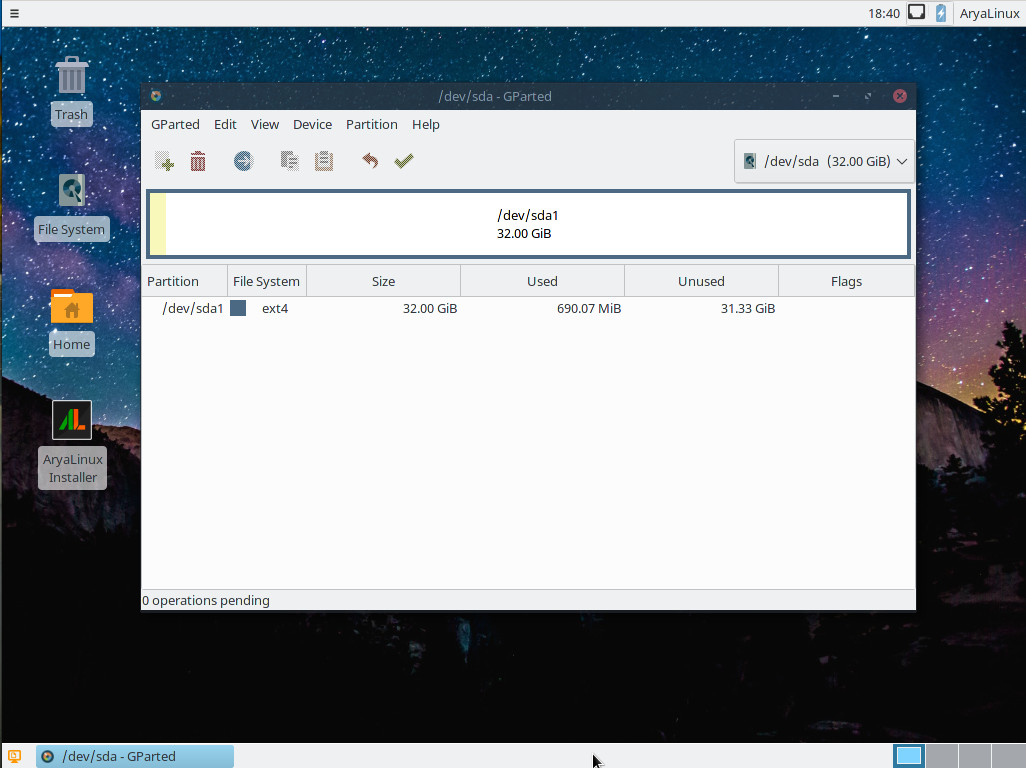
The good news on that front is that the developers have included the GParted tool in the live distribution, so you can create the necessary partitions. Before you launch the installer, click the desktop menu (three vertical lines in the upper left corner of the desktop) and then click System > GParted. When GParted fires up, you will need to create (at least) a root partition (Figure 1).
Figure 1: Using GParted on Arya.
Do note that you need a minimum of 20GB of space to install Arya; anything less will cause the installer to fail. After you’ve created the root partition with GParted, you can close the tool and then fire up the Arya Installer.
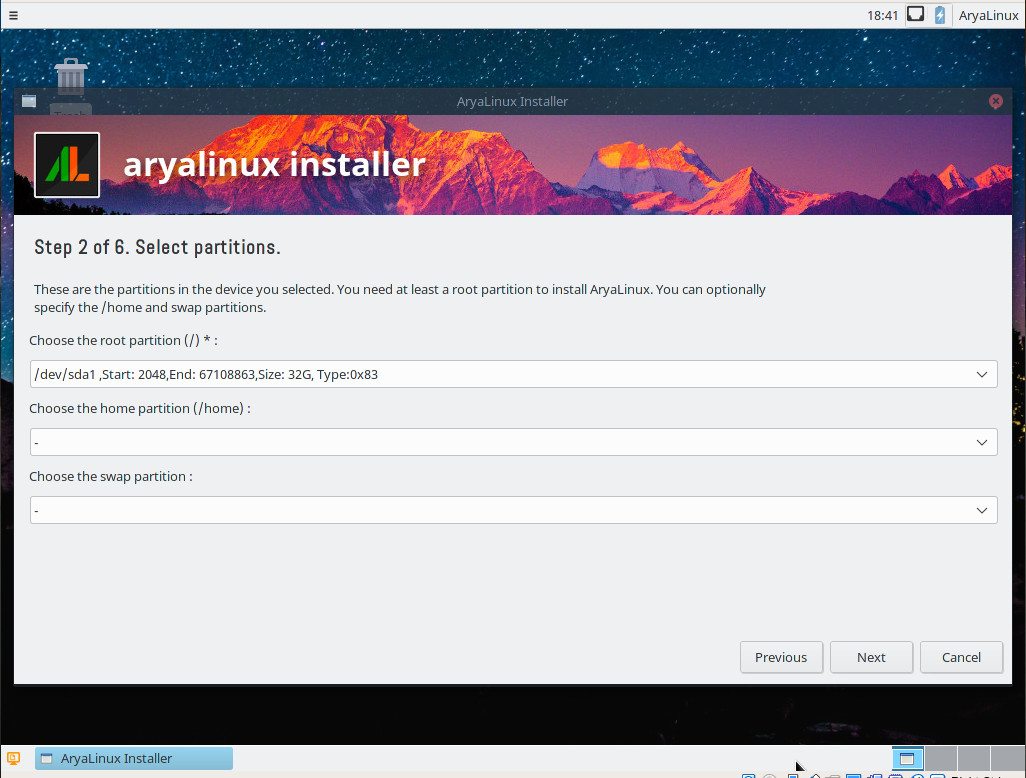
For the most part, the Arya installer is very straightforward. The only hiccup that might trip you is the partition selector. The first thing you must do is select the partition you just created as the root partition. Once you have that done, you can click Next (Figure 2)—unless you want your /home partition to exist outside of the root partition (in which case, you must have already created that partition with GParted as well).
Figure 2: The Arya partition selector.
Beyond that, you should have no problems with the remainder of the Arya installation. When the installer completes, reboot the system, and log into your shiny new (source-based) Linux distribution.
What’s to like?
I should preface this by saying neither Xfce or Mate have ever been my desktop of choice (I’ve always veered toward more modern takes on the desktop, such as Elementary OS or GNOME). That said, the Xfce instance I worked with was quite nice. There’s nothing surprising here; it all works without a single issue. Out of the box, you’ll find software like:
Of that list, the only piece of software that isn’t out of date is Xfce. The good news, however, is that Arya does, in fact, include a package manager called Alps. With this command-line-only tool, you can upgrade the software with relative ease. You must first open up a terminal window and then issue the command su. When prompted, type your administrator password (which is set during installation). At the new Bash prompt, you can upgrade software like so:
alps upgrade PACKAGENAME
Say, for example, you want to upgrade the Thunderbird email client. To do this, you will issue the command:
alps upgrade thunderbird
Unlike an upgrade on, say Ubuntu, the process on Arya can take some time. Alps downloads the newest version of the source and then installs from there. Upgrading Thunderbird from the default version to the latest version took nearly two hours (which is considerably longer than it took to install the operating system). That’s considerable time for upgrading an email client. However, in the end, I could rest assured knowing I had the latest iteration of Thunderbird, built from source. Unfortunately, there is not a mechanism within Arya to run a full upgrade. In other words, you must upgrade your desktop one application at a time.
As far as performance is concerned, Arya runs like a champ. This may be due to the lightweight desktop; even so there was a smoothness and stability to the platform you don’t always find with distributions this new (less than two years) being developed by so few (two developers).
What’s not to like?
Outside the time it took to upgrade a single piece of software, the only problem I ran into was an inability to get the VirtualBox Guest Additions installed. If you’re installing on standard hardware, this won’t be an issue. If, however, you’re thinking of testing Arya as a virtual machine, you’ll have to miss out on the guest additions. That’s a small price to pay, especially if you plan on eventually installing Arya on a standard desktop or laptop machine. Beyond that, Arya did not disappoint.
I should make one disclaimer: I did not test Arya on a laptop, so I cannot comment on how well it performs with mobile hardware (e.g., wireless).
Is AryaLinux right for you?
Ask yourself this one question: Would you rather have a Linux distribution that is all about convenience, or does having a complete desktop built from scratch better suit your needs? If you’re looking for simplicity and convenience, look elsewhere. If the idea of having a from-source desktop gives you a case of the smiles, then AryaLinux might well be the very distribution you’ve been looking for.
Learn more about Linux through the free “Introduction to Linux” course from The Linux Foundation and edX.
If you make use of a Linux server to share out directories and files, you’ll want to make sure you do everything you can to prevent the likes of SambaCry. Here are a few tips.
You’ve already heard of WannaCry, a ransomware attack that can lock down data on Windows machines. This particular exploit comes by way of an SMB vulnerability. Naturally, if you use Linux you know about Samba; but did you also know that, according to CVE-2017-7494:
All versions of Samba from 3.5.0 onwards are vulnerable to a remote code execution vulnerability, allowing a malicious client to upload a shared library to a writable share, and then cause the server to load and execute it.
ZTE’s Zhang Fan, Chief Architect of Packet Core, will deliver a keynote address at the upcoming OPNFV Summit focused on “NFV Practice for vEPC Commercial Network.” Read below for a preview of what you can expect from ZTE onsite at OPNFV Summit this year. OPNFV Summit is taking place June 12-15 in Beijing.
Where do you see your role — and that of OPNFV — in terms of the broader end-to-end open networking stack? OPNFV plays a key role in the integration of IT technologies and standards organizations by centralizing the ecosystem via a dedicated reference platform, which speeds up NFV development and maturity. Since OPNFV representatives are comprised of CT vendors, operators, and IT vendors, among others; OPNFV reflects common requirements needed across the NFV ecosystem. For example, OPNFV’s strong collaboration with other upstream communities including OpenStack, OpenDaylight, DPDK, FD.io, etc. illustrate the project’s ability to serve as a connection across the end-to-end open networking stack.
OPNFV is the only open source community targeting NFV solutions, including infrastructure, VIM and MANO. ZTE is pleased to be joining the OPNFV community along the journey to accelerate open source NFV.
At NodeSource, we maintain the consistently-updated Node.js repositories for Linux distributions. These aren’t repositories like most Node.js developers think of them – git repositories – but rather repositories in the sense of installing Node.js via the given Linux OS’s built-in package manager – like aptand yum.
With the release of Node.js 8 yesterday, we’ve gone ahead and built the Node.js 8 binaries and made them readily available if you’re using Node.js on a Debian- or Enterprise Linux-based distro.
Want to get the latest and greatest with Node.js 8 on Linux? Let’s get you up and running: