Home Blog Page 626

State of the Union: npm

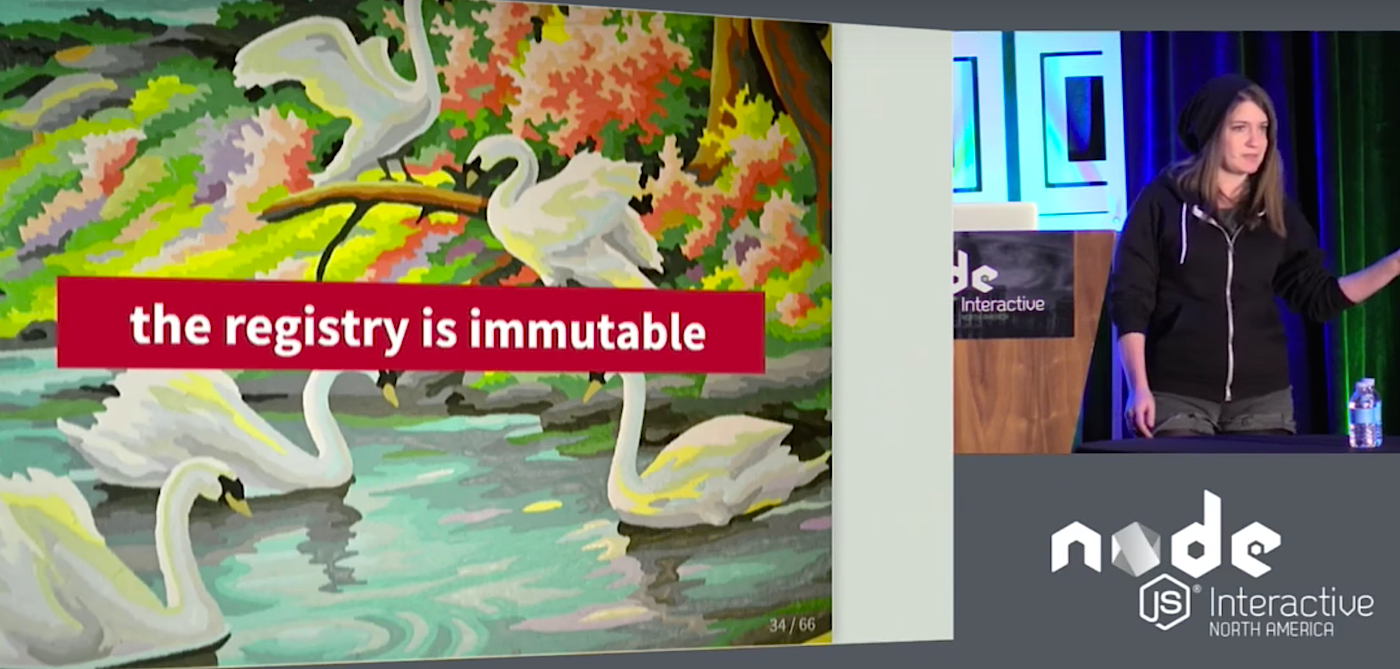
Ashley Williams kicked off her colorful “paint by number” keynote at Node.js Interactive by explaining that npm is actually a for-profit company. Npm makes money by selling its enterprise services and, apart from the amounts required to run the everyday operations of a regular company, its revenue is invested in running the npm registry.

Williams, as the Developer Community and Content Manager, described her job as the person in charge of “explaining how npm works.” Because her audience was probably already familiar with npm as a tool, Williams focused on how it works as a service and some of the staggering figures associated with the registry.

For example, in the 28 days prior to the talk, users had installed 18 billion (“billion” with a “b”) packages from the registry, although this translated to “only” about 6 billion downloads. The downloads are substantially lower than the installs because approximately 66 percent of the installs are now being served from the cache.

The figures regarding downloads are not the only ones that have seen exponential growth. The number of packages is also growing at an accelerated rate. At the beginning of 2015, the registry contained about 12,500 packages. But at the time of Williams’ talk, the number was already up to nearly 400,000. In the week before, 4,685 packages were published in the registry.

Interestingly, the npm repository is also used as a first step to getting into programming for Node. About 160 people publish their first package every week in the registry and, at the current rate of growth, Williams predicts that will increase to an average of 200 people a week through 2017.

Currently, 102,460 active unique publishers are already working within the system, and there are 314,582 registered users. Williams remarks on how amazing this figure is considering the sole advantage of registering on the site is the ability to publish in the registry.

11 lines of code that broke the Internet

Williams also addressed the elephant in the room by tackling the topic of unpublishes. In March 2016, a disgruntled developer unpublished all his modules from the registry. Among them was a seemingly harmless chunk of code 11 lines long — left-pad. left-pad padded out the left hand-side of strings with zeroes or spaces and did nothing else. However, a huge amount of other modules relied on left-pad and broke when the module was removed from the registry, causing no small amount of chaos.

Williams admitted that the left-pad debacle happened because of naive policies at npm. Since, the npm team have devised new policies, the main one being that you are only allowed to unpublish a package within 24 hours of publishing it.

They also hosted a forum on GitHub to get feedback from the community and discovered that most people unpublishing packages were doing so because they didn’t want that package listed on their user page anymore. This led to the new dissociate and deprecate policy. The new policy avoids packages from being erased from the registry, but developers can re-assign the package to npm user. This dissociates the package from the original developer and deprecates it, marking it as unmaintained.

Although Williams admitted that having dissociated and deprecated packages hanging around in the registry is not ideal, it does guarantee there won’t be another random unpublish that will break other people’s setups.

Reliability

So another left-pad won’t happen, but, what would happen if all the registry went down? Williams said this highly unlikely. ping.npmjs.com shows in real time stats the availability of public services npm runs. The site consistently shows that the registry’s services offer a 99.999 uptime.

Williams also pointed out that the registry is also very fast. That’s because the vast majority of the data they need to serve is now served statically. Data is only updated when the registry receives something from the “changes fee.” According to Williams’ benchmarks, downloading from the registry, as opposed to downloading directly from a module’s Git repository, is 75 percent faster.

The registry is also huge. At over 350,000 packages, the npm registry contains more than double the next most populated package registry (which is the Apache Maven repository). In fact, it is currently the largest package registry in the world.

The downside is that 80 percent of npm users are doing front-end development and 20 percent are using npm ONLY for front-end code. Npm was designed for people writing modules in Node and not for developers writing applications or client-side JavaScript. This means that npm’s set of tools are sometimes inadequate for what users want to do.

Fortunately, the community has started writing their own tools to compensate. Williams gave the example of Greenkeeper.io, a service that keeps dependencies updated in front-end applications. Npms, another external service, offers an advanced search of the registry, including metrics. Yarn is especially designed for people who require speedy package installs. It also prevents malicious code from being executed in applications by checksumming the integrity of all installed packages.

Williams pointed out that npm actively supports developers building cool stuff on top of the core services, and she encouraged her audience to check out the registry API documentation and resources like the Replicate service. The latter allows you to see in real time the changes happening within the registry.

Finally, Williams recommends that everybody regularly update their npm package with

npm i npm@latest -g

because the npm provided with the standard Node.js installation tends to be several versions old.

Watch the complete video below:

https://www.youtube.com/watch?v=mY3DyBT55do?list=PLfMzBWSH11xYaaHMalNKqcEurBH8LstB8

If you are interested in speaking or attending Node.js Interactive North America 2017 – happening in Vancouver, Canada next fall, please subscribe to the Node.js community newsletter to keep abreast with dates and time.

Shasta: Interactive Reporting at Scale

Shasta: Interactive Reporting At Scale Manoharan et al., SIGMOD 2016

You have vast database schemas with hundreds of tables, applications that need to combine OLTP and OLAP functionality, queries that may join 50 or more tables across disparate data sources, oh, and the user is waiting, so you’d better deliver the results online with low latency.

It sounds like a recipe for disaster, yet this is exactly the situation that Google faced with many of its business systems, especially it seems with their advertising campaign management system. Business logic and data transformation logic was becoming tangled bottlenecking development, queries were way too large to be expressed gracefully in SQL (especially when considering the dynamic aspects), and traditional techniques to speed up queries such as maintaining materialized views either increased the cost of writes too much, or gave unacceptably stale data.

Read more at The Morning Paper

New Framework Uses Kubernetes to Deliver Serverless App Architecture

A new framework built atop Kubernetes is the latest project to offer serverless or AWS Lambda-style application architecture on your own hardware or in a Kubernetes-as-a-service offering.

The Fission framework keeps the details about Docker and Kubernetes away from developers, allowing them to concentrate on the software rather than the infrastructure. It’s another example of Kubernetes becoming a foundational technology.

Read more at InfoWorld

Dockerfile Security Tuneup

I recently watched 2 great talks on container security by Justin Cormack from Docker at Devoxx Belgium and Adrian Mouat from Container Solutions at GOTO Stockholm. We were following many of the suggestions but there was still room for improvement. So we decided it was good time to do a security tuneup of our dockerfiles.

Official images

We’re longtime users of Alpine Linux as we prefer the smaller size and reduced attack surface compared with Debian or Ubuntu based images. So we were using the official alpine image as the base for all our images. However an added benefit of the official images is that Docker have a team dedicated to keeping them up to date and following best practices.

Read more at Microscaling Systems

Quantum Computing Is Real, and D-Wave Just Open-Sourced It

QUANTUM COMPUTING IS real. But it’s also hard. So hard that only a few developers, usually trained in quantum physics, advanced mathematics, or most likely both, can actually work with the few quantum computers that exist. Now D-Wave, the Canadian company behind the quantum computer that Google and NASA have been testing since 2013, wants to make quantum computing a bit easier through the power of open source software.

Traditional computers store information in “bits,” which can represent either a “1” or a “0.” Quantum computing takes advantage of quantum particles in a strange state called “superposition,” meaning that the particle is spinning in two directions at once. 

Read more at Wired

10 Open Source Point of Sale Systems for Linux

As Linux became more stable and popular business are looking for saving every bucks and Open source Point of Sale applications are getting first choice especially for small businesses for managing work, sales and inventory. We have seen some of the Open source POS have grown such an extend that exceed known close source POS brands.  Here is a short list of POS that you can at try free of cost.   

1. PHP Point of Sale

Platform: LAMP
Type: Retail
Reviewer’s Rating 3/5

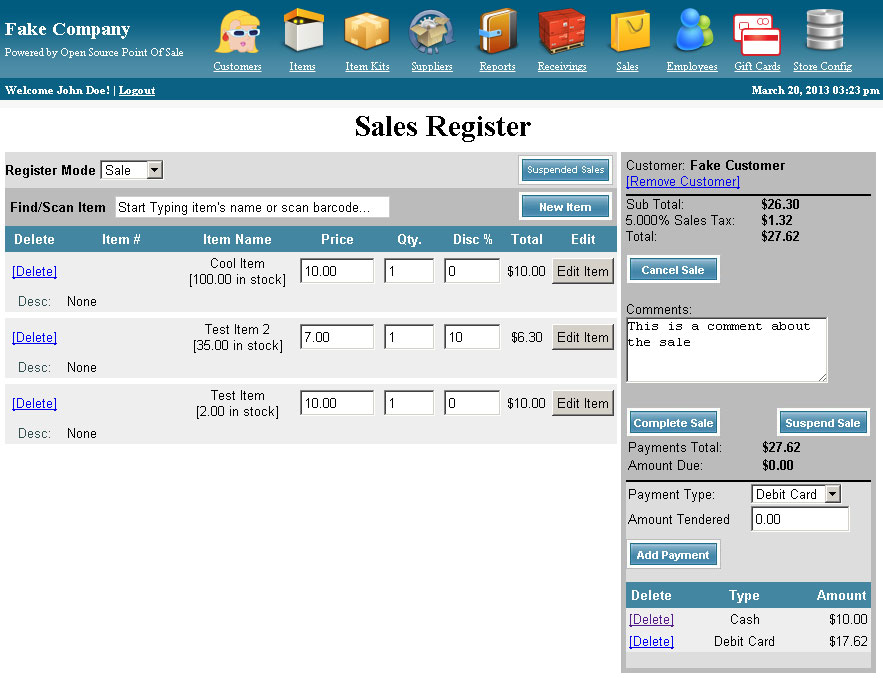
PHP Point of Sale System is in the market for last few years. It’s a Lamp based Point of sale suitable for small and medium stores. The site also provide active support and has predefined list of hardware. It has master database for customer, sales, supply, employee and provides flexible reporting. Being a web based POS it has limited support for POS printer and cashdrawer. 

Screenshot


Download: https://sourceforge.net/projects/phppointofsale/
 

2. Floreant POS

Platform: Java, MySQL/Derby/PostgreSQL
Type: Restaurant & Retail
Reviewer’s Rating 4.5/5

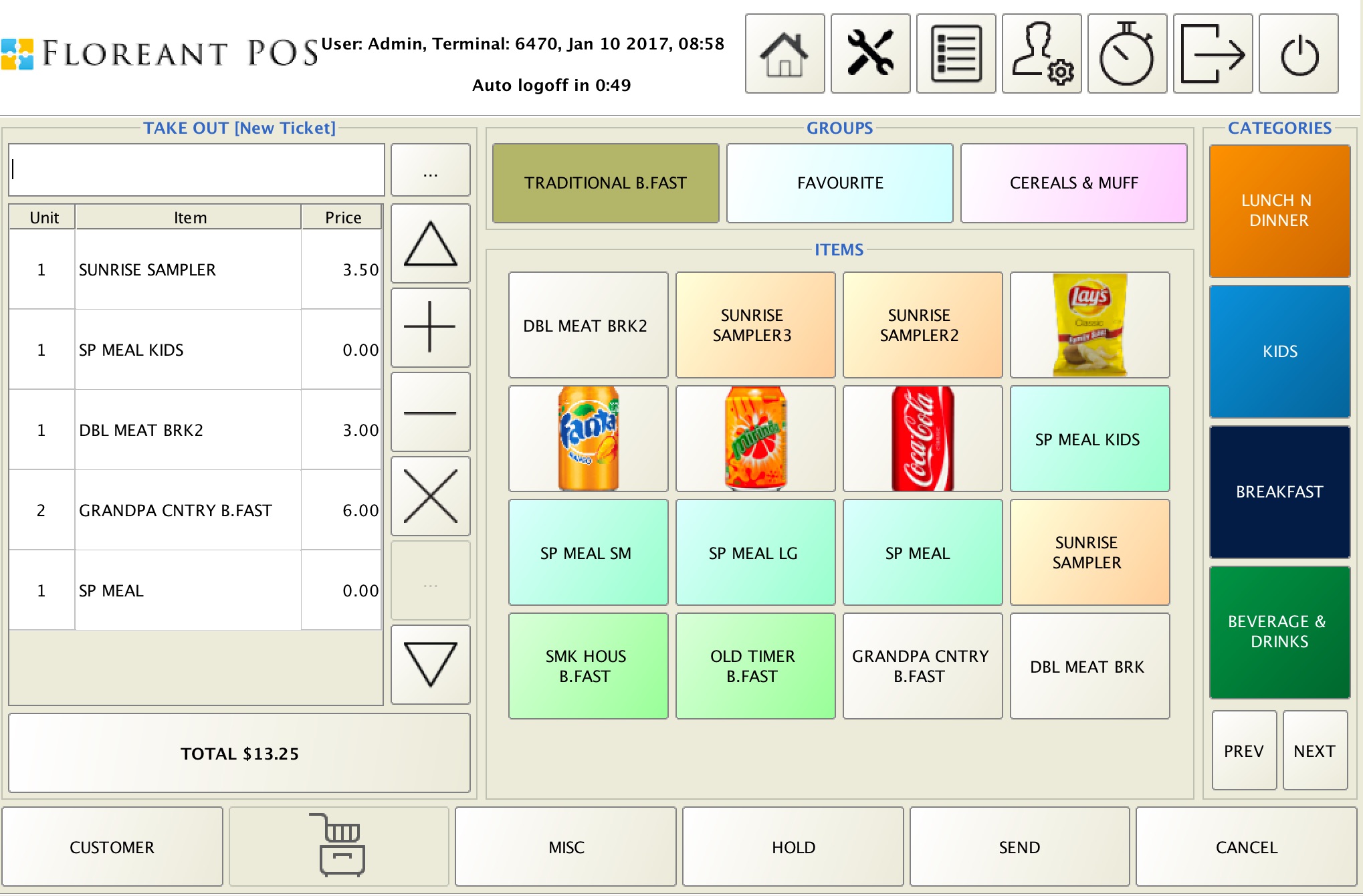
Floreant POS was originally designed for Dennys restaurant chain and then released as open source in 2009. Being a Java based application it has advantage of support for different type of hardware  including customer display pole, digital scale and barcode scanner. Some features we find are

  • Kitchen & Receipt printer routing & KDS
  • Pizza Builder
  • Support for Dine In, Take out and Home delivery order type
  • Discounts, Coupons and Shift wise pricing
  • Back office reports

Compared to other POS Floreant has simple User Interface that fits for tablet and large monitors. It has customizable order types.  If a restaurant has dine in as well as small restail outlet this could fit it well.  Floreant handling back office features like Tax, Customer,  Payroll, Server tips, Drawer pull etc.  It also produce sales analysis, hourly sales and server productivity. Its founder company OROCUBE LLC maintains this open source system and also offers commercial support for them. 

Download: http://floreant.org/#download
 

3. Unicenta

Platform: Java
Type: Retail
Reviewer’s Rating 4/5

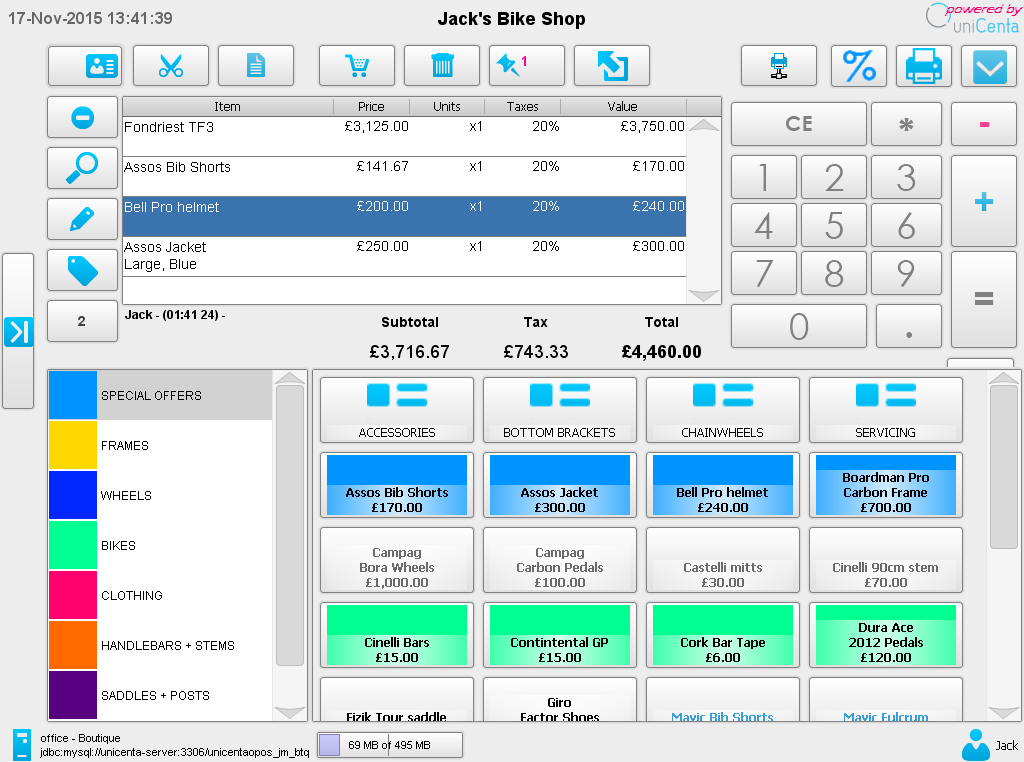
Unicenta is award winning POS used in huge number of retail stores. This one is fork of another open source POS named Open bravo.  Unicenta features touch screen based POS, inventory, table layout and web based report plugin. Being a Java based system it supports wide range of hardware, barcode, scanner, cash drawer. It has  both free and paid supported releases. 


Download: http://unicenta.com  


4. Wallace POS

Platform: Web
Type: Retail
Reviewer’s Rating 3.5/5

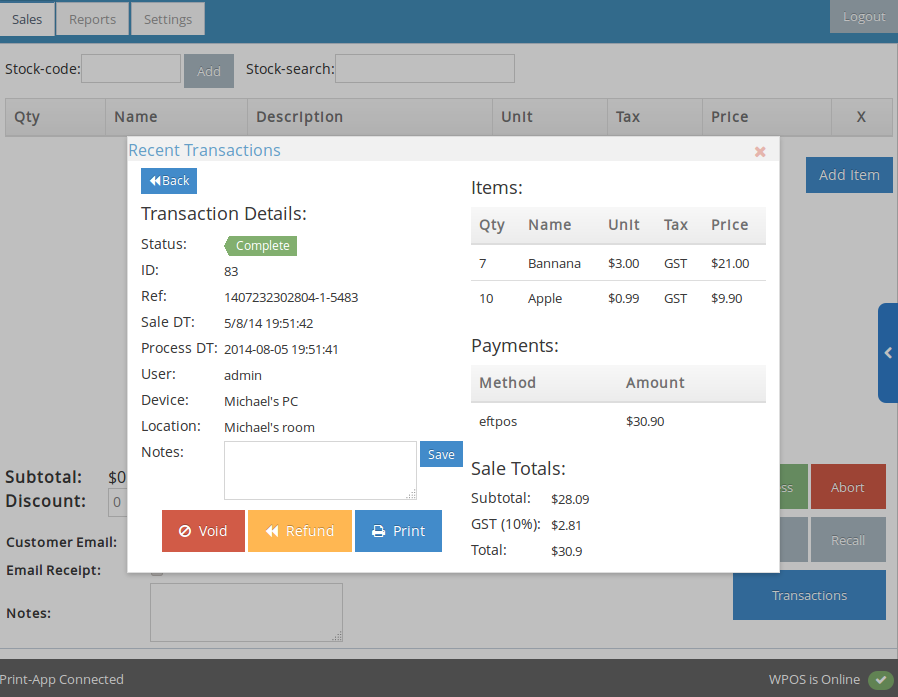
Wallace seems to be very promising Web based Point of sale system for reports. It has very nice design and rich set of reports. It has role based user permission, multiple terminal and support for return, discount and cancellation. Being a web based system it has limitation of terminal wise sales report generation and supports limited hardware.


Download: https://wallacepos.com/

5. Chromis POS 

Platform: LAMP
Type: Restaurant and Retail
Reviewer’s Rating 3/5

Chromis POS was part of Unicenta Project and this fork added extensive improvement in last a year. They have variable pricing system that is needed for fish market. Their Kittchen display is simple and supports bump bar. Chromis is better solution for Quick server stores than Fine Dine-ins. Reason is it has limited features for Table service and server cash out.

Download http://chromis.co.uk/


6. OODO

Platform: Web
Type: Restaurant and Retail
Reviewer’s Rating 3.5/5
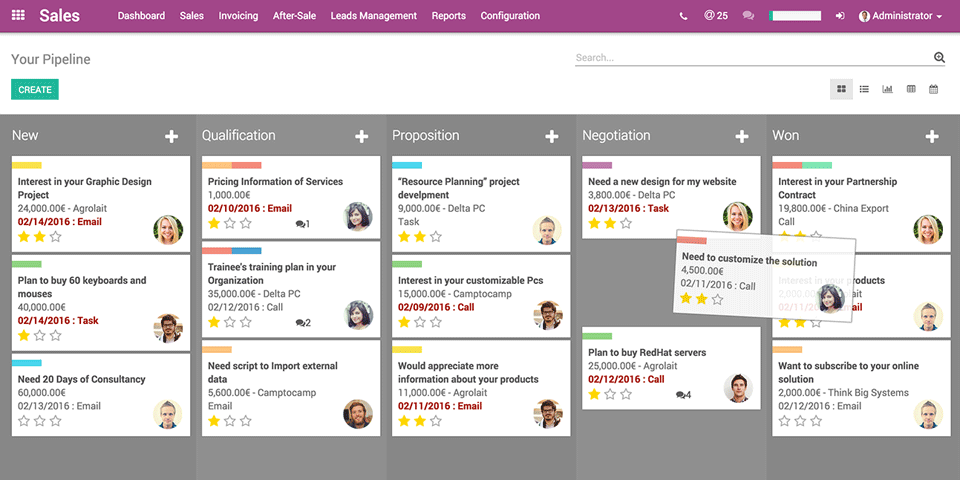
Odoo is a popularl ERP that has POS system inside.  Odoo’s open source edition is released under an LGPL version 3, and the source is available on GitHub. Odoo is primarily written in Python.


Download : oodo

7. OS POS

Platform: Web
Type: Retail
Reviewer’s Rating 3/5

Open Source Point of Sale (OSPOS) is a Retail Management Solution for Independent Retailers. OSPOS includes several modules.

  • Point of Sale
  • Inventory Control
  • Customer Management
  • Employee Management
  • Reports


8. Wanda POS

Platform: Java
Type: Retail
Reviewer’s Rating 3/5

Its another fork of Open bravo and has become popular these days.

Download http://wandaapos.com/

9. POSNIC 

Download http://posnic.com

10. Core POS 
Type: Retail
Reviewer’s Rating 3/5
Core POS is new and it has presence in Github. 

Download: http://site.core-pos.com/


The Linux Foundation Welcomes JanusGraph

We’re pleased to kick off 2017 by announcing that JanusGraph, a scalable graph database project, is joining The Linux Foundation. The project is starting with an initial codebase based on the Titan graph database project. Today we see strong interest in the project among developers who are looking to bring the graph database together, as well as support from organizations such as Expero, Google, GRAKN.AI, Hortonworks, IBM and others. We look forward to working with them to help create a path forward for this exciting project.

Several members of the JanusGraph community, including developers from Expero, GRAKN.AI and IBM, will be at Graph Day Texas this weekend and invite discussion about the project.

JanusGraph is able to support thousands of concurrent users in real time. Its features include elastic and linear scalability, data distribution and replication for performance and fault tolerance, high availability and hot backups, integration with big data platforms such as Apache Spark, Apache Giraph and Apache Hadoop, and more.

To get learn more and get involved, visit https://github.com/JanusGraph/janusgraph.

New Wireless Daemon for Linux

This presentation from Marcel Holtmann is about a new 802.11 wireless daemon for Linux. It is a lightweight daemon handling all aspects around WiFi support for Linux. It is designed with a tiny footprint for IoT use cases in mind.

OpenSSL For Apache and Dovecot: Part 2

Last week, as part of our meandering OpenSSL series, we learned how to configure Apache to use OpenSSL and to force all sessions to use HTTPS. Today, we’ll protect our Postfix/Dovecot mail server with OpenSSL. The examples build on the previous tutorials; see the Resources section at the end for links to all previous tutorials in this series.

You will have to configure both Postfix and Dovecot to use OpenSSL, and we’ll use the key and certificate that we created in OpenSSL For Apache and Dovecot .

Postfix Configuration

You must edit /etc/postfix/main.cf and /etc/postfix/master.cf. The main.cf example is the complete configuration, building on our previous tutorials. Substitute your own OpenSSL key and certificate names, and local network:

compatibility_level=2
smtpd_banner = $myhostname ESMTP $mail_name (Ubuntu/GNU)
biff = no
append_dot_mydomain = no

myhostname = localhost
alias_maps = hash:/etc/aliases
alias_database = hash:/etc/aliases
myorigin = $myhostname
mynetworks = 127.0.0.0/8 [::ffff:127.0.0.0]/104 [::1]/128 192.168.0.0/24
mailbox_size_limit = 0
recipient_delimiter = +
inet_interfaces = all

virtual_mailbox_domains = /etc/postfix/vhosts.txt
virtual_mailbox_base = /home/vmail
virtual_mailbox_maps = hash:/etc/postfix/vmaps.txt
virtual_minimum_uid = 1000
virtual_uid_maps = static:5000
virtual_gid_maps = static:5000
virtual_transport = lmtp:unix:private/dovecot-lmtp

smtpd_tls_cert_file=/etc/ssl/certs/test-com.pem
smtpd_tls_key_file=/etc/ssl/private/test-com.key
smtpd_use_tls=yes

smtpd_sasl_auth_enable = yes
smtpd_sasl_type = dovecot
smtpd_sasl_path = private/auth
smtpd_sasl_authenticated_header = yes

In master.cf un-comment the following lines in the submission inet section, and edit smtpd_recipient_restrictions as shown:

#submission inet n  -  y  -  - smtpd
  -o syslog_name=postfix/submission
  -o smtpd_tls_security_level=encrypt
  -o smtpd_sasl_auth_enable=yes
  -o milter_macro_daemon_name=ORIGINATING
  -o smtpd_recipient_restrictions=permit_mynetworks,permit_sasl_authenticated,reject
  -o smtpd_tls_wrappermode=no

Reload Postfix and you’re finished:

$ sudo service postfix reload

Dovecot Configuration

In our previous tutorials we made a single configuration file for Dovecot, /etc/dovecot/dovecot.conf, rather than using the default giant herd of multiple configuration files. This is a complete configuration that builds on our previous tutorials. Again, use your own OpenSSL key and certificate, and your own userdb home file:

protocols = imap pop3 lmtp
log_path = /var/log/dovecot.log
info_log_path = /var/log/dovecot-info.log
disable_plaintext_auth = no
mail_location = maildir:~/.Mail
pop3_uidl_format = %g
auth_mechanisms = plain

passdb {
  driver = passwd-file
  args = /etc/dovecot/passwd
}

userdb {
  driver = static
  args = uid=vmail gid=vmail home=/home/vmail/studio/%u
}

service lmtp {
 unix_listener /var/spool/postfix/private/dovecot-lmtp {
   group = postfix
   mode = 0600
   user = postfix
  }
}

protocol lmtp {
  postmaster_address = postmaster@studio
}

service lmtp {
  user = vmail
}

service auth {
  unix_listener /var/spool/postfix/private/auth {
    mode = 0660
        user=postfix
        group=postfix
  }
 }

ssl=required
ssl_cert = </etc/ssl/certs/test-com.pem
ssl_key = </etc/ssl/private/test-com.key

Restart Dovecot:

$ sudo service postfix reload

Testing With Telnet

Now we can test our setup by sending a message with telnet, just like we did before. But wait, you say, telnet does not support TLS/SSL, so how can this be so? By opening an encrypted session with openssl s_client first is how. The openssl s_client output will display your certificate, fingerprint, and a ton of other information so you’ll know that your server is using the correct certificate. Commands that you type after the session is established are in bold:

$ openssl s_client -starttls smtp -connect studio:25
CONNECTED(00000003)
[masses of output snipped]
    Verify return code: 0 (ok)
---
250 SMTPUTF8
EHLO studio
250-localhost
250-PIPELINING
250-SIZE 10240000
250-VRFY
250-ETRN
250-AUTH PLAIN
250-ENHANCEDSTATUSCODES
250-8BITMIME
250-DSN
250 SMTPUTF8
mail from: <carla@domain.com>
250 2.1.0 Ok
rcpt to: <alrac@studio>
250 2.1.5 Ok
data
354 End data with .subject: TLS/SSL test
Hello, we are testing TLS/SSL. Looking good so far.
.
250 2.0.0 Ok: queued as B9B529FE59
quit
221 2.0.0 Bye

You should see a new message in your mail client, and it will ask you to verify your SSL certificate when you open it. You may also use openssl s_client to test your Dovecot POP3 and IMAP services. This example tests encrypted POP3, and message #5 is the one we created in telnet (above):

$ openssl s_client -connect studio:995
CONNECTED(00000003)
[masses of output snipped]
    Verify return code: 0 (ok)
---
+OK Dovecot ready
user alrac@studio 
+OK
pass password
+OK Logged in.
list
+OK 5 messages:
1 499
2 504
3 514
4 513
5 565
.
retr 5
+OK 565 octets
Return-Path: <carla@domain.com>
Delivered-To: alrac@studio
Received: from localhost
        by studio.alrac.net (Dovecot) with LMTP id y8G5C8aablgKIQAAYelYQA
        for <alrac@studio>; Thu, 05 Jan 2017 11:13:10 -0800
Received: from studio (localhost [127.0.0.1])
        by localhost (Postfix) with ESMTPS id B9B529FE59
        for <alrac@studio>; Thu,  5 Jan 2017 11:12:13 -0800 (PST)
subject: TLS/SSL test
Message-Id: <20170105191240.B9B529FE59@localhost>
Date: Thu,  5 Jan 2017 11:12:13 -0800 (PST)
From: carla@domain.com

Hello, we are testing TLS/SSL. Looking good so far.
.
quit
+OK Logging out.
closed

Now What?

Now you have a nice functioning mail server with proper TLS/SSL protection. I encourage you to study Postfix and Dovecot in-depth; the examples in these tutorials are as simple as I could make them, and don’t include fine-tuning for security, anti-virus scanners, spam filters, or any other advanced functionality. I think it’s easier to learn the advanced features when you have a basic working system to use.

Come back next week for an openSUSE package management cheat sheet.

Resources

Learn more about Linux through the free “Introduction to Linux” course from The Linux Foundation and edX.

How to Make the Most of the Free Intro to DevOps Course on edX

John Willis — a leader in the DevOps movement — is hosting a series of webinars to accompany the free Introduction to DevOps: Transforming and Improving Operations training course from The Linux Foundation and edX. Last month, he provided a thorough introduction to the course and offered tips and tricks on how to get the most out of it. If you missed this introduction, you can watch the complete webinar replay on demand.

There are several ways to approach this course. Willis described four different approaches to consider depending on your needs and interests:

  1. Watch just the included videos in the free course (15 hours)

  2. Read the following suggested books and then do Step 1 (30 hours total)

    1. The Phoenix Project — a novel by Gene Kim about bottlenecks, constraints, theory of constraints, importance of flow, a modern day re-imagining of the book The Goal

    2. DevOps Handbook (co-authored by John Willis)

  3. Steps 1 & 2 + watch the additional suggested videos, read suggested blogs, and white papers (50-60 hours total, including 15 hours of videos, 15 hours of suggested advanced research, two books, and 10 advanced reading recommendations)

  4. Treat it like a college course doing all of the above and all the recommended reading (estimated 120 hours)

Hear Willis’s advice in the video clip below:

Attend Office Hours Webinars

Attending Willis’s office hours webinar to get your DevOps questions answered is another great way to make the most of this free course. Throughout this multi-webinar series, Willis will share his insights and guide participants through the course. In each upcoming webinar, he will provide a quick chapter summary, leaving plenty of time to answer your questions and enhance your training experience.

In the first session, presented in December, Willis explained the DevOps concept, which he says can help organizations develop and deliver services more quickly and reliably. In session two, earlier this month, Willis covered Chapter 1 of the DevOps course then opened up the session to answer questions in the style of college office hours. You can watch the replay of session two on demand.

In session three, Willis will briefly cover Chapter 2 of the training course and address your questions.

Join us on January 31, 2017 for the next installment of this webinar series: Intro to DevOps with Course Author John Willis, in which Willis will provide a brief overview of Chapter 2 and take your DevOps questions! Register Now >>

John Willis is the cohost of DevOps Cafe Podcast (Devopscafe.org) and a co-author of the DevOps Handbook. He is also the course author of Introduction to DevOps: Transforming and Improving Operations, a free course from The Linux Foundation and hosted on edX.org.