This article is intended to be a very high-level discussion of Linux filesystem concepts. It is not intended to be a low-level description of how a particular filesystem type, such as EXT4, works, nor is it intended to be a tutorial of filesystem commands.
Every general-purpose computer needs to store data of various types on a hard disk drive (HDD) or some equivalent, such as a USB memory stick. There are a couple reasons for this. First, RAM loses its contents when the computer is switched off. There are non-volatile types of RAM that can maintain the data stored there after power is removed (such as flash RAM that is used in USB memory sticks and solid state drives), but flash RAM is much more expensive than standard, volatile RAM like DDR3 and other, similar types.
The gap between the computational science and open source software communities just got smaller – thanks to an international collaboration among national laboratories, universities and industry.
The Eclipse Science Working Group (SWG), a global community for individuals and organizations who collaborate on commercially-friendly open source software, recently released five projects aimed at expediting scientific breakthroughs by simplifying and streamlining computational science workflows. The open source projects, which represent years of development and thousands of users, are the product of intense collaboration among SWG members including ORNL, Diamond Light Source, Itema AS, iSencia, Kichwa Coders, Lablicate GmbH, and others.
This week in Linux and open source news, R3 has made its blockchain platform’s code public, a newly identified vulnerability threatens Android phones, and more! Keep your finger on the pulse of OSS with this weekly digest.
1) Corda’s code will be contributed to the Hyperledger Project.
5) “The same internal, deep learning tools that Microsoft engineers used to build its human-like speech recognition engine, as well as consumer products like Skype Translator and Cortana, are now available for public use.”
The Linux desktop can be a confounding thing—always just on the cusp of perfection, but seemingly lacking one small detail or another. Granted, nearly every Linux desktop can be brought to that level of greatness with a configuration or two, but every so often you just wish you could install and be done with it.
You won’t have to bother with codecs
You won’t have to hunt down third-party software
You won’t have to tweak the UI to fit your needs
You could easily play games
Media “just worked”
Most of us can take a standard distribution and get the above working with little to no effort. But other users may want a computer operating system that doesn’t require extra work.
That is where Chapeau comes in. Chapeau is a cutting-edge Linux distribution, built from Fedora Workstation, using the GNOME desktop environment, and intended to be an incredibly intuitive and easy to use, out-of-the box experience.
Trust me when I say Chapeau is exactly that.
Part of the Chapeau marketing states that it is “Fedora without the work.” I could not have said it better. With Chapeau, you get a desktop distribution in which everything works—in every way—out of the box.
What Chapeau includes
Do you remember the old days of Linux, when the “start” menu would include a massive list of applications (most of which you would never use)? Chapeau manages to included software packages that combine to make an incredibly impressive array of applications that doesn’t go the old school Linux route of “something for everyone.” Instead, Chapeau has refined the package list to contain everything a modern user would need to not only work, but play. The list includes:
Kernel 4.7.4
GNOME 2.20
LibreOffice 5
PlayOnLinux
Wine
Steam
VLC
Mozilla (with included Adobe Flash)
Hardware Helper Tool
RPMFusion
All necessary codecs (free and non-free) for media and DVD playback
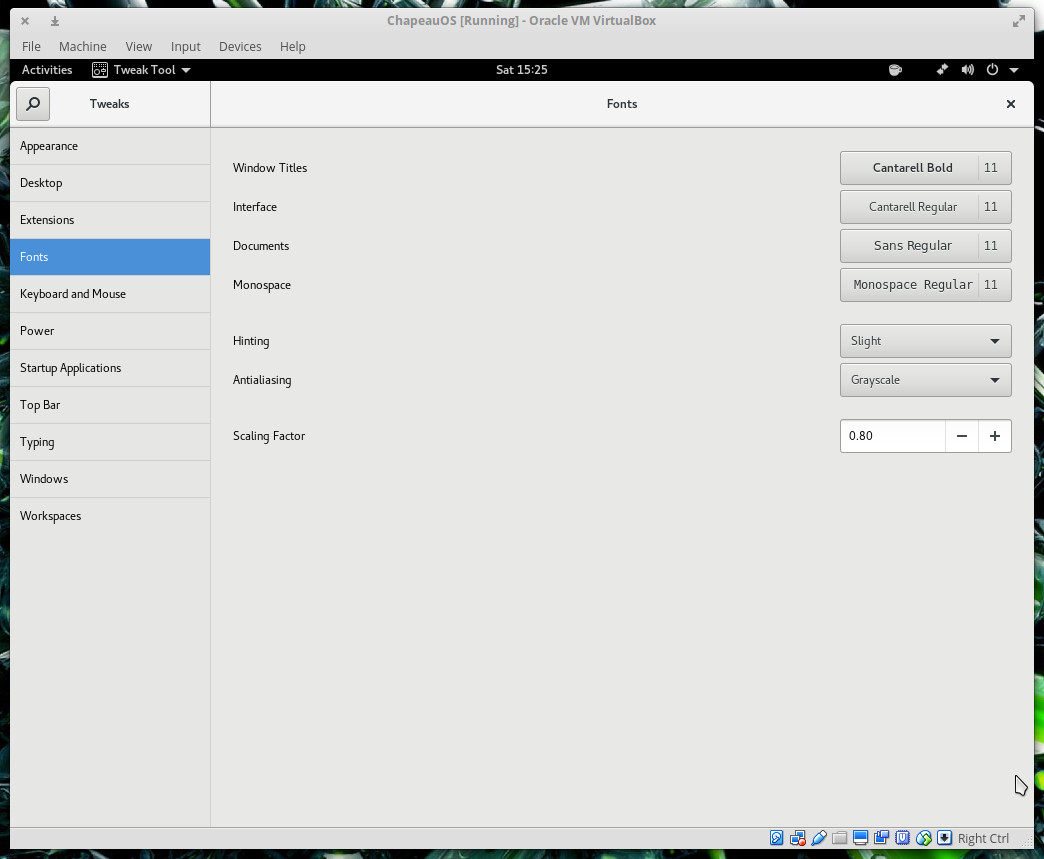
The goodness doesn’t end with the included packages. Chapeau also includes a few UI enhancements (many of which should be considered in the main release of GNOME). One such enhancement is tighter default font scaling. The developer of Chapeau (Vince Pooley—yes, this project is maintained by one man) has installed GNOME Tweak and turns the scaling factor down to .80. For some (like myself), this font scaling does a great job of keeping the UI both clean and readable. Fortunately, if you prefer to increase the font scale back to the GNOME 1.0 default, you can simply open up Tweaks and bump the font scaling back up to 1.0 (Figure 1).
Figure 1: Configuring font scaling in the Tweaks tool.
Activities Folders
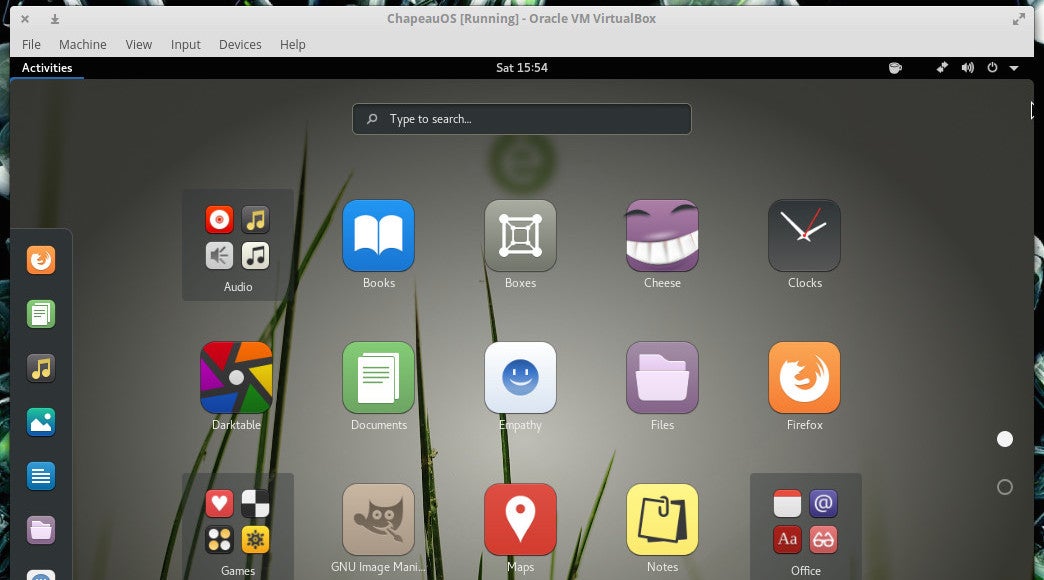
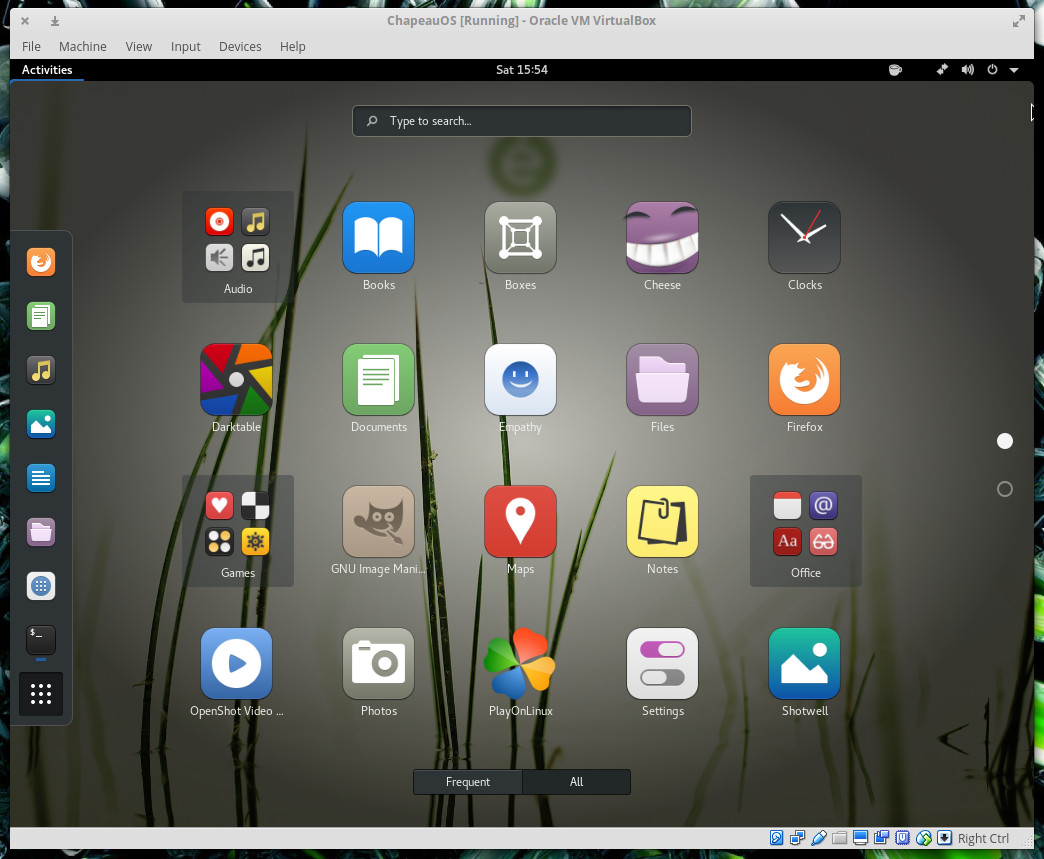
One very nice, but subtle, addition Pooley made to GNOME is the inclusion of a few extra app folders within the Dashboard. Instead of the default Utilities and Sundry folders, Chapeau includes folders for Wine, Games, and Office (Figure 2).
Figure 2: Keeping the Dashboard uncluttered with app folders.
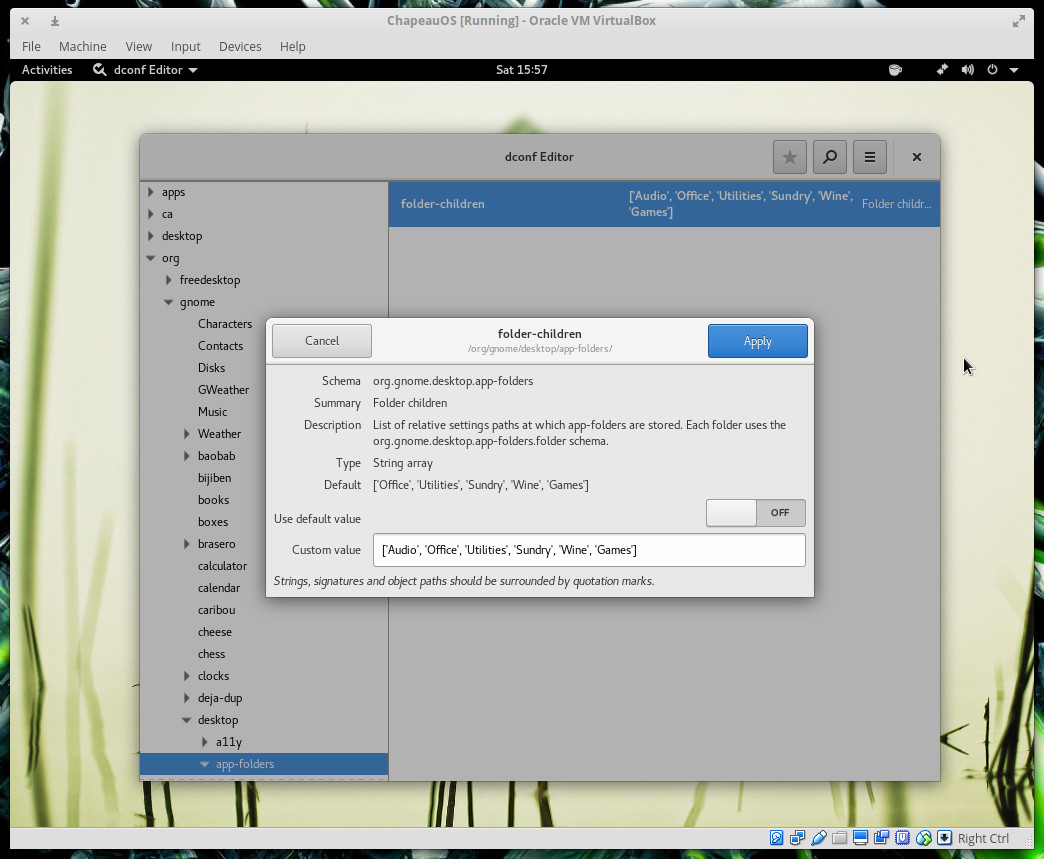
As you can see, I added an extra category for Audio. Adding folders to the GNOME Dashboard isn’t quite as simple as dragging one launcher onto another (as it is in Android). Instead you have to open up the dconf-editor (which Chapeau includes), navigate to org > gnome > desktop > app-folders, double-click on folder-children, add your new folder to the Custom value line, and click Apply (Figure 3).
Figure 3: Adding a new app folder with the dconf-editor.
If you find the folder doesn’t show up, you might have to issue the following commands first (I’ll demonstrate by creating the Audio folder):
gsettings set org.gnome.desktop.app-folders.folder:/org/gnome/desktop/app-folders/folders/Audio/ name ‘Audio’
gsettings set org.gnome.desktop.app-folders.folder:/org/gnome/desktop/app-folders/folders/Audio/ translate true
gsettings set org.gnome.desktop.app-folders.folder:/org/gnome/desktop/app-folders/folders/Audio/ categories “[‘Audio’]”
Now if you go back to dconf-editor and add the folder for Audio, it will appear in the Dashboard…populated with apps in the Audio category.
The one trick I would like to see the Chapeau developer pull off would be creating the ability to “drag and drop” one launcher onto another to create app folders. Why this isn’t the default behavior in GNOME, I cannot figure out.
Games, games, games
When you ask most why Linux has failed to make much headway in the land of the desktop, the immediate answer is almost always “Games!”. Even though the typical computer user is not a gamer, it seems gaming is the thing that holds Linux back from taking the desktop by storm.
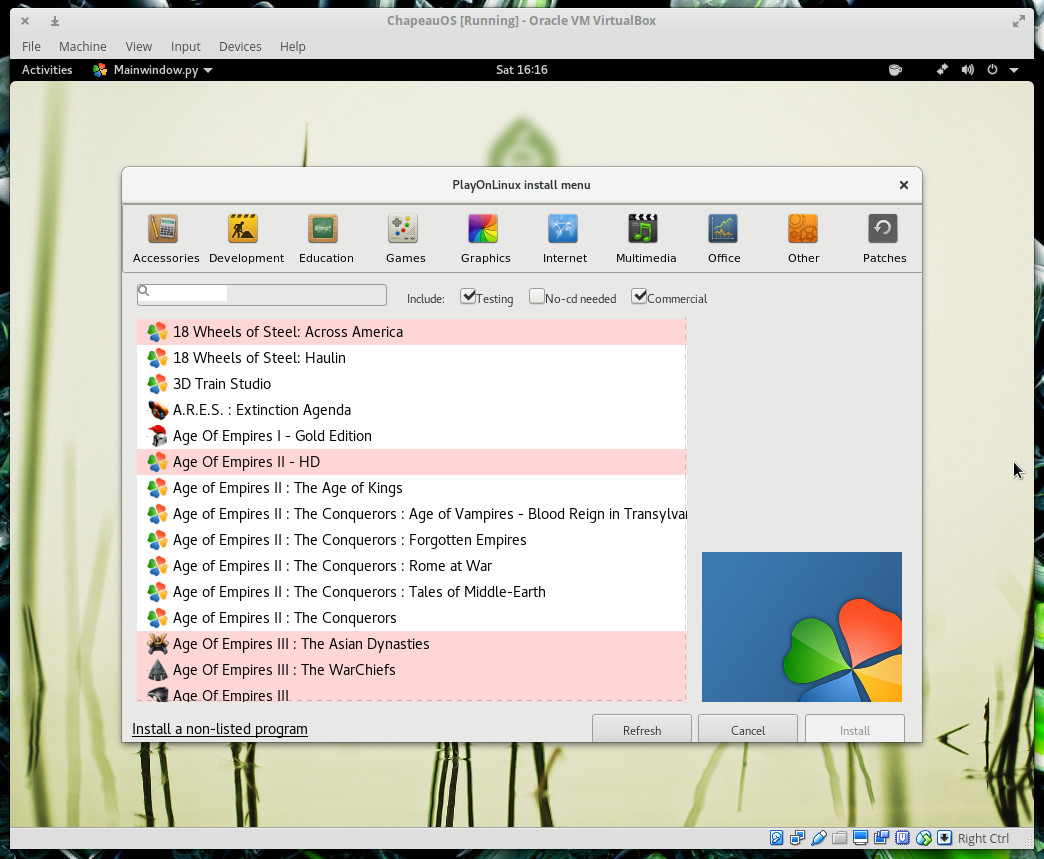
Chapeau goes a long way to rectify that problem. By including PlayOnLinux, Wine, and Steam (as well as a few native games such as Chess, Mines, Reversi, Neverball & Neverputt), Chapeau has made it easy for users to run their favorite games on Linux. Between PlayOnLinux (Figure 4) and Steam, you can install and run just about any game you like.
Figure 4: PlayOnLinux supports thousands of games.
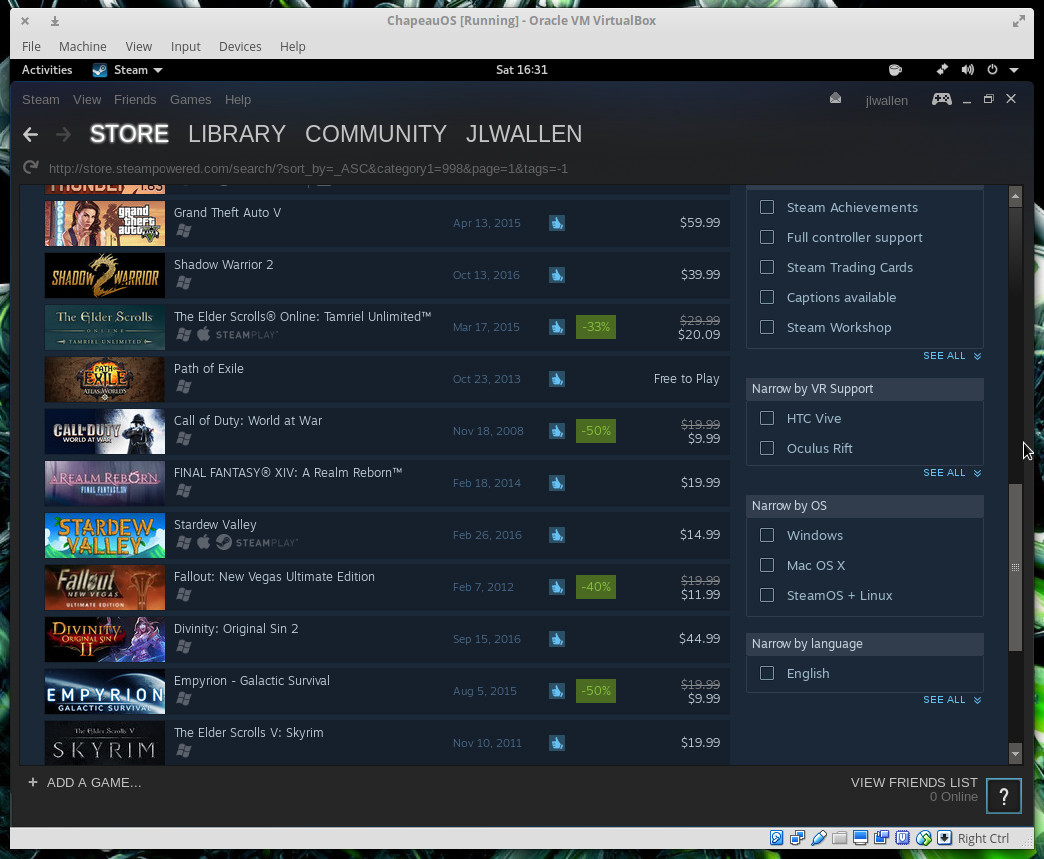
If PlayOnLinux doesn’t do it for you, Steam is sure to make the prospect of playing games on Linux a treat. Open up the Steam app (allow it to update on first launch), log into your Steam account (or create a new account), and start searching for games to play (Figure 5).
Figure 5: Steam on Chapeau makes gaming simple.
Chapeau gets it right
I’ve used so many Linux distributions over the years. They seem to come and go like fashion trends. Yes, the stalwarts like Ubuntu, Fedora, Debian, SUSE, and Linux Mint will remain, but the fringe distributions don’t always enjoy such staying power.
Chapeau, however, doesn’t feel like a fringe distribution. In fact, Chapeau does everything right. Not only does it include something for every modern user, it works…and works well. In the end, that truly is the mark of a good distribution, how well it succeeds in doing what it sets out to accomplish. Of all the distributions I’ve used, Chapeau gets more right than any other. Whether you’re a casual browser, a master of productivity, or a gamer…Chapeau has you covered.
Develop a good working knowledge of Linux using both the graphical interface and command line with this free Introduction to Linux course from The Linux Foundation.
To manage an OpenStack cloud infrastructure, you need to manage the configuration of the individual cloud services and the orchestration between them. Because OpenStack is an open source product, other open source tools are a popular choice to install, manage, and run an OpenStack cloud.
There are many ways to evaluate open source tools. Some considerations include the language used or perhaps availability of a UI. Equally important is the health of the open source project’s community as measured by the diversity of contributors and the overall activity on the project.
This article will compare the community contributions of four of the top open source automation tools used with OpenStack: Ansible, Chef, Juju Charms, and Puppet.
What is OpenStack day 2 management?
Getting up and running with OpenStack is divided into three phases, known colloquially as:
Day 0: Plan
Day 1: Install and configure
Day 2: Operate, run and manage.
Some examples of ‘day 2’ operations are:
Responding to hardware failures
Scaling the cloud up (and down)
Compliance of the cloud workload
Planning for capacity requirements
Monitoring the cloud.
The tasks are often boring and crave automation to free up administrators to spend time on more creative work.
Open source automation tools have modules to manage OpenStack and free up time for other tasks. Puppet is used in Red Hat OpenStack Platform Director, Mirantis Fuel and others. Chef is used by SUSE, the crowbar project, and others. Ansible is used by HPE Helion, Red Hat, Rackspace and others. Juju has its own configuration engine and collection of Charms to deploy and manage OpenStack.
Upstream activity
An open source project is driven by its community, leadership and contributors. Developers contribute code and documentation to a project. Why is it important to analyze contributions?
A high level of activity is a healthy indicator of the popularity and wide adoption of an open source project.
A diverse pool of contributors to a project means that no one vendor dominates a project and multiple people and organizations can vote on the direction a project should take.
An open source project with many contributors stands a better chance of succeeding and thriving.
For example, the Linux operating system, Apache web server and Mozilla/Firefox browser would not have succeeded without a large and diverse group of contributors.
The following is an analysis of contributions to the four OpenStack management projects, based on the number and diversity of each project’s commits: Ansible, Chef, Juju charms and Puppet.
(Nomenclature:
An open source contributor is a developer who participates in the open source project.
An open source commit is a change to the source code or documentation that is accepted by the community)
Ansible
Ansible simplifies the build of consistent environments without agents, daemons, or extra packages. Developers build playbooks which target the cloud infrastructure. Designed for multi-tier deployments, Ansible models IT infrastructure by describing how systems inter-relate, rather than managing one system at a time. The metrics for Ansible (listed under “complementary” project types) are for all of Ansible, including all modules in core and extras. The Ansible project is not in the OpenStack Big Tent.
Chef is a client-server based orchestration management “infrastructure as code” for deploying applications, version control and configuration files. Chef is written in Ruby. Chef “Cookbooks” can be written for deploying, security, monitoring etc. Chef requires an agent to be installed and pull configuration on a specified schedule.
Juju is an application and service modelling tool that enables you to model, configure, deploy and manage applications and pre-configured services and OpenStack. Charms are sets of scripts for deploying and managing services. Charms declare interfaces that fit charms for other services, so relationships can be formed.
Puppet is a Declarative Language for “write once deploy many” packages for on-demand Openstack configuration and version control. Puppet is deployed in a client/server setup, or serverless mode where clients periodically poll the server for desired state, and send back status reports to the server (master). Puppet can provision, upgrade, and manage nodes throughout their lifecycle. Puppet is based on Ruby, a custom DSL for writing manifests, utilizes ERB for templates. Puppet has Web UI and reporting tools
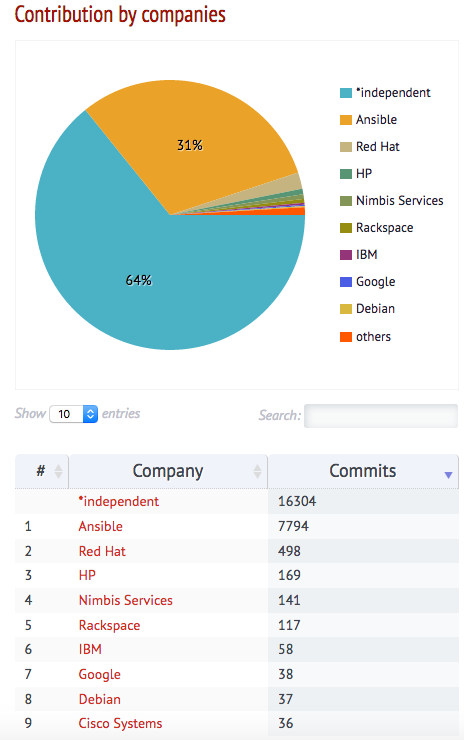
Reviewing the above statistics the contributions by number of commits rank as follows (rounded numbers):
Ansible 25,200
Puppet 4,500
Juju Charms 1,160
Chef 470
A brief analysis of the contributors to each repository shows that
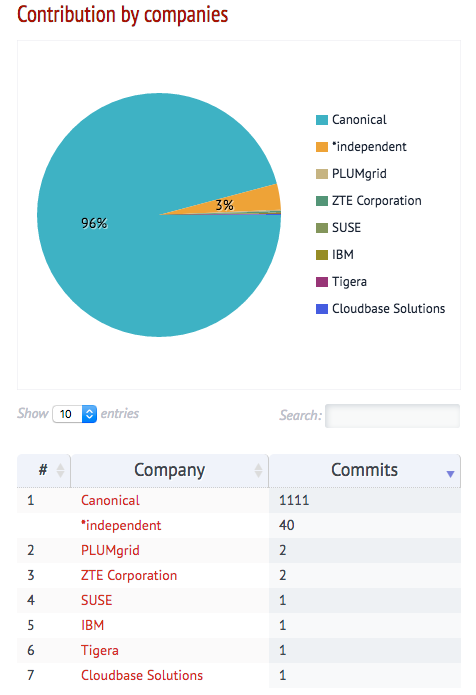
Canonical is a leader of the Charms repository with few contributions by other vendors and few independent contributors.
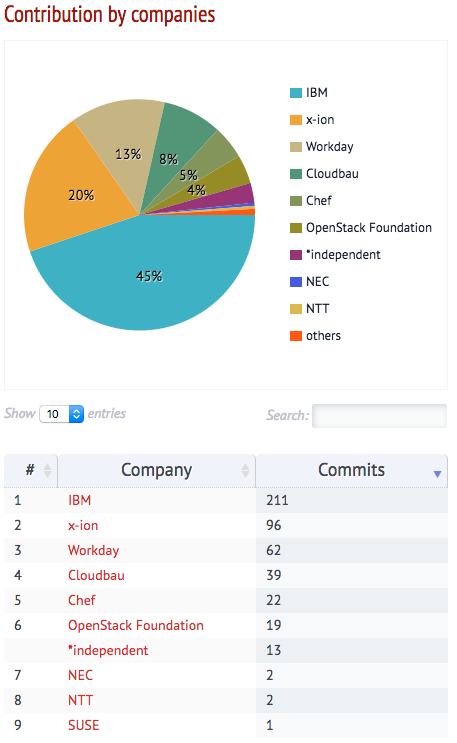
The Chef repository is dominated by IBM and x-ion with a few contributions by others and minimal by independents.
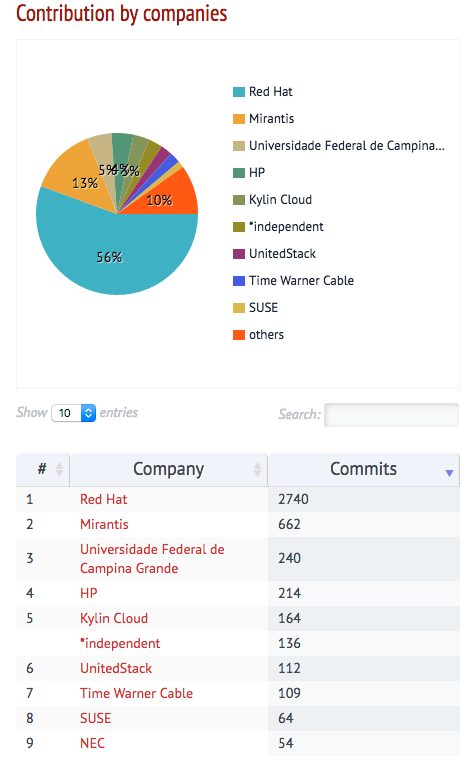
Puppet has a diverse contribution by Red Hat, Mirantis, a university, independents and a few other vendors.
The Ansible repository has a healthy contribution from independent contributors and vendors, Red Hat, HPE and Rackspace.
Conclusion
Day 2 operations are still dominated by manual and custom individual scripts devised by system administrators. Automation is needed by enterprises. Based on the above analysis, Ansible is a leading open source project with a high number contributions and a diverse community of contributions. Thus Ansible is a well supported and popular open source tool to orchestrate and manage OpenStack.
Learn everything you need to know to create and manage private and public clouds with The Linux Foundation Training’s online, self-paced OpenStack Administration Fundamentals course.
My work as director of the Security Awareness Training program at the SANS Institute affords me a view across hundreds of organizations and hundreds of thousands of employees trying to build a more secure workforce and society. As we near the end of this year’s National Cyber Security Awareness Month, here are two tips to incorporate robust security awareness training into your organization and daily work.
1. Focus the Training
Changing behavior is hard. But security awareness training shouldn’t be. Most training is just too hard for many users. “Too hard” has many definitions: Too long. Too much. Too often. Too boring. Too many behaviors. In general, many organizations make the mistake called cognitive overload, which is when you dump so much on employees that they simply forget it all. Sound familiar? There is a better way. Keep the training short and sweet and focused on what will really mitigate your risks. Avoid cognitive overload by taking the time up front to ensure engagement and relevance.
Increasing diversity in the technology industry is something that has gone from discussion to action in recent years. In 1985, 37 percent of computer science graduates were women. That number has continued to decline over the years, with women now earning only 18 percent of today’s computer science degrees according to National Center for Education Statistics.
A recent study conducted by Bitergia’s Daniel Izquierdo Cortázar presented at OpenStack Austin 2016 found that women comprise 11 percent of the OpenStack community, representing only a .5 percent increase since 2011. Women contributed 9 percent of the commits to OpenStack, up from the previous average of 6.8 percent since 2011.
Changing these numbers requires not only for women to participate in these communities, but for those in positions of power and privilege to make room for women in tech, trust their skills, and allow them to lead.
SQL injection attacks exist at the opposite end of the complexity spectrum from buffer overflows, the subject of our last in-depth security analysis. Rather than manipulating the low-level details of how processors call functions, SQL injection attacks are generally used against high-level languages like PHP and Java, along with the database libraries that applications in these languages use. Where buffer overflows require all sorts of knowledge about processors and assembler, SQL injection requires nothing more than fiddling with a URL.
As with buffer overflows, SQL injection flaws have a long history and continue to be widely used in real world attacks. But unlike buffer overflows, there’s really no excuse for the continued prevalence of SQL injection attacks: the tools to robustly protect against them are widely known. The problem is, many developers just don’t bother to use them.
Microservices architecture has reached a tipping point where its broad adoption is now pretty much guaranteed. According to a survey by NGINX, nearly a third of companies have deployed microservices in production, and another third are either using microservices in development or considering them. Furthermore, there is fairly even distribution of microservices adoption across small (36%), medium (50%), and large companies (44%), indicating that the approach has merit regardless of how many developers you have in your organization.
However, developing microservices is not always easy, and not necessarily a panacea or silver bullet versus monolithic architectures. While limiting the function of a program to a specific task may reduce the absolute lines of code, it may introduce other challenges related to testing, team coordination, and distributed computing complexity.
Finally mistral work flows start to work in QuickStart environment.
Memory allocation as 7 GB for PCS HA Controllers and 6.7 GB for each compute overcloud node (1 VCPU by default for any node running in overcloud) seems to be safe to pass phases 5.X of overcloud deployment with QuickStart , having some kind of hidden ksm&&ksmtuned configuration when comparing with same amount of swap memory been utilized by instack-virt-setup. QuickStart allocate about 3-4 times less, around 200 KB vs 600-800 handled by default ksm setup.