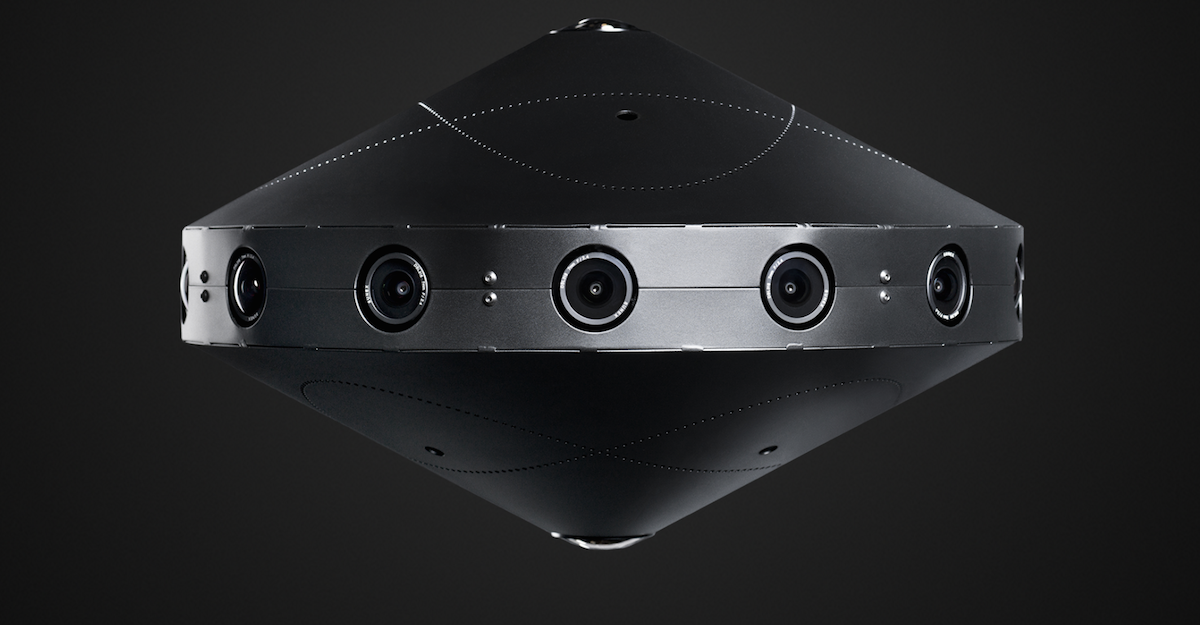
In April, Facebook announced it had built a “Surround360” 3D-360 video capture system, but that it did not plan to sell it. Instead, the social networking giant promised it would open source both the hardware and the Ubuntu Linux-based software used to stitch together images from the camera into stereoscopic 360 panoramas. This week, Facebook did just that, posting full specs and code for the device on GitHub.
The Surround360 incorporates 14 wide-angle cameras with 4-megapixel resolution and global shutters, arranged in a ring-like design. The cameras can output 4K, 6K, or 8K video resolution. There are also two fisheye lenses on the bottom and one on top to complete the 360-degree immersive experience. The rugged aluminum chassis sits on a pole, which is masked in software so it is invisible when you look down with your VR headset.
The device is built entirely with off-the-shelf hardware that can be ordered online. Facebook offers a cartoon-like manual that promises to help you build the device in as little as four hours.
Facebook is motivated by the need to create content not only for its Oculus Rift VR headset and Samsung’s lower-end, Oculus-infused Gear VR, but also its own Facebook.com ads and user-generated content. In its announcement, Facebook said it wanted to “accelerate the growth of the 3D-360 ecosystem,” and that “anyone will be able to contribute to, build on top of, improve, or distribute the camera based on these specs.”
Well, maybe not just anyone. The parts cost about $30,000 — much more than many 3D-360 cameras, such as the dual-fisheye, $350 Ricoh Theta S or the soon-to-ship, 16-camera GoPro Odyssey, which costs $15,000. Yet, it’s cheaper than most professional-level models, such as the spherical, eight-camera Nokia OZO, which sells for $60,000.
Linux Software Vastly Reduces Processing Time
The major benefit of the higher end cameras — and the Surround360 in particular — is not only quality and durability, but much shorter processing time stitching videos into a seamless whole. The open source Linux software “vastly reduces the typical 3D-360 processing time while maintaining the 8K-per-eye quality we think is optimal for the best VR viewing experience,” says Facebook.
The task is daunting considering the amount of RAW video data involved – the Surround360 can capture 120GB per minute at 30fps, or 240GB at 60fps. To stitch the disparate views together, the system uses an optical flow algorithm to compute left-right eye stereo disparity rather than using tedious, manual “hand stitching.”
Optical flow lets you synthesize views separately for the left and right eyes, as well as flow the top and bottom camera views into the side views, and flow pairs of cameras views to match objects appearing at different distances. As a result, the camera can maintain “image quality, accurate perception of depth and scale, comfortable stereo viewing, and increased immersion,” says Facebook.
The Surround360 can be controlled remotely from any device with a web browser. The Ubuntu Linux 14.04 desktop used for processing, however, must be top-of-the-line, and capable of a 17Gbps sustained transfer rate. An 8-way level-5 RAID SSD is required to keep up with the isochronous camera capture rates.
Playback is currently optimized for the Oculus Rift and smartphone-enabled GearVR. On the latter, 8K playback requires a “dynamic streaming” feature that adds a “noticeable lag,” but is still acceptable, according to a hands-on report from TechCrunch. Presumably, you could also use other headsets, and you can view panoramas on computers with 2D displays without the immersive vertical views.
Facebook is a major consumer and producer of open source, mostly Linux-based software, and has previously experimented with open source hardware in its Open Compute initiative for servers. It chose not to open source the Oculus Rift, however.
Razer’s OSVR HDK 2.0 headset is open source, as well as Google’s much lower end Cardboard. The other major open source VR effort is OpenVR, an open source version of Valve’s SteamVR software, which forms the basis for HTC’s commercial Vive headset.
The Surround360 is not the first open source panoramic video camera. Elphel’s $60,000 and up Eyesis4Pi is a panoramic, stereophotogrammetric rig that incorporates 24 Linux-driven Elphel cameras with 5-megapixel resolution. After stitching, this results in a panoramic image resolution of 64 megapixels, says Elphel. A similar Elphel panoramic camera was mounted on the first Google Streetview cars before being replaced with an in-house design.
Some Windows desktop users will certainly be new to Bash and the new shell, Ubuntu on Windows. In Part 1, I introduced the topic, and in Part 2, I showed how to get started by installing Windows. In this part of our series, I’ll describe a handful of essential commands to help get started.
1. <Tab>
Learn to love your <Tab> key! Start typing any command and press <Tab> to complete the rest of your command. When multiple matching options exist, you can press <Tab><Tab> to list all available options. Watch a real Linux command line wizard at work, and you’ll marvel at how efficient, and accurate she is, deftly using the <Tab> key accomplish the most complex tasks in a minimum number of keystrokes.
2. man
Documentation! Most commands in your Ubuntu shell will have excellent “manuals” or “manpages.” Simply type man <command> and you’ll enter a page viewer, where you can learn all about whatever you’re trying to better understand. All Ubuntu manpages are also rendered to HTML, and you can search and read them at manpages.ubuntu.com. Heck, let’s read the manpage for man, itself!
man man
3. sudo
You’ll find that some commands refuse to work, unless you type sudo. sudo stands for superuser do. It’s exactly like Windows’ “Run as Administrator” action. sudo is how you execute privileged instructions, like editing system configuration files, installing additional software, or making permanent changes to the system. Read more about it in the manpage here, and try the following:
whoami
sudo whoami
4. apt
apt is the packaging system for Ubuntu. It’s the command-line tool that enables you to add and remove software from your Ubuntu shell. apt talks to archive.ubuntu.com, which is much like the Windows Store or Apple iTunes store, except ALL of the software is free! Moreover, the vast of majority of it is completely open source. You can search for software, install packages, remove packages, update, and upgrade your system. Read more about apt in the manpage here, and try the following:
sudo apt update
sudo apt upgrade
apt search tree
apt-cache search tree
sudo apt install tree
tree /etc
sudo apt purge tree
5. Pipes
While not strictly a “command”, perhaps the most fundamental concept to understand in Bash is that you can always “pipe” the output (stdout, or “standard out”) of one command, to another command as its input (stdin, or “standard in”). In this manner, you can “pipeline” many different UNIX/Linux utilities together, with each one processing the output of the other. To use a pipe, you simply add the | character to the end of your command, and then start typing your next command. In the rest of the examples below, you will “build” more and more advanced processing on the command line, through the use of pipes. You can learn more about pipes here.
6. grep
grep will quickly become your best friend, in your Ubuntu environment on Windows! grep stands for “get regular expression,” which means that you can do some super fancy searching, if you speak in regexes. You’ll want to learn that eventually, but let’s start simply. Here’s a couple of examples to try, and make sure you read the manpage.
apt-cache search revision control
apt-cache search revision control | grep git
7. sed
sed is a simple “inline editor.” Like piping text to grep, you can pipe data directly to sed, and using regular expressions, you can replace text. This is super handy for automating lots of tasks, updating files, and countless other things. Here’s a simple example — we’re going to print (cat) a file, and then replace all of the colons (:) with three whitespaces. Note that we’re not going to actually edit the file (though we could). We’re just going to print the output to the terminal. Try this, and make sure you read the manpage!
cat /etc/passwd
cat /etc/passwd | sed “s/:/ /g”
8. awk
awkis amazing! It is its own programming language and can do some pretty spectacular things, like advanced mathematics and text formatting with merely a couple of characters. You can spend the next year of your life becoming an awk expert. But let’s just look at a super simple example, that’s always handy! Let’s say you want to split some text into a column, and only get the first column. We’ll build on our previous example, to get a list of users on the local system. Try this, and then read the manpage!
cat /etc/passwd
cat /etc/passwd | sed “s/:/ /g”
cat /etc/passwd | sed “s/:/ /g” | awk ‘{print $1}’
9. xargs
If you like to automate tasks, you definitely want to get to know xargs. xargs provides, effectively, a “loop” that you can use on the command line. Basically, you can run the same command over and over, against a variable that changes. Let’s say that we wanted to say hello to each of those users we just listed. Try this, and then read the manpage!
cat /etc/passwd
cat /etc/passwd | sed “s/:/ /g”
cat /etc/passwd | sed “s/:/ /g” | awk ‘{print $1}’
Some commands produce very little or no output. Others produce a lot more output than can fit on the screen. In these cases, you should use the command less. less will “page” the information, allowing you to scroll down, up, and even search in the text. Let’s look at our system log, and then try piping it through less, moving up and down with the arrow keys and PgUp and PgDn keys. Type q to quit, and then read the manpage!
cat /var/log/syslog
cat /var/log/syslog | less
11. ssh
ssh is how we get from one Linux machine, to another. Ubuntu on Windows, of course, comes with the ssh client, enabling you to ssh directly to any other Linux system that has an ssh server (openssh-server, in Ubuntu) installed. You’ll definitely want to read up on ssh in the manpage!
ssh example.com
12. rsync
rsync is the brilliant tool in Linux that we use to securely copy and synchronize directories from one place to another — perhaps on the local system, or even over an encrypted connection across the network. More than a decade before Dropbox, OneDrive, or iCloud, Linux users have been efficiently backing up their data “to the cloud” using rsync. Check out the manpage, and try this:
mkdir /tmp/test
rsync -aP /usr/share/doc/ /tmp/test/
ls /usr/share/doc
ls /tmp/test/
rm -rf /tmp/test
13. find / locate
Windows users are certainly familiar with the File Explorer’s file search mechanisms. Let’s look at two ways to search your Linux filesystem, for files and directories. We can use thefindcommand, which has a ton of interesting options. You should read more about find in its manpage and locate in its manpage, and try these commands:
find /etc/
find /etc/ -type d
find /etc/ -type f
find /etc/apt -name sources*
find /mnt/c/Program Files
sudo updatedb
locate bash.exe
This is merely the tip of the iceberg! There are hundreds of commands. List the ones installed in /usr/bin, and count them using:
ls /usr/bin
ls /usr/bin | wc -l
There, you just learned two more commands (ls and wc)! And I’m sure, by now, you know to check their manpages 🙂
Automation and orchestration are key in any infrastructure setup. DevOps professionals need tools that can help them do their jobs more accurately and efficiently, but there isn’t one key to open all doors. According to a recent report from The New Stack, for example, more than 40 percent of survey respondents said an orchestration platform was the primary way they managed containers in their organization. However, “the actual products being used or planned for use were strongly influenced by a respondent’s stage of container adoption.”
Different organizations have different needs, and they use different DevOps tools to get the job done. I talked to some companies to learn more about various DevOps tools they use or recommend.
The Right Tool for the Task
There are many different software engineering approaches, and Amar Kapadia Senior Director, Product Marketing at Mirantis, breaks them down into the following four stages: continuous development, continuous integration and testing, continuous deployment, and continuous monitoring.
Different tools exist for these specific tasks, said Kapadia. For continuous development, there’s Git and Eclipse; for continuous Integration – Jenkins; and for continuous monitoring — a new class of application lifecycle management tools (ALM), such as New Relic.
Anything that provides automation of infrastructure setup is a great starting point, said Mike Fiedler, Director of Technical Operations at Datadog. Projects like Chef, Puppet, Ansible all provide the ability to treat “infrastructure as code,” bootstrapping hosts – whether they be cloud-based or hardware — in a repeatable, predictable fashion.
For monitoring, Fiedler said open source tools like Ganglia and Graphite are good, general purpose starter tools that can get any organization off the ground. In terms of build automation, he pointed at Jenkins, TeamCity, Travis CI, and CircleCI. And, as far as deployment is concerned, he said there are some good wrappers around executing remote commands, like Fabric, Capistrano, RunDeck. These also follow the model of automating some of the repeatable parts of a deployment pipeline with snippets of code.
Sam Guckenheimer, product owner and group product planner at Microsoft mentioned Spinnaker. This tool is hosted on GitHub and was originally developed by Netflix. According to the GitHub page, Spinnaker is an open source, multi-cloud continuous delivery platform for releasing software changes with high velocity and confidence. Guckenheimer described Spinnaker as a very promising multi-cloud delivery platform.
Thomas Hatch, the creator of Salt and CTO of SaltStack suggested SaltStack (no surprises there). He added, however, that there are many great tools that can assist DevOps pros in doing their jobs more accurately and efficiently. Each team needs to find the tools that work best for their own use case.
Amit Nayar, Vice President of Engineering at Media Temple, agreed that the DevOps tools that a company or a team will choose will depend on the problems they are trying to solve.
He identified three important factors in choosing the right tools:
The tech stack largely determines the tools, as the tools a LAMP stack team chooses may vary greatly from those of a Windows/.NET-based team, for example.
The budget will determine whether or not a company will go with open source self-service tools vs. proprietary hosted-SaaS based tools, for example.
The deployment target is also a large factor in choosing DevOps tools in relation to whether a team is deploying applications to their own bare-metal/virtualized infrastructure vs. deploying to public cloud infrastructures such as AWS and Azure.
Nayar also provided a list of some of the DevOps tools they like at Media Temple:
Source code repositories with Git and GitHub
Continuous integration and deployment with Jenkins and RunDeck
Container technology with Docker
Infrastructure automation with tools like Puppet, Ansible, AWS CloudFormation/CodeDeploy, etc.
Monitoring with Nagios, Prometheus, Graphite, ELK logfile analysis stack, etc.
Almost all VictorOps users are practitioners and heavy users of DevOps tools, said Jason Hand, DevOps Evangelist & Incident & Alerting specialist at VictorOps. He shared the following list of popular tools used by their customers: Icinga, Nagios, Jira, Trello, Hubot, Slack, Jenkins, Graphite, RayGun, Takipi, New Relic, Puppet, Chef, GitHub, Cassandra, Ansible, Grafana, ElasticSearch, Logstash, and Kibana.
Application provisioning is where most people are right now, according to Greg Bruno, VP Engineering, Co-Founder at StackIQ. Puppet, Chef, Ansible, and Salt are very popular because they fit the majority of use cases. Automated server provisioning is the next logical step: Get the machines deployed and preconfigured to use Puppet and Chef, and then complete your application provisioning through those tools.
Conclusion
Nothing’s better than getting a list of DevOps tools used by some of the major player themselves. Which of these do you use, or which ones do you suggest?
Sign up to receive one free Linux tutorial each week for 22 weeks from Linux Foundation Training. Sign Up Now »
Virtualization isn’t the answer to every problem in IT. There are plenty of workloads where neither containers nor hypervisors are the answer. The old problems of being able to easily provision, utilize and make highly available bare-metal workloads remain, so what options exist for the modern sysadmin?
Solutions to this problem can be largely divided into two groups: persistent and non-persistent workloads. For all intents and purposes, these break down into OpEx and CapEx problems, respectively.
Non-Persistent(ish) Workloads The simplest method of making a workload non-persistent(ish) is simply to disconnect the storage from the compute. Using Fibre Channel or iSCSI LUNs delivered from centralized storage has been used for ages. If the server dies, who cares? Attach the LUNs to another server and off you go.
Apache Spark, the in-memory processing system that’s fast become a centerpiece of modern big data frameworks, has officially released its long-awaited version 2.0. Aside from some major usability and performance improvements, Spark 2.0’s mission is to become a total solution for streaming and real-time data. This comes as a number of other projects — including others from the Apache Foundation — provide their own ways to boost real-time and in-memory processing.
Most of Spark 2.0’s big changes have been known well in advance, which has made them even more hotly anticipated. One of the largest and most technologically ambitious additions is Project Tungsten, a reworking of Spark’s treatment for memory and code generation.
Project Calico is an open source layer three virtual networking system for containers, which can be deployed across a variety of todays platforms and setups, including hybrid environments. While centralized control can quickly cause an underlying software-defined network (SDN) to reach load capacity, Project Calicos removal of a central controller helps ease this pain point for developers.
In this episode of The New Stack Makers embedded below, we explore how Project Calico hopes to streamline and evolve software-defined networking, as well as the Calico’s collaboration with Flannel to build the Canal policy-based secure networking software. With Project Calico, there is no centralized controller. It uses etcd as a high-level key value store. Then we have an agent that runs on every host, that has an algorithm that calculates in a distributed fashion exactly what a host has to do. This is good for horizontal scale, which becomes important with the move to containers, said Pollitt.
In Text Rendering with Xamarin, I drilled down into the countless ways and options that Xamarin provides you to display text on the screen of multiple mobile devices. In this article, I’ll focus on the cross-platform mechanisms and the support for per-platform code in Xamarin.
SAP vs. PCL
Xamarin Forms provides two different paths to cross-platform applications. The shared assets project (SAP) contains files that are included directly with each platform’s project at build time. The portable class library (PCL) is different and creates a share dynamic link library that is loaded at runtime by each platform’s application. The difference is important, as you’ll soon see, because there are different techniques you can use when you know at build time what platform the code is going to run on vs. at runtime only.
Code vs. XAML
Xamarin Forms exposes a cross-platform object model for laying out UI elements on the screen…
2-factor authentication is a great thing to have, and more and more services are making it a standard feature. But one of the go-to methods for sending 2FA notifications, SMS, is being left in the dust by the National Institute of Standards and Technology.
NIST creates national-level guidelines and rules for measurements, and among the many it must keep up to date are some relating to secure electronic communications. An upcoming pair of “special publications,” as its official communiques are called, update its recommendations for a host of authentication and security issues, and the documents are up for “public preview.” I put the phrase in quotes because technically, a “public draft” triggers formal responses from partners and, in fact, from NIST itself.
The following five open source tools allow us to satisfy these goals while remaining a high-functioning team.Remotely-distributed system administration teams provide around-the-clock coverage without anyone losing sleep, and have the benefit of drawing from a global talent pool. The OpenStack global infrastructure team relies on these five open source tools to communicate, and to coordinate our work.
We also add in a few more provisos:
we must do our work in public
we work for different companies
we must use open source software for everything we do
The following five open source tools allow us to satisfy these goals while remaining a high-functioning team.
Read more at OpenSource.com
The CORD Project recently became an independent project hosted by The Linux Foundation. CORD (TM)(Central Office Re-architected as a Datacenter), which began as a use case of ONOS®, brings NFV, SDN, and commodity clouds to the telco central office and aims to give telco service providers the same level of agility that cloud providers have to rapidly create new services. Major service providers like AT&T, SK Telecom, Verizon, China Unicom, and NTT Communications, as well as companies like Google and Samsung, are already supporting CORD.
As an open source project, CORD can have its own board, governance, steering teams, and its own community, to help achieve its goals and deliver value to service providers, vendors, and industry.
In advance of the first CORD Summit, which will be held July 29 at Google, we talked with Guru Parulkar, executive director of ON.Lab, about the launch of the new open source initiative and the overall goals of the project.
Linux.com: You recently announced the CORD Project as its own independent initiative. Why did On.Lab decide to do this? What are the mission and goals for CORD as its own project?
Guru Parulkar: CORD started as a use case of ONOS, which is creating an open source software defined networking (SDN) OS for service providers with scalability, performance, and high availability. ON.Lab and our partners and collaborators designed a few proof of concepts (PoCs) and demonstrations of CORD during 2015 and early 2016. They were very well-received by the community, and we believe CORD captured the industry’s imagination. It quickly became apparent that CORD represents a compelling “solution platform for service delivery” and can bring a lot of value to service providers. So, we decided to make CORD a separate open source project with the mission to bring “datacenter economy” and “cloud agility” to service providers by building an open reference implementation and nurturing a vibrant open source community.
Guru Parulkar, Executive Director of ON.Lab
Linux.com:What is the market problem CORD is trying to solve? Why is CORD needed?
Guru:CORD essentially aims to reinvent the service provider central office and thus has the potential to reinvent the future access networks and services for tens of millions of residential, mobile and enterprise customers.
A central office represents very important infrastructure for a service provider. It is essentially a gateway to three important segments of customers: residential, mobile, and enterprise users. These central offices have been evolving over the past 40-50 years and have hundreds of different types of devices, which are closed, proprietary, and not programmable. As a result, service providers are looking to transform their infrastructures with platforms and solutions that offer the same type of economies that data center operators have been enjoying with merchant silicon, white boxes, and open source software platforms. They are eager to achieve the same level of agility that allows a cloud provider to rapidly create new services — maybe every week. The CORD project delivers an integrated solutions platform for service delivery that service providers need to be competitive in the market and meet their customers’ rapidly changing demands.
Linux.com: You recently announced some major new collaborators — Google, Radisys, and Samsung. Why are so many companies investing in CORD right now?
Guru: We are delighted to welcome Google, Radisys, and Samsung to the ONOS and CORD partnerships. They all bring unique value of their own to our projects. Given Google’s track record as a provider of cloud and access services, we anticipate it will play an important role in strengthening the CORD architecture, implementation, and deployments. Radisys plans to provide turn-key CORD pods that will accelerate development and adoption of CORD, while Samsung is a leader in mobile wireless and will help us accelerate adoption of CORD in this important market segment.
During this past year, ON.Lab and our partners and collaborators have demonstrated a few CORD PoCs for residential, mobile and enterprise customers. We demonstrated how CORD can be an integrated solutions platform that leverages merchant silicon, white boxes, and open source software and delivers a range of services including traditional connectivity and cloud services. I believe the players in the industry see the potential of CORD and realize that this is the right time to participate, contribute, and create real solutions and services using CORD to reinvent the access networks and services.
Linux.com:CORD started as a use case for ONOS, so there is already a community, PoC, and field trials that exist. Can you summarize CORD’s traction to date?
Guru:Besides our existing service provider partners, we also have 20 companies that are active collaborators and many other service providers around the globe that are also interested and want to use CORD. Our developer community is also growing quickly. We are very pleased with the traction. At the same time, we have lot of work ahead of us before CORD can become the mainstream solution for service providers.
Linux.com:The first CORD Summit is coming up July 29. What can attendees expect to learn? Any exciting keynotes and presentations? Why did Google agree to host the event? What role will they play in the event?
Guru:We are expecting a very productive inaugural CORD summit. We have a packed agenda and a sold-out event with 300 participants. Craig Barratt from Google will present one of the keynotes — this is the first time we will hear from Google about CORD in a public setting and so that should be interesting for the community. AT&T and China Unicom will also give keynotes, sharing their perspective and assessment of CORD progress. Finally, Jim Zemlin, executive director of Linux Foundation, will do a keynote on CORD as an open source project.
Beyond the keynotes, we will have several presentations that will provide an overview of CORD platform and how it can be used for residential, mobile, and enterprise domains of use. We will also have presentations on the first open source CORD distribution — how to get it, use it, and contribute to it. Finally, we will have breakout sessions where we will present and discuss the roadmap — what is next for CORD and various domains of use. We will also have a breakout session on community building. These breakout sessions will also provide an opportunity for the community to provide input and shape the roadmaps and indicate how they plan to participate and contribute.
We hope the summit will help the engage and unite the community to accelerate development and deployment of CORD.
Linux.com: On.Lab has been working with The Linux Foundation via ONOS for a while. Describe the nature of that relationship and the services and guidance you receive from the organization. How does the partnership benefit ONOS?
Guru:The Linux Foundation is a very important partner for us. ON.Lab has lot of expertise in distributed software and networking especially SDN. We need a partner that can guide us and provide help in creating open source platforms and communities — this is where The Linux Foundation excels and has a tremendous track record. Thus ON.Lab and The Linux Foundation have complementary strengths. Together we have an opportunity to shape the future of service provider networking. Specifically, we have been working with The Linux Foundation on how to set up open source governance, IT infrastructure, community building, and evangelism of our projects with media and analysts.
Linux.com: What technical features differentiate CORD from competing solutions in the market?
Guru: I cannot think of any open source projects or platforms that can be thought of as a direct competition to CORD. The key differentiators of CORD include the following:
Unique and strong partnership.
Integrated solutions platform for “service” delivery.
A common platform for three critical and big domains of use.
Leverages merchant silicon and white boxes.
Built with best in class open source platforms.
Each differentiator by itself represents significant value, and together they do make CORD a very compelling platform and open source project. These differentiators are not meant to suggest that CORD is done. Actually, we have lot of work on many fronts ahead of us. CORD needs to mature to be deployable in a production infrastructure at scale. Once this happens, it will be ready to go mainstream.
Linux.com: How can business and technical leaders, developers, network administrators, and engineers get started with CORD?
Guru: CORD is an open source project, and we want to follow the best practices of open source projects to make it easier for developers and users from service providers and vendors to use and build on CORD.
We have created a distribution in standard repositories that a developer or user can download and auto-build CORD on a single node very quickly — hopefully, in an hour or so. We also provide excellent documentation in terms of white papers, design notes, videos, and demos to make it really easy for developers and users to get started. Moreover, we are using Continuous Integration/Continuous Delivery (CI/CD) to help make the developers productive. Our goal is to create a positive experience for new and existing developers and users.