Home Blog Page 749

Intel’s SGX Tiptoes Towards Linux

Intel has fulfilled a promise made in April to open-source a Linux driver for its SGX technology.

SGX – Software Guard Extensions – first landed in 2013, and allows programmers to lock up code and data inside containers enforced by the CPU. The idea is to create an environment to assure people “clouding” their enterprise systems that not even admins in the data centre can spy on what’s going on.

Back in April, Chipzilla promised an SGX SDK for Linux, and a few weeks ago – with so little fuss we overlooked it – it made good over at GitHub.

Read more at The Register

How to Install Linux Mint 18 Alongside Windows 10 or 8 in Dual-Boot UEFI Mode

Linux Mint 18 has been released in wild by the Linux Mint project developer team as a new long term support edition which will receive support and security updates until 2021. This tutorial will guide you on how you can install Linux Mint 18 in dual-boot with a variant Microsoft Operating System, such as Windows 88.1 or 10, on machines with EFI firmware and a pre-installed version of Microsoft OS.

[[ This is a content summary only. Visit my website for full links, other content, and more! ]]

Read full article

Software Security: Does Quality Provide a Blueprint for Change?

Software security has been in the news a lot lately, between various high profile social media hacks to massive data breaches it feels like people in the industry are always talking about security, or more appropriately, the lack thereof. While having a conversation with somebody from my company’s internal security team a few weeks ago I had a bit of an epiphany: security in 2016 is much like quality was in 1999.

Read more at Josh Meier’s Blog

6 Excellent Open Source Google Drive Clients

Google Drive is a very popular cloud storage service. Files can be accessed from any computer with an Internet connection.

To provide an insight into the quality of software that is available, we have compiled a list of 6 high quality open source Google Drive clients. Hopefully, there will be something of interest for anyone who wishes to use the Drive service.
Full article

Celebrate SysAdmin Day With Free, Weekly Linux Tutorials

In the 2016 Open Source Jobs Report, 90 percent of open source professionals surveyed said they keep their skills up to date with free online tutorials. Open source pros relish a challenge and are continuously learning to stay on the cutting edge of technology.

And so, to celebrate System Administrator Appreciation Day and help satisfy that burn to learn, The Linux Foundation is offering more free resources for advancing your sysadmin career.    

We’ll deliver one free e-book tutorial to your inbox each week for 22 weeks from Linux Foundation Training. Everyone who signs up for the series before then end of July will also be entered into a drawing to win one of 10 free e-learning courses of your choice or one of three free LinuxCon North America passes we’re giving away.  

The series will help test your knowledge of basic sysadmin principles and give you a quick, weekly refresher on the topics covered by the Linux Foundation Certified System Administrator (LFCS) certification exam. It’s also just a great way to get more Linux tutorials.

Each e-book in the series gives a short overview of one topic that’s critical for Linux sysadmins to know, lists key ideas related to the topic, then gives you a scenario to work through, and shows you how to do it. Some of the topics include:

  • Using the command line

  • Filesystem and storage management

  • RAID devices and swap partitions

  • System security

And much, much more!

To enter to win, all you have to do is subscribe to the SysAdmin Tutorial Series between now and the end of July. Happy SysAdmin Day from all of us at The Linux Foundation!

Sign up now


What Has the Open Container Initiative Achieved in Its First Year?

The Open Container Initiative (OCI) was formed in June 2015. Their main goal was to  establish common standards for software containers. It was originally named the Open Container Project and later became a Linux Foundation project.  Founding members included CoreOS, Amazon Web Services, Apcera, Cisco, EMC, Fujitsu, Goldman Sachs, Google, HP, Huawei, IBM, Intel, Joyent, Mesosphere, Microsoft, Pivotal, Rancher Labs, Red Hat, and VMware Docker.

Initially, OCI began creating run-time standard specs, but later the group agreed to deal with container image format specs.  The project has been around for more than year now, and, on July 13, 2016, IBM hosted an online panel titled “Open Container Initiative at 12 Months” to provide an overview of what the project has achieved so far.

Five members of the OCI project participated in the panel, including Michael Dolan (The Linux Foundation); Jeff Borek (OCI Cert WG Vice-Chair); Michael Crosby (OCI Runtime spec lead maintainer); Rob Dolin (OCI TB certifianton WG co-chair), and Mrunal Patel (OCI Runtime spec maintainer).

The panel was moderated by Dolan who works at Microsoft as Senior Program Manager and Technical Diplomat, and the discussion was focused on providing people with an overview of OCI’s progress.

Dolan started with an overview of why the OCI was created in the first place. The primary objective was to address the emerging space around containers, in particular the rise of Docker containers and other container platforms. Within that, an open source community has been developed and curated under The Linux Foundation. The OCI is working on vendor neutral, portable, and open industry standards around container formats and runtime.

He said that their goal is to deliver the promise of containers as the source of application portability. It’s an extremely important issue. As containers proliferate, many companies are deploying thousands of containers, and there is a pressing need for runtime standard spec. OCI is also curating a certification program to ensure that those containers meet the standards that have been developed in OCI.

As of May 2016, 46 organizations have signed up as members of OCI. These organizations are supporting the community and enabling the great collaboration that’s under way.

How the project is structured

The OCI project’s governance has remained fairly lightweight and has a streamlined process in terms of what is to be done and by whom.  To deal with business matters like trademarks, budgets and certifications they have set up a Trademark Board (TB), in which any member of the OCI can participate.

The TB is maintained completely independently of any technical work going on. All of the technical work, including collaboration of both the open source code base and specification for containers is done in the Technical Development Community (TDC).

Unlike the Trademark Board, the TDC is not restricted to members. Anyone who is interested can participate, just like any other open source project. Dolan said that in addition to technical work, a lot of non-coding work is needed, and he invited people to participate in things like documentation and  testing.

The third entity is the Technical Oversight Board (TOB), which was elected to deal with more challenging issues. This includes managing conflicts between projects, violations of procedures and guidelines, and any cross-project issues that need high-level assistance.  Dolan said that the TOB is really meant as a last resort for issues that can’t be addressed or resolved within the Technical Developer Community for the projects.

The TOB is also responsible for accepting, removing, or archiving any OCI project that has been accepted. Currently, two projects are being worked on, and in the future the TOB will be responsible for adding new projects or sunsetting projects if they are no longer being worked on.

Many processes are still TBD

Crosby talked about the release process and current state of specs. Crosby said that the release process is currently a work-in-progress. They have now a basic outline of how they want the releases to work with the specification and any code that will be released. He said that there are couple of pull requests submitted that address how OCI is changing the release process.

OCI has been around for a bit longer than a year now, and the project has reached some milestones to where they are now thinking about releasing the 1.0 spec, how to handle changes, and supporting backward and forward compatibility in the future.

Overall, it’s still work in progress, and Crosby invited people to get involved as there is an open conversation going on in the GitHub repo.

Status of container specs

Crosby then talked about the two existing projects in OCI: Runtime specs and Container Image format specs. OCI started off with the Runtime spec as the first project from day one. It included the standard I/O for containers so that the input and output for the container was standardized.

The group is now are working on version 1.0 of the Runtime spec; RC 1 was released two weeks ago. They are gathering feedback and adjusting any open issues on that RC. They have been iterating on the RC to make it stable. He said that everything is looking good on the Runtime side.

Next, he talked about the Container Image format spec that started off in March this year. OCI imported Docker v2 image, and it was worked upon by various maintainers and people from the TDC.  The Container Image Format spec deals with how containers are packaged and moved around. There is a lot of work going on, and the 0.3.0 release is expected soon. He pointed out that both specs will interoperate with each other and provide end-to-end use case for containers.

He said that they are trying to keep a one to two months release cycle for the Runtime spec and the Image spec will follow the same cycle. All of these releases are tagged and pushed on GitHub repos where people can check them out and contribute.

When Dolin asked about the status of the source code, Crosby talked about runc, that is  the reference implementation of OCI Runtime spec. He said that runc implements the specs to the fullest. It allows you to spin containers, interact with them, and manage their lifecycle. The code is already available in the GitHub repository. Crosby emphasised that it’s a very solid container Runtime where you can start building high-level systems on. Patel then talked about the OCI tools that allow developers to validate their runtime and make sure it’s compliant with OCI.

Borek described work being done on certification side. He said that while a lot of  people are collaborating and supporting the evolution of the technology, they are trying to do it in a balanced way because they don’t want to expand the scope of the OCI too much. He said that at OCI they want to follow the shipping/container metaphor and come up with an open standard way to specify Runtime and Image Format while allowing a lot of creativity and innovation in the broader ecosystem to bring the full potential of this technology forward.

He said that they are discussing whether to focus strictly on a list of must level of compliance or consider more fine-grained must and should types of processes for evaluating container compliance. OCI is trying to strike the right balance between simplicity and providing enough granular focus to ensure that the proper level of base technology is perpetuated as part of this working group.

Dolin concluded the webcast by inviting people to join and get involved with the OCI project. They organize weekly technical meetings that are open to everyone. You can get in touch through GitHub, mailing list, and IRC chat on IRC freenode.

 

This Week in Open Source News: AGL Releases Unified Code Base 2.0, Enterprise Software Uses Flawed Code, & More

1) The Linux Foundation’s Automotive Grade Linux project announces release of Unified Code Base 2.0.

Open-Source Linux a Step Closer to Automotive Use– CNet

2) Though the use of 3rd-party code in enterprise software projects grows, the code still often has open flaws.

Enterprise Software Developers Continue to Use Flawed Code in Apps– ComputerWorld

3) Anyone using a Chromebook/Chrome on Linux can visit web.skype.com to make one-to-one and group voice calls.

Linux Users Can Now Make Skype Calls From the Web in Chrome– TechCrunch

4) AT&T to release virtualisation automation software, amounting to over eight million lines of code.

AT&T’s ECOMP Code to Land Soon at Linux Foundation– The Register

5) New IBM innovation center to deliver tech pilots based on blockchain for finance and trade.

IBM to Open Blockchain Innovation Centre in Singapore– ZDNet

Linux Should Lead True Universal Computing

Imagine computers that you can have conversations with or control through gestures and head movements. Or even your own thoughts.

There are endless energies and resources for whizbang toys such as games, crappy mobile apps, and new generations of smartphones… but the one area of genuine innovation, the one that is truly ground-breaking, is stuck in Nowheresville. In this glorious year 2016, we’re still ignoring computer users with vision, hearing, and other physical limitations.

None of us are getting any younger, and injury or illness can befall anyone. And yet, many people are excluded because they can’t see, or hear, or use a mouse and keyboard comfortably.

This is a silly state of affairs: it’s just an engineering problem. Ideally, anyone should be able to use any computer on equal terms, without needing someone standing by to help. And why not? Computers are just machines. We make them. We can make them better.

Linux and FOSS are the natural leaders for true universal computing, because FOSS always leads to the widest adoption. Let’s take a look at the current state of accessibility and then review some development resources.

Assistive Technologies

Talking computers are at the top of the list. We should be able to give commands, dictate content, and have computers read to us. Android’s “OK Google” voice recognition isn’t bad; it does a good job of getting words and punctuation right, and it supports useful commands for web searches, taking notes, and sending messages.

The missing pieces are universal support in all Android apps and offline support. You need to be connected to the network for OK Google to work, because it needs server computing power. This may change, however, as Google Research is investigating a speech recognition system that runs faster than real-time (not sure how that works, does it time travel?) locally, and does not require network resources.

Google Glass made a big splash and had a lot of potential for assistive technologies. But it was difficult to get an actual device to test, and then Google killed the whole project, which highlights the need for open hardware in addition to open software.

Mobile and wearable computing is the future, and the use of general-purpose PCs will continue to decline. But they are not going away anytime soon, and I certainly don’t see servers declining, but rather the opposite, so the current dismal state of voice operations still needs to be remedied.

A few specialized Linux distributions are available for people with vision and other impairments. They don’t provide complete solutions, but they’re trying, and they’re good alternatives to expensive proprietary products like the JAWS screen reader, which costs a mint and requires Microsoft Windows. (Imagine a world in which computer users are continually nagged to be responsible for their own computer security; then imagine a world in which the largest malware vector is required.)

TalkingArch is a bootable CD/USB version of Arch Linux for vision-impaired computer users. It is speech-enabled at startup, using the eSpeak software synthesizer and Speakup screenreader. It also supports Braille displays with brltty. Vision-impaired users will likely need help downloading and burning the image, and will need help installing it to a hard disk. Booting to removable media may also present problems because there is not yet an accessible BIOS; if you can’t see, how do you choose your boot device?

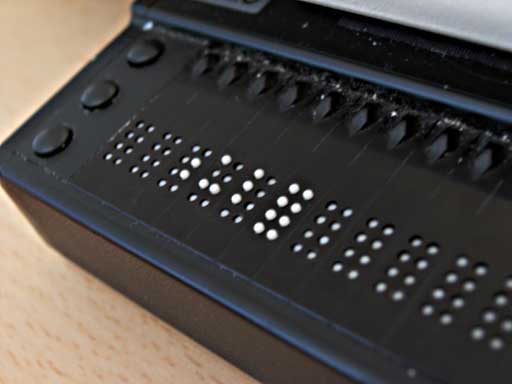
Braille displays address some accessibility issues, but much work is needed.
Braille displays support both input and output, and they function as both keyboards and monitors. They cost several thousand dollars, again highlighting the need for open hardware.

Vinux is based on Ubuntu 14.04, the Orca screen reader, and Unity, GNOME, and Mate. GNOME has the most comprehensive accessibility framework. Again, in addition to usability and compatibility hurdles, getting Vinux onto removable media or permanent installation is a major obstacle.

Sonar is a great distro with the latest in FOSS assistive technologies, including the OpenDyslexic Font for users with dyslexia, and the eViacam head and eye-tracking software for users who have trouble using a mouse and keyboard. eViacam requires a webcam.

Knoppix ADRIANE is a nice talking desktop system that bundles a good set of applications for web, multimedia, messaging, and document production. ADRIANE is for users who prefer a text interface to a graphical desktop. Again, the main hurdles are getting it downloaded and set up to use.

True Universal Computing

Assistive technologies should be baked in as fundamental subsystems, just like networking and graphics, rather than stapled on as afterthoughts, so that all applications can easily hook into them. The currently active Linux and FOSS accessibility projects all struggle for support. Even simple accessibility considerations such as readable text and universal color schemes don’t get much attention. Around 10 percent of all men have a form of color blindness, with red-green the most common. Isn’t that great? The two colors we use the most for status indicators!

This is the most meaningful Linux/FOSS frontier, and I encourage contributors to consider making accessibility their primary contribution to the world.


ChaletOS: A Linux for Those Who Miss Windows 7

For many, the computer interface has always followed the same formula:

  • Start Menu

  • Panel

  • System tray

  • Desktop icons

With those simple elements, people have happily interfaced with their hardware and done their jobs for a very long time. For those working within the world of Windows, the best take on that formula was (in many an opinion) Windows 7. So, it should come as no surprise that some Linux distributions have adopted that formula to create a desktop with which users would feel a sense of immediate connection. Some Linux takes on that metaphor have failed and some have reached a modicum of success. But none have managed to pull off what ChaletOS has.

Don’t get me wrong, under the all-too familiar looking desktop (Figure 1), ChaletOS is still Linux. But the execution of the design cannot be mistaken.

Figure 1: The ChaletOS default desktop should be very familiar.

Before you can get “under the hood,” however, it’s hard to not see exactly what developer Dejan Petrovic was shooting for with ChaletOS.
He succeeded.

What makes this so “Windows-y”

The first thing you should know is that ChaletOS is based on Xubuntu—which indicates the look and feel was achieved via Xfce. Added to this desktop were a number of tweaks focused on giving the user the ability to alter and refine the style, as well as the inclusion of Conky. Included with this Xfce-volution is what Petrovic calls the Style Changer. The ChaletOS Style Changer is an elegant solution for tweaking the look and feel. With it, you can easily change the theme of both Xfce and Conky (Figure 2).

Figure 2: The Chalet Style Changer.

No, the Style Changer isn’t on par with the likes of Ubuntu Tweak, but when you glance at the ChaletOS Settings manager, you have everything you need to tweak the platform to perfectly meet your needs.

Click on the ChaletOS Start Menu, and you’ll see yet another familiar landscape (Figure 3).

Figure 3: The ChaletOS Menu.

Within the Menu, you’ll find all the standards:

  • Favorites

  • Recently Used

  • App/configuration categories

  • Quick access to Log Out/Shutdown/Reboot

  • Quick access to Settings

  • Search

The Start Point

I recently wrote about another very user friendly Linux distribution—Linux Lite (see my post “Linux Lite 3: The Ideal Platform for Old Hardware and New Users”). Although I wouldn’t say ChaletOS knocks Linux Lite from its new-found perch atop the “best of” throne, it comes close. One reason I believe ChaletOS to be a solid distribution for new users (besides its ultra-familiar interface) is the Start Point app. Open this app and you’ll see a world of possibility (Figure 4).

Figure 4: The ChaletOS Start Point ready to serve.

From Start Point, you can update your system with the click of a button. You can click on the How To tab and find ChaletOS-specific how to videos and articles or click on the Recommended tab and find videos about software that can be installed on ChaletOS.

I’ve been thrilled to find more distributions including apps like ChaletOS’s Start Point. Any distribution that plans to focus on new users should consider these help centers a must-have. ChaletOS’s Start Point would be a great reference for any developer hoping to snag a piece of the new user pie.

The caveats

So far so good, eh? At first blush, ChaletOS looks and feels like a distribution that will make a lot of noise in the Linux landscape—as it should (it’s a fine platform). That doesn’t mean it’s perfect. I will say, however, the imperfections will seriously depend on the level of user we’re talking about. Let me explain.

For the new user, ChaletOS should only suffer from a bare minimum of issues. The only glaring issue I found is that, out of the box, there is no office suite installed. I usually expect to see LibreOffice or (if I’m dealing with a minimal distribution) AbiWord. Instead, what I found in the “Office” menu was a listing of applications that wouldn’t suit the needs of any user level:

  • A PDF viewer

  • A dictionary

  • An ebook viewer

That’s it. In order to work with office documents, you’d either have to sign into your Google or your Office365 account or install an office suite. For users familiar with installing applications on Linux, that won’t cause the slightest hiccup. New users, however, will have to know to visit the Application Center and then search for LibreOffice. Sounds easy, right? I’ve worked with users for whom that process isn’t exactly second nature. To that end, I would highly recommend, to the developers of ChaletOS, that LibreOffice be included in the default installation. The less new users have to do out of the box, the better.

The next caveat jumps up a user level or two. Most Linux users I know like to be able to really tweak their desktops. Although ChaletOS has an outstanding tool for selecting from a number of styles, adding new styles to the system isn’t at all intuitive. In fact, it took a bit of digging to locate where the Conky themes are stored in ChaletOS. Open up a terminal window (press [Ctrl]+[t]) and then issue the following command:

cd /opt/extras.ubuntu.com/chaletosstylechanger/conky

Now issue the ls command and you’ll see all the included Conky styles. I attempted to add a few  new Conky themes into that directory, but the attempt failed. And considering there’s no clear way to add Conky themes from within the Style Changer, your best bet is to install the Conky Manager app (outlined here “How to Install and Configure Conky”). Once the Conky Manager app was installed, the downloaded Conky themes were simple to apply.

Naturally, the new user isn’t going to dive deep into the muck and mire of Conky and will (most likely) stick with the few included themes. But, it would be nice to have the ability to easily install a few new themes out of the box.

The final verdict

Although I happen to be a fan of the new world desktop order of GNOME, Unity, and elementary OS Freya, I cannot help but feel a sense of great respect for what ChaletOS is not only striving for, but achieving. Dejan Petrovic has created a desktop that not only works well with lesser powered hardware, but with lesser “powered” users. Anyone that knows Windows 7, would be instantly at home with ChaletOS. It’s easy to use, easy on the eyes, and easy on the system resources.

Operators Are Migrating From NFV MANO Trials to Reality

Some operators are progressing from network functions virtualization (NFV) management and orchestration (MANO) trials to the launching of commercial services, according to a new report from Current Analysis.

While some of those commercial services are at the virtualized infrastructure manager (VIM) levels of orchestration, some are at the virtual network function manager (VNFM) level and even the NFV orchestrator level, the analyst firm says. This is happening even though ETSI hasn’t released final MANO specifications.

Read more at SDx Central