This tutorial shows how to use eCryptfs to encrypt a directory on Ubuntu 16.04. eCryptfs is a POSIX-compliant enterprise-class stacked cryptographic filesystem for Linux. You can use it to encrypt partitions and also directories that don’t use a partition of their own, no matter the underlying filesystem, partition type, etc.
Read the complete article: https://www.howtoforge.com/tutorial/how-to-encrypt-directories-with-ecryptfs-on-ubuntu-16-04/
This week in Linux and open source news, Nike releases its open source software on GitHub, Kubernetes’ growth continues as a new version is released, and more! Stay in-the-know with our weekly digest.
1) Nike publishes three open source projects on GitHub and open-sourced the code that powers its own site.
One of the greatest aspects of Linux is its flexibility—it can be whatever you need it to be. It can be a massive server for big data, a desktop for rendering video or editing audio. A graphic designer’s studio. An every-day, get things done machine.
Or something in between.
For every job, you’ll find a distribution. For every need, you’ll find a tool. For every piece of hardware, you’ll find a version of Linux ready to make it work for you. Whether you’re working working with big iron or a low-end, aging desktop or laptop…there’s a Linux for the job.
At the same time, Linux can be a bit challenging to new users. Yes, most modern distributions and desktops have come a very long way to making the Linux ecosystem much, much easier than it once was. But some new users need a bit more help than others. And some, lesser-powered hardware could use that same helping hand.
That’s where the likes of Linux Lite shines to a brilliant perfection. Linux Lite falls into that ubiquitous category of Linux distributions perfectly suited for low-end hardware. However, this particular take on the lightweight operating system achieves something few in this category can manage.
It delivers all the tools you need to get the job done, all the while making Linux a no-brainer for any level of user.
Linux Lite isn’t a stripped-down version of our favorite open source operating system. You won’t open up the main menu to see software that barely gets the job done. There’s no Abiword, Gedit, or Gnumeric in place of LibreOffice. You won’t find Midori standing in for Firefox. Linux Lite has everything you need…and more. In fact, this take on the “lightweight Linux distribution” is so not lightweight, it might well leave you wondering why the term “lite” even applies. The only conclusion that I can draw with the name is that the lite actually applies to Linux and not to the size of the distribution’s footprint.
In other words, this is Linux that doesn’t actually feel like Linux. Anyone could login to this distribution and be instantly at home. It’s that easy to use.
Lite is still lite
At the heart of every lightweight distribution is the desktop and most all of them use Xfce. Linux Lite is no exception, and it uses that desktop to perfection. With the Linux Lite desktop, users will find all the things they have become accustomed to. There are no tricks, no unique takes on the desktop metaphor. Linux Lite is simplicity designed around the fundamental idea of familiarity….all the while, retaining a speed that other “full-blown” desktops have trouble matching.
To test the limits of Linux Lite, I installed the OS on my oldest laptop—one that comes to a crawl with the likes of Ubuntu, GNOME, and Fedora. I wanted to see how standard tools would fare on a platform laying claim to the “lite” title.
By all accounts (in terms of technology), this machine is a dinosaur (a Sony VAIO, purchased sometime around 2009) and should have been retired long ago. However, it has made for an interesting compare and contrast for how Linux distributions fare with low-powered hardware. And Linux Lite certainly gave this poor machine a new lease on life.
The minimum requirements of Linux Lite are:
700MHz processor
512mb RAM
VGA screen capable of 1024×768 resolution
DVD drive or USB port for the ISO image
The suggested requirements of Linux Lite are:
1.5GHz processor+
1024mb ram+
VGA, DVI or HDMI screen capable of 1366×768 resolution+
DVD drive or USB port for the ISO image
Making Linux easy for new users
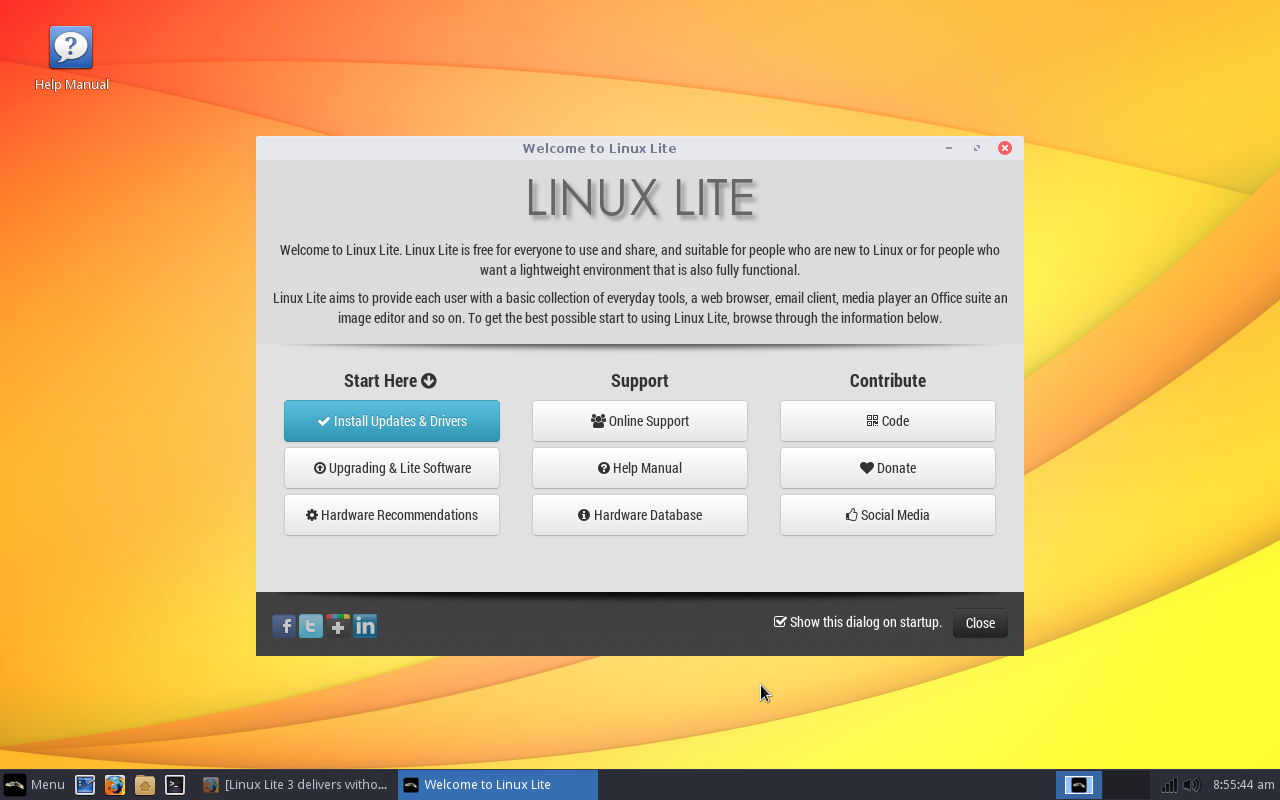
When you log into Linux Lite, you’ll be greeted by something every Linux distribution should include—a welcome screen. This welcome screen (Figure 1) offers to walk the new user through the process of getting up to speed on the platform.
Figure 1: The Linux Lite Welcome window will be a welcome sight for new users.
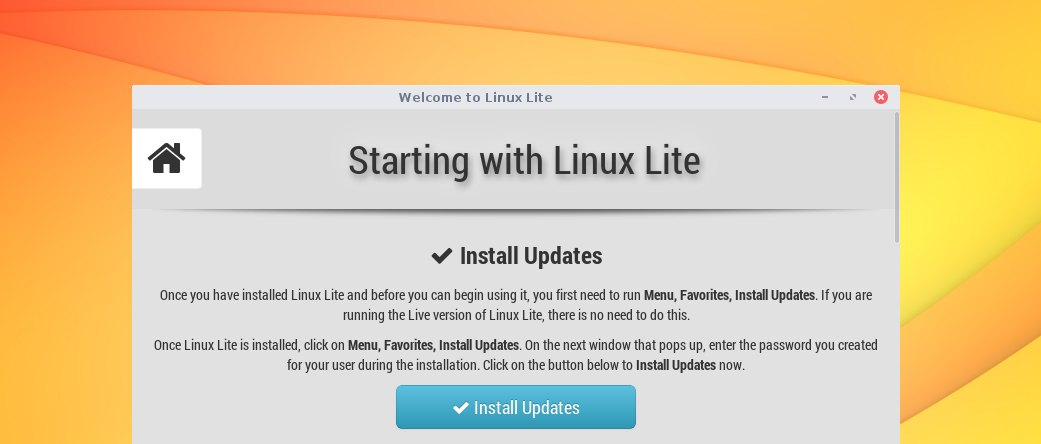
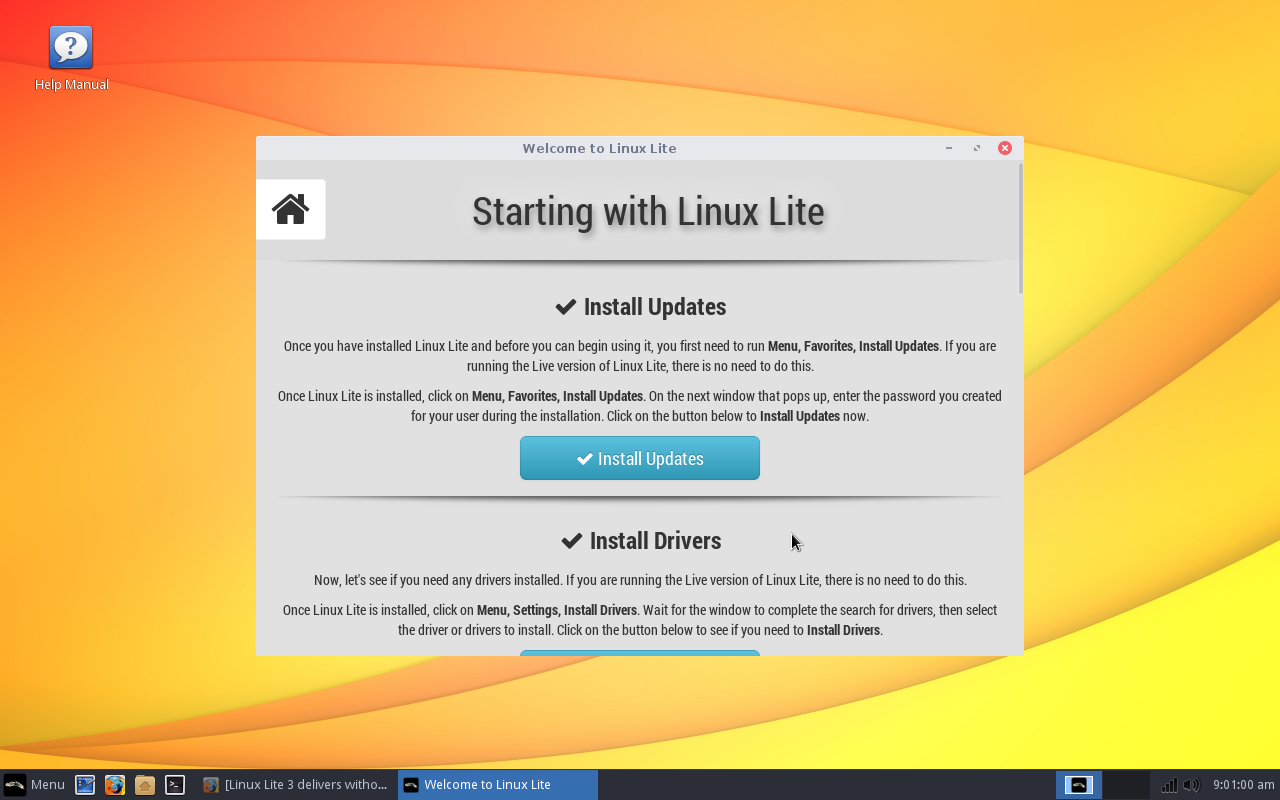
The first thing the Welcome window instructs you to do is click on the Install Updates and Drivers button. Do that and you’ll find yourself in a new window labeled Starting With Linux Lite (Figure 2).
Figure 2: Getting started with Linux has never been so easy.
Click on the Install Updates button, enter your user password, and then click Yes when prompted. All updates will be downloaded. Once the updates have been downloaded, click the Update button and the process will begin. If the kernel happens to be included in the update, you will be prompted to reboot the machine; otherwise, you’re good to go. Simple.
Once the updates are complete, you can proceed with checking for and installing (if applicable) any necessary proprietary drivers. Should the tool find any proprietary drivers, it is up to you if you apply them. Since my VAIO test machine makes use of Intel graphics, there were no proprietary drivers to install. Should you be using hardware with an Nvidia GPU (or a wireless chipset that might require a third-party driver), a proprietary driver will most likely be available.
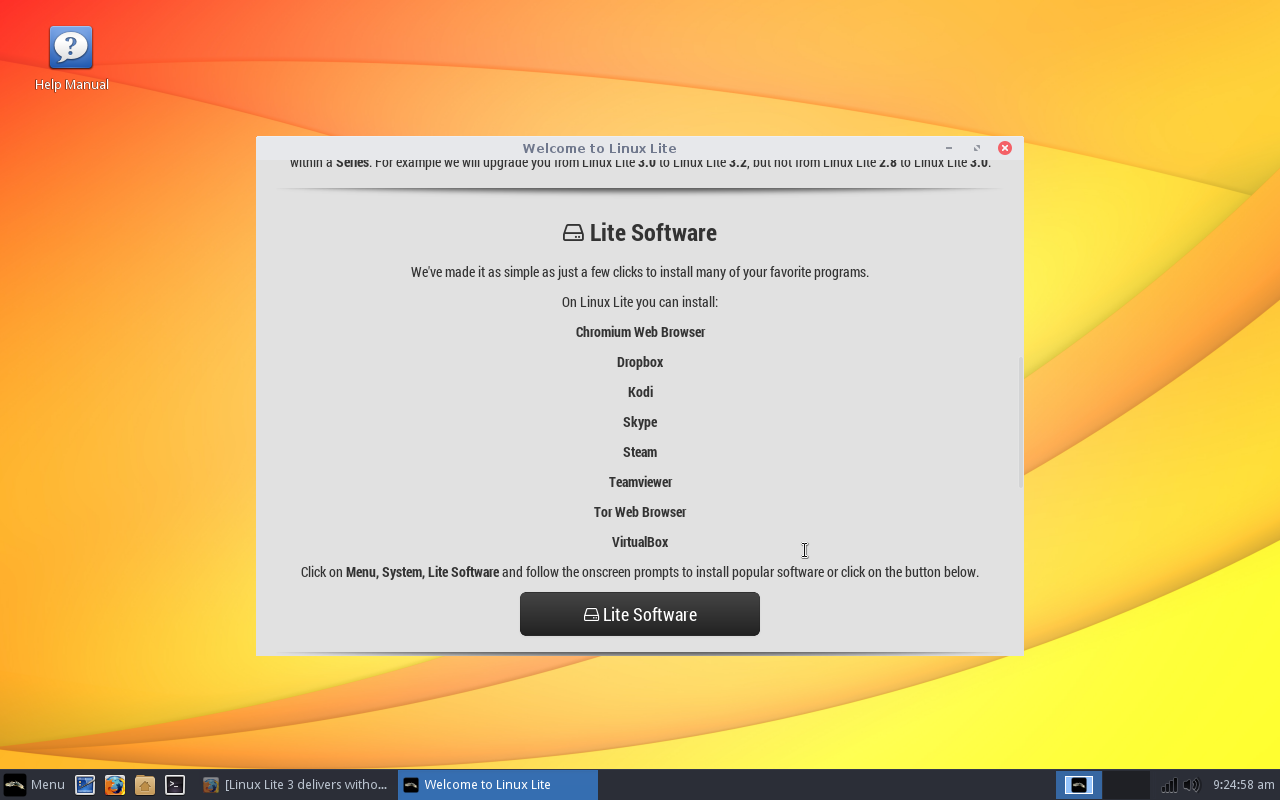
Beyond the proprietary drivers, the Welcome window offers one last bit of useful help. Click on the Lite Software button (Figure 3) and you will be greeted with a simple window asking you if you want to Install Software, Remove Software, or Exit.
Figure 3: Linux newbies won’t have any trouble installing software on Linux Lite.
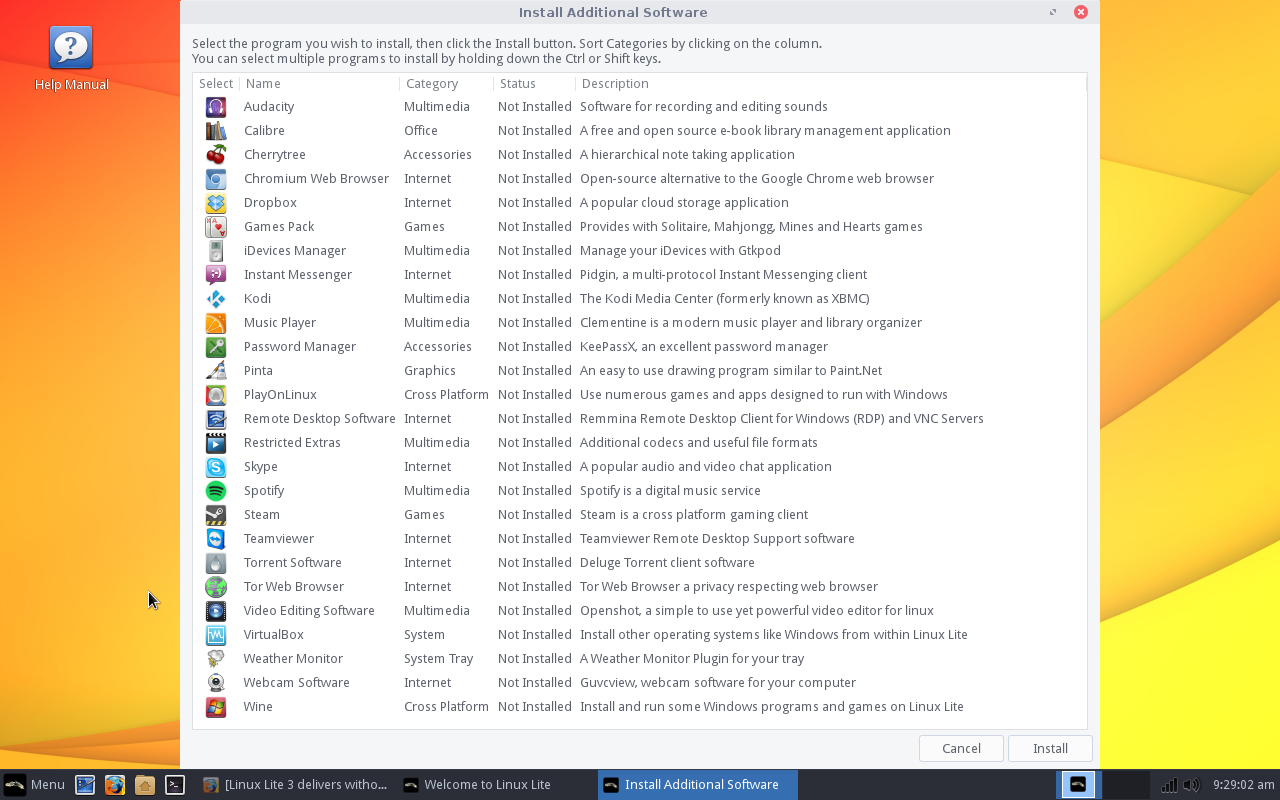
When prompted, select Install Software, and then click OK. What happens next might surprise long-time Linux users. A window will appear (Figure 4) with a basic list of available titles. Click on a title and then click Install. That’s it.
Figure 4: Incredibly easy software installation with Linux Lite.
There may not be many bells and whistles for the Linux Lite software installation tool, but it makes installing key software (such as Audacity, Skype, Clementine, Spotify, Wine, Steam, etc.) something that won’t put off any level of user. To me, that is the heart and soul of Linux Lite—and why I believe the lite applies more to the Linux than to the footprint of the distribution.
Last but not least
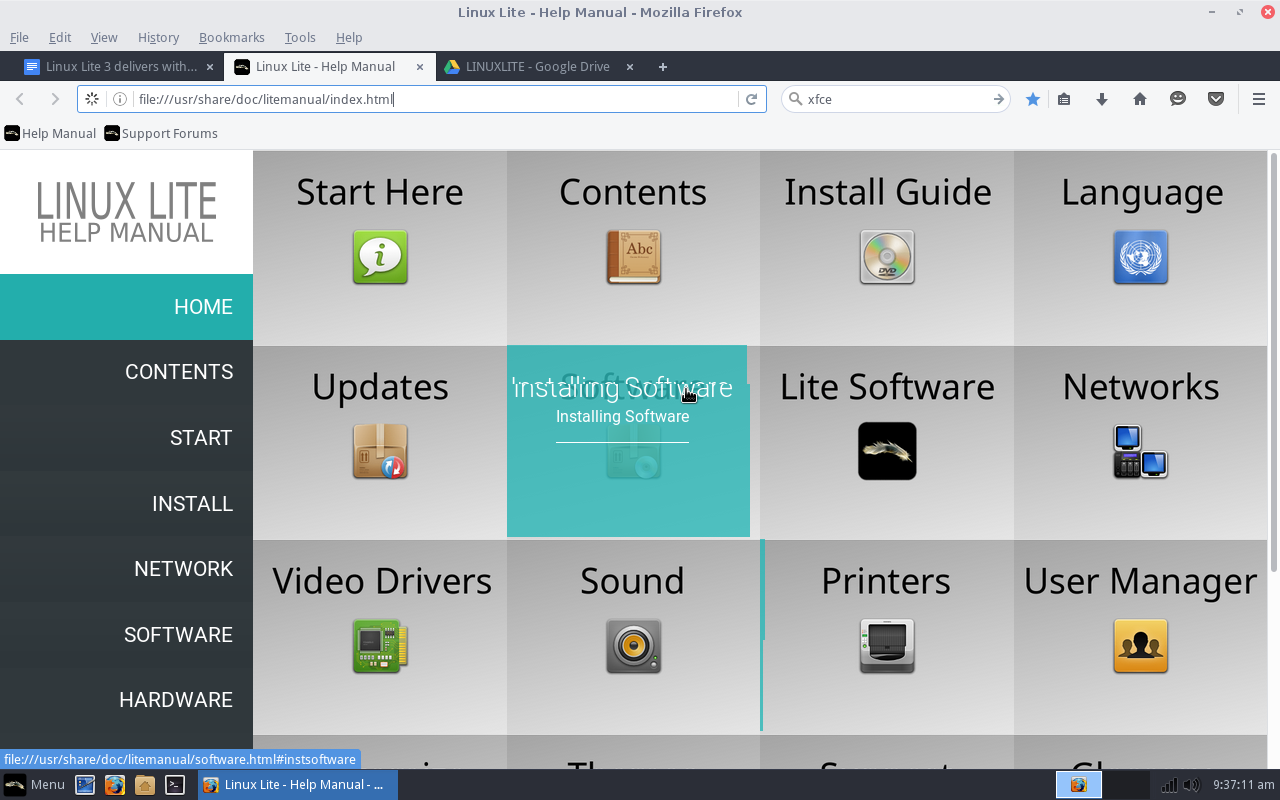
As if Linux Lite couldn’t make it any easier for the new user, they include a single icon on the desktop labeled Help Manual. Click on that and a local web page will open (Figure 5). This page includes help sections for every aspect of using Linux Lite.
Figure 5: The Linux Lite Help Manual.
Any user, new to Linux Lite, could comb through the Help Manual and learn everything they need to get up to speed on the platform (although most users won’t need it—thanks to Linux Lite’s ease of use). The developers of Linux Lite deserve a massive round of applause for taking the time to put this together.
The bottom line
It’s simple. Linux Lite is, hands down, not only one of the best “lightweight” Linux distributions I’ve ever used, but probably one of the single best distributions geared toward new users. I cannot imagine a user—even one who has never experienced a platform other than Windows—finding Linux Lite even remotely challenging to use.
In the end, if you’re looking for a distribution that will breathe new life into old hardware, and make using Linux as easy as any other operating system on the planet, look no further than Linux Lite.
The three cutting-edge frameworks showcased in these talks from MesosCon North America demonstrate the amazing power and flexibility of Apache Mesos for solving large-scale problems.
Perhaps you have noticed, in our Apache Mesos series, the importance of frameworks. Mesos frameworks are the essential glue that make everything work in a Mesos cluster, the layer between Mesos and your applications. They perform a multitude of tasks, including launching and scaling applications, monitoring and health checks, configuration management, and scheduling. In these talks, you’ll learn how:
Netflix uses Mesos to power their recommendation engines.
Huawei Technologies uses Mesos to make a distributed Redis framework.
Crate.IO runs a distributed, scalable, shared-nothing SQL Mesos framework.
Building a Machine-Learning Orchestration Framework on Apache Mesos
Antony Arokiasamy and Kedar Sadekar, Netflix
Have you ever wondered what powers recommendations on Netflix? It isn’t hordes of employees studying your viewing habits, and it isn’t PigeonRank. Rather, it is a self-learning framework called Meson, which is built on Apache Mesos.
Antony Arokiasamy and Kedar Sadekar lead the personalization infrastructure team at Netflix. They build the infrastructure for the algorithmic teams, who build the machine-learning algorithms that power recommendations at Netflix.
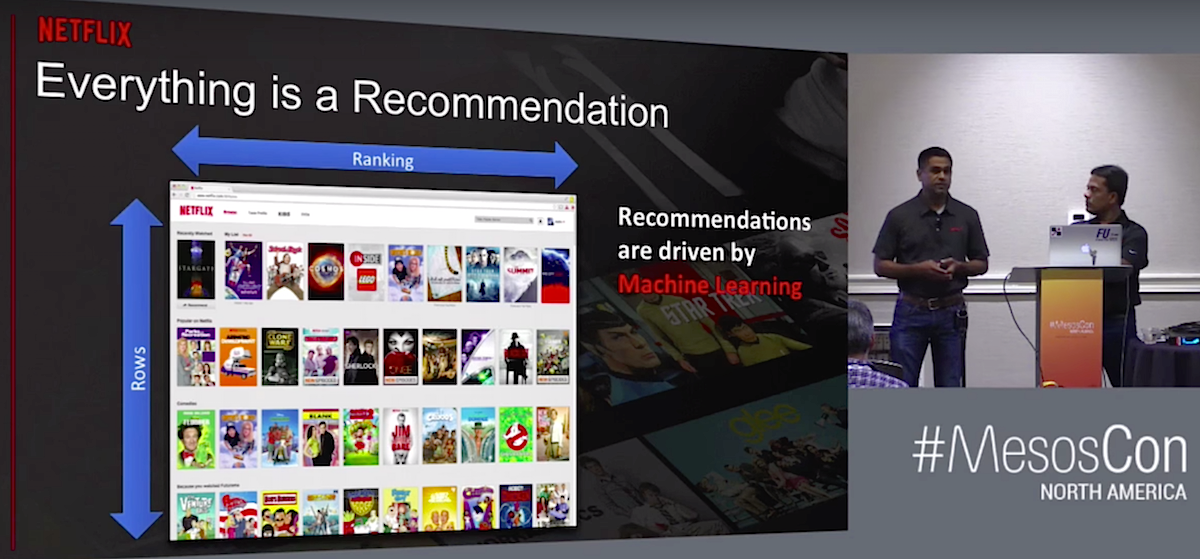
“We want to delight the customer every time you interact with Netflix. We have over 81 million subscribers, and delighting a subscriber or a member means any time you turn on Netflix we want to put forth content to you that we feel you will be really happy to watch…Everything you see once you turn on Netflix is a recommendation. For example, on this page every row is sorted in a particular order which is personalized for that particular user,” Sadekar says.
Netflix is a global business, so they use both global and regional recommendation models, and different tools for different models. “Let’s say certain kinds of movies, certain action movies or martial arts movies carry well in all markets. So let’s train those sets of users using a global model. So for this we want to use Spark. Let’s say in India, you like Bollywood and something else, you like another set of movies, another set of genres. In this one, the technology of choice is R. At the end of it we have a Scala-based thing that’s actually doing the model validation, or choosing the best model that needed to be fit” explains Sadekar.
Meson is flexible and complex, incorporating Hadoop, Docker, Spark, R, Python, and Scala. Watch Arokiasamy and Sadekar’s talk (below) to learn the details of how it all goes together.
Redis is a popular key-value store for persistent caching, but running it in a distributed environment is a complex endeavor. Hosting Redis-as-a-service is especially difficult. Dhilip Kumar S of Huawei Technologies shares how he built a thin, high-performing Redis framework on Mesos, which delivers Redis’s good performance and simplifies running it in a cluster.
“One of the most popularly requested middleware is Redis,” says Dhilip, “because it’s absolutely lightweight and it’s easy to create, and almost all Web applications require Redis. We think that the biggest problem down the lane two years as a public cloud provider would be to actually maintain this huge number of Redis instances.”
Dhilip’s team forecast three major Redis problems to solve: customers who need a simple setup with a single Redis binary, high availability with a Redis master and slaves on the same hosts or on different hosts, and 3.0 clusters with multiple Redis masters. They also had to solve the problems of creating, administering, monitoring, clustering, and metering thousands of Redis instances.
Watch the complete presentation to learn how they did it, and to see a live demo of creating multiple Redis instances using Mesos.
Managing Large SQL Database Clusters with the Apache Mesos Crate Framework
Aslan Bakirov and Christian Lutz, Crate.IO
The good news is Mesos makes it possible to perform amazing creative large-scale computing feats, as we have seen previously in this blog series. The bad news is these wonderful technologies are still young and present new challenges, such as horizontally scaling databases. Our old reliable war horses, MySQL, MariaDB, and PostgreSQL can’t do that. Christian Lutz, CEO of Crate.IO, built the Crate distributed, highly-scalable, highly-available, shared-nothing SQL database to meet modern challenges.
Aslan Bakirov describes the features that make Crate the best SQL database for Mesos. “Crate has a shared-nothing architecture, which means that nodes in the Crate cluster do not share any states, so that if any node in your cluster fails, the other nodes will not be affected from that. The second main feature is all nodes are equal. Every node can be treated as a master node whenever it’s needed, so if you lose any of your master nodes, one of your slave node can become a master node and expose the cluster state to other nodes in the Crate cluster. The third main feature of the shared-nothing architecture is each node in a Crate cluster can perform any type of a query on every node in the Crate cluster.”
The Crate Mesos Framework integrates the data storage layer with Mesos.
Watch the full presentation to learn more, and to see a live demo.
Apache, Apache Mesos, and Mesos are either registered trademarks or trademarks of the Apache Software Foundation (ASF) in the United States and/or other countries. MesosCon is run in partnership with the ASF.
Recently, the OpenStack Foundation conducted a survey to dig deeper into who was actually involved with its community. The results were quite shocking, showing that only 11 percent of the entire OpenStack population identify as women. Team leaders across the industry took notice, with many asking how they could improve diversity not only within their communities but their hiring practices.
In this episode of The New Stack Makers embedded below, we address the issue of how to build diverse communities within open source, how and why companies should focus on enacting hiring practices that are inclusive and welcoming of diverse candidates, and the ways in which the increased visibility on diversity in technology impacts marginalized individuals in the workplace. The New Stack founder Alex Williams sat down with DreamFactory developer relations manager Jessica Rose, Bitergia co-founder and chief data officer Daniel Izquierdo, and director of community development at Red Hat OpenShift, Diane Mueller to hear their thoughts…
The variety of wayspeople have found to cram the palm-sized Raspberry Picomputer inside a handheld device are some of my favorite Pi projects. But those projects are usually expensive, and some even require a 3D printer. The PocketC.H.I.P. isn’t nearly as powerful as a Pi, but it’s still the handheld machine I’ve wanted for a long time. Plus, it’s just $50.
The market for open source PaaS (Platform-as-a-Service) and Container platforms is rapidly evolving, both in terms of technologies and the breadth of offerings being brought to market to accelerate application development. Many IT organizations and developers are now mandating that any new software usage (on-demand consumption) or purchase must be based on open source software so that they have greater control over the evaluation process. In addition, many organizations want the option to choose whether their deployments are on-premises or use a public cloud service. As the pace of change accelerates for many open source technologies, IT organizations and developers are evaluating the architectural trade-offs that will impact new cloud-native applications as well as integrations with existing applications and data.
Microsoft has released artificial intelligence system Project Malmo to the open-source community. The system, now available to all, uses Minecraft to test artificial intelligence protocols. On Thursday, the Redmond giant revealed the shift of Project Malmo from the hands of a small group of computer scientists in a private preview to GitHub, a code repository for open-source projects.
Formerly referred to as Project AIX, the platform has been developed in order to give startups a cheap, effective way to test out artificial intelligence programming without the need to build robots to test commands and comprehension with physical subjects.
New thinking around software-defined networking makes the Wi-Fi network edge especially powerful. Two decades ago, the core was the place to be in campus networking. The networking battles of the 1990s concluded with the edge specialists humbled and assimilated by core product lines. Control the core, we declared, and the edge will fall into place.
But now the edge is fruitful, and the core is sterile—and for two reasons. First, the wireless interface adds mobility and complexity to the edge. Second, the new architectures of software-defined networking (SDN) and IoT are based on centralized models that take sensed information, manipulate a software representation of the network, then send control signals back to network nodes. Nodes are peers under the controller. Their importance is based on the quantity and quality of the information they can report, as well as the sophistication of the control they can apply.
Every system administrator has to deal with plain text files on a daily basis. Knowing how to view certain sections, how to replace words, and how to filter content from those files are skills…
[[ This is a content summary only. Visit my website for full links, other content, and more! ]]
Read the full article here: http://www.tecmint.com/linux-sed-command-tips-tricks/