Home Blog Page 756

10 Biggest Mistakes in Using Static Analysis

Using static analysis the right way can provide us with cleaner code, higher quality, fewer bugs, and better maintenance. But, not everybody knows how to do it the right way. Check out this list of mistakes to avoid when performing static analysis.

Static analysis was introduced to the software engineering process for many important reasons. Developers use static analysis tools as part of the development and component testing process. The key aspect of static analysis is that the code (or another artifact) is not executed or run, but the tool itself is executed, and the input data to the tool provides us with the source code we are interested in.

Read more at DZone

Using Blender as Video Editing Software on Linux

Let’s admit it, professional grade video editing is still a weakness of the Linux desktop. The closest thing you can get to professional video editing on Linux is Lightworks, but that’s still closed source.

If you are looking for fully open source video editing software for Linux, there are actually many options, but in my experience, they all lack something or other. There are two video editing tools in particular that I often use on my Linux machine depending on the project: PiTiVi and Blender.

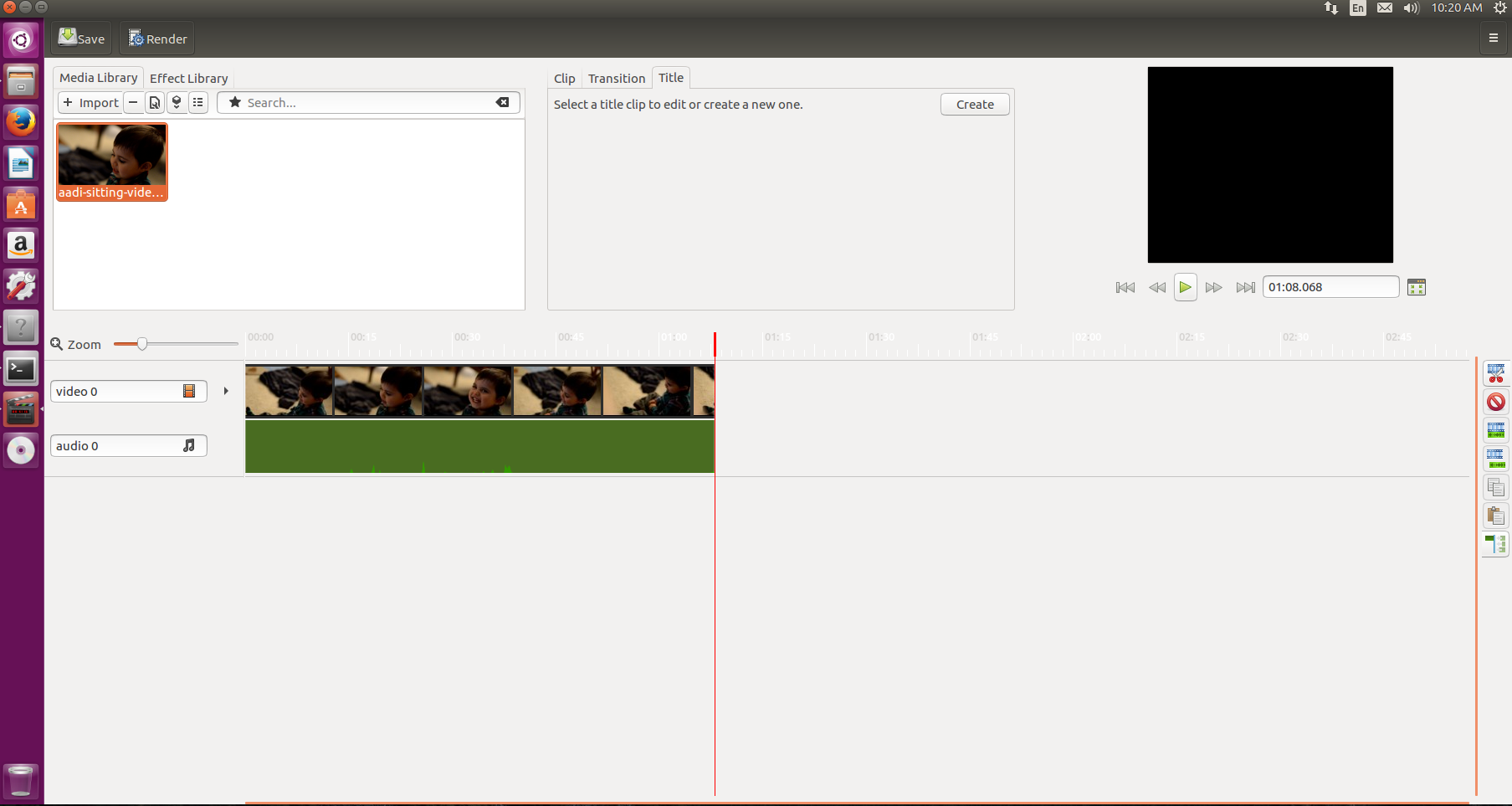
PiTiVi is extremely easy to use, so I’m not going to spend much time on it here. All you need to do is open it, drag and drop clips onto the multi-track timeline, and create a movie. It’s as simple as that. PiTiVi (Figure 1) also offers some nifty tools that allow you to apply effects and transitions. I often use it to create simple tutorial videos.

Figure 1: PiTiVi.

Setting Up Blender

Blender, on the other hand, is extremely polished, powerful, and featureful. But, video editing is not the primary job of Blender; it is intended for use as 3D animation software that doubles as a video editor. That means Blender can be a bit intimidating to a new user; it was to me.  But, once you understand the basics, you will enjoy the power of Blender.

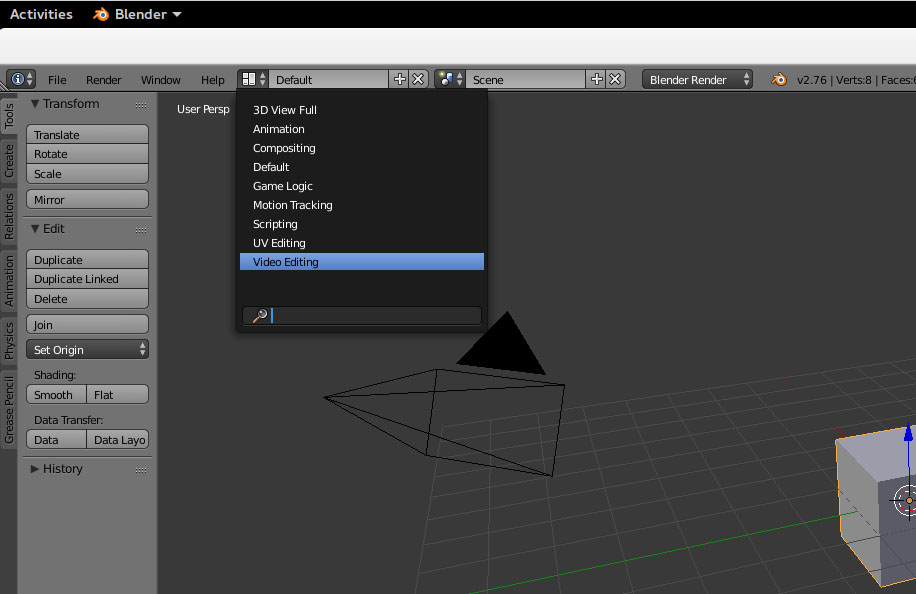
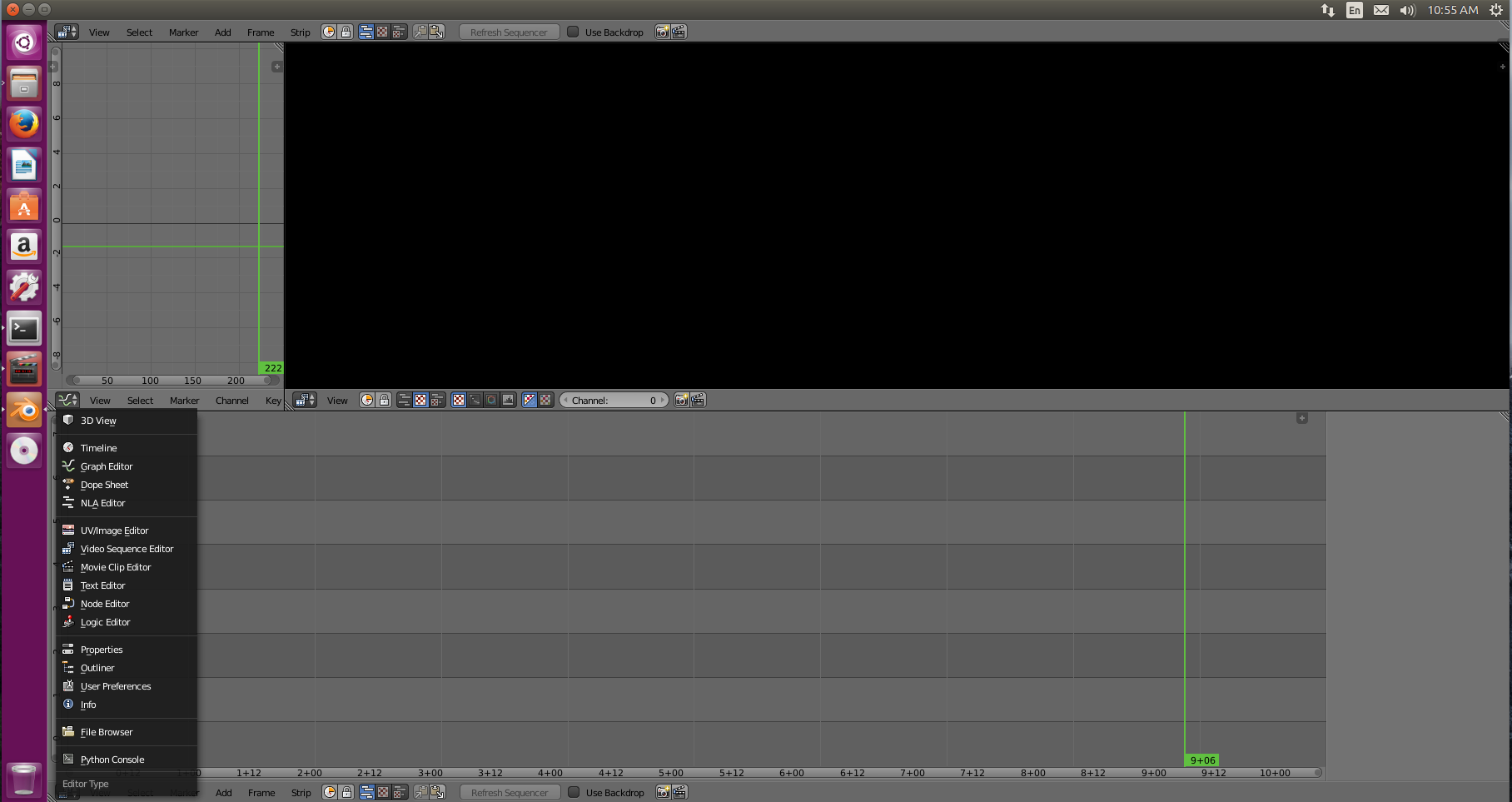
Figure 2: Change from default to Video Editing mode.
Blender is available in the official repos of all major distributions so you can easily install it. Once installed, open Blender and you will see the default 3D animation layout. You’ll need to change that to video editing mode, which is quite easy. Just go to the menu and change the project from default 3D rendering mode to to Video Editing mode (Figure 2).

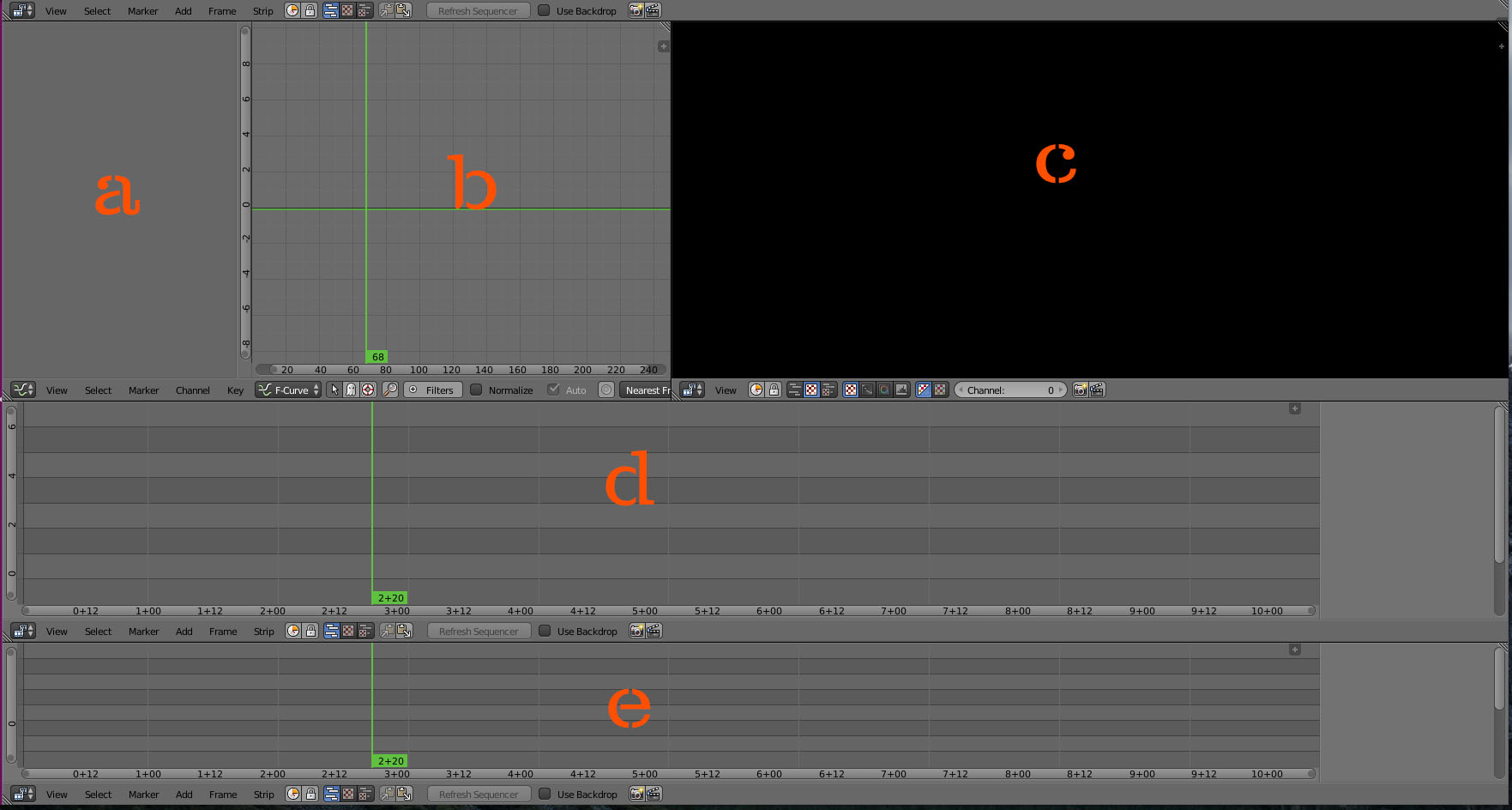
Figure 3 shows what you see once you make those changes — with items labeled from a to e.

Figure 3: Overview.
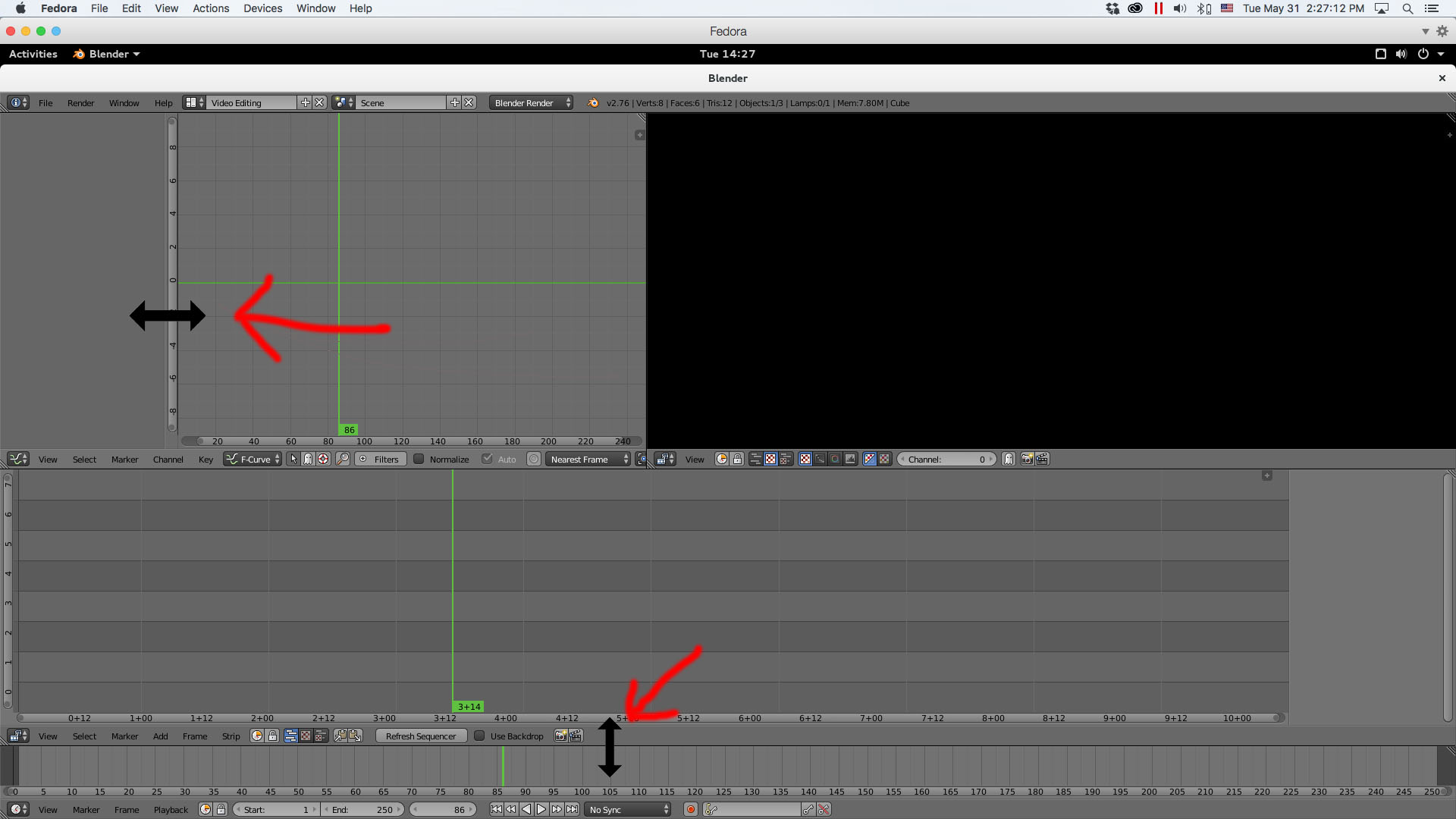
However, there are only three elements that we are going to keep. We will keep b, which we will change to project settings. We will also keep c, which offers preview of clips, and d, which is the timeline. We are going to get rid of items a and e. To do this,  just hold the mouse at the edge, grab the item, and drag it out (Figure 4).

Figure 4: Drag items to delete.

Next, we are going to change b from the default Graph editor to the properties panel — I’ll explain why in a minute. Note: Each window has its own sub-menu that’s located below the window, so just click on the submenu below the Graph editor window and change to “properties” (Figure 5).

Figure 5: Select Properties.

You could have changed Graph editor to any other window, but I chose properties because it’s extremely important. That’s where you set the properties for your project.

Let’s say that your film is shot at 1080p and 30fps. You have to make sure that Blender has the correct information about the project. I wish it could automatically detect the resolution and frame rate the way Adobe Premiere does, but it can’t, so we have to. And, that’s where the Project window comes in handy. Just make the changes to the resolution and frame rate in the window.

The next thing to do is configure the location of the rendered/exported film. Go to Output and changed the location from /tmp to your desired location. Next, you can set the audio and video formats for the project.

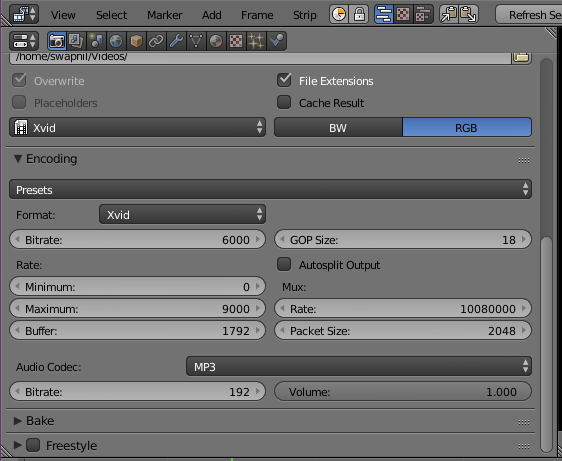
To do this, first change the file format from PNG to Xvid and choose RGB.  Now go to the Encoding option and choose Xvid from Presets list. To set the audio, scroll down and choose MP3 for audio (Figure 6).

Figure 6: Select audio output.
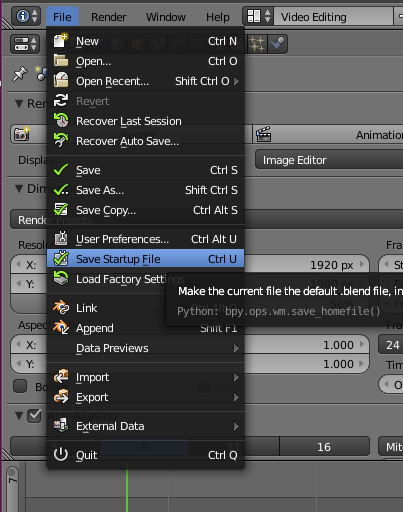
You are all set now. Note, however, that all these settings will be lost in the next project, so you will want to select this configuration as the default. Go to File and then choose Save Startup File (Figure 7). Now, every time you open Blender, these will be your default settings.

Figure 7: Save your settings.
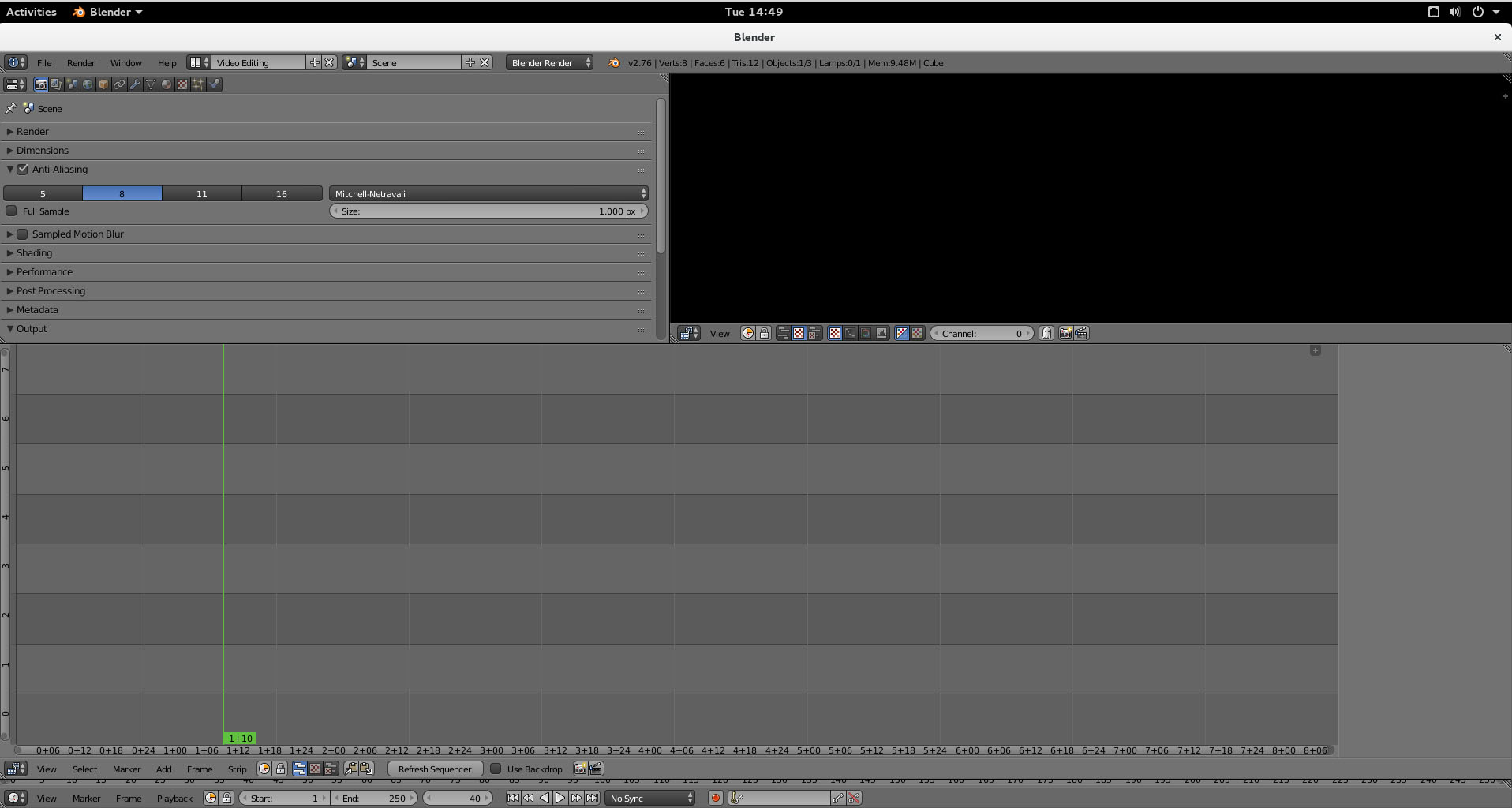
So finally, Figure 8 shows what my workspace.

Getting Started

Now you can start working on your films. You can add any clip to the timeline by dragging the clip from the file manager of the OS to the timeline. You can play and pause a clip by using the play and pause button at the bottom of the timeline or by using Alt+A for play and pause.

There are two ways to cut a clip: soft cut and hard cut. A soft cut allows you expand the clip even after you cut it, just like in Adobe Premiere. A hard cut, on the other hand, will cut the clip and you won’t be able to expand it by using frames from the severed clip. I use soft cut. Just move the cursor to the frame where you want to cut the clip and hit the K key.

To move the clip around, press b and then pull the rectangle on the clips that you want to select. Then press the g key to grab those clips and move them to the desired position on the timeline.

However, while working on a project, you may just want to move the clip up and down in the tracks without messing with their position. After pressing g, hit the x to stay on the same track but move the clip backward and forward. You can press y to move up and down on the track without changing the frame location. This can be very useful when you are working on a very complex project with clips spread across multiple tracks.

Figure 8: Workspace.

Rendering a Project

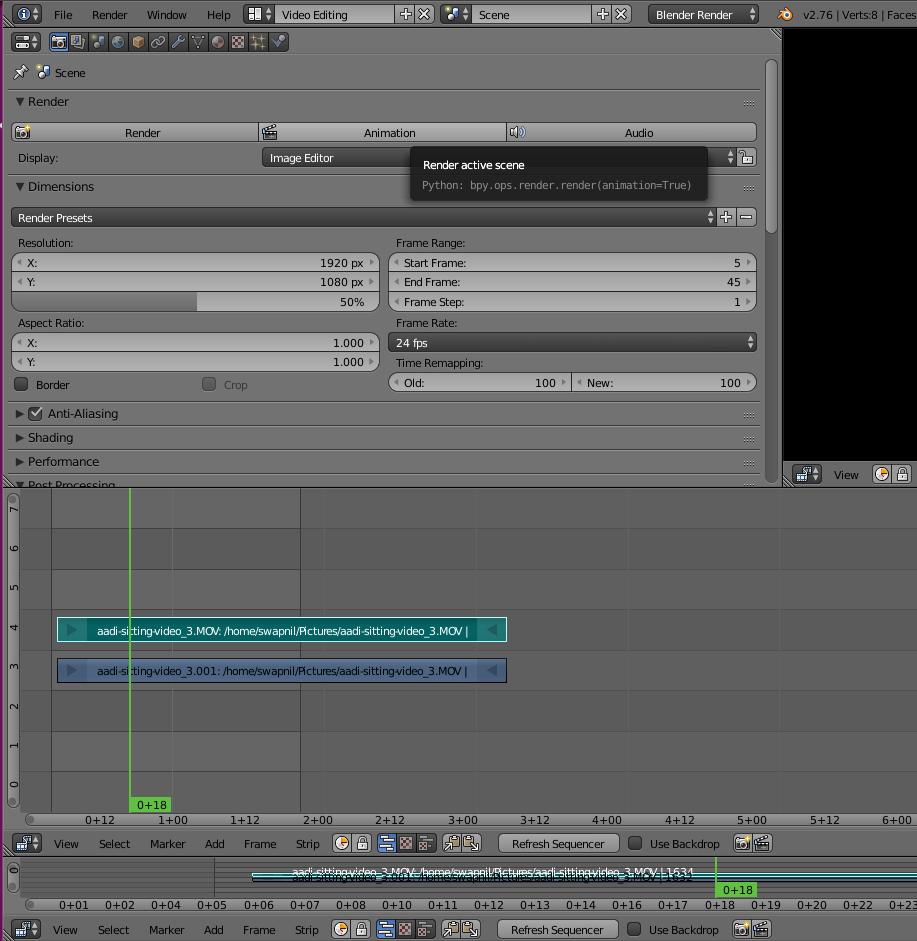
To render or export a completed film, go to the project window and there choose the start frame and end frame. You will notice two black lines at the beginning and end; those lines mark the beginning and end of the project that will be rendered (Figure 9).

Figure 9: Rendering the project.
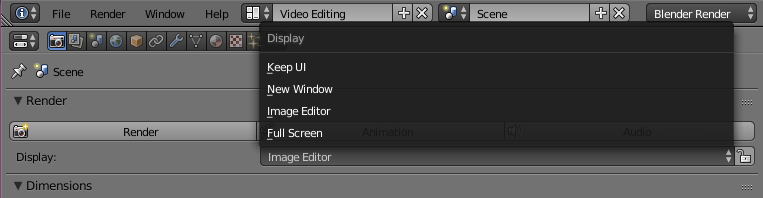
Note: If you don’t have powerful machine or you don’t want to put strain on your system, then you can choose Keep UI in the display option below Render settings (Figure 10).

Figure 9: Select Keep UI.

That’s it, your movie has been exported.

The fact is, in this article, we have not even scratched the surface of what Blender is capable of doing. With these steps, however, you can quickly get Blender up and running and begin experimenting on your own. We may touch upon some of the more advanced features in the future.

Kubernetes 1.3 Steps Up for Hybrid Clouds

The Kubernetes community on Wednesday introduced Version 1.3 of its container orchestration software, with support for deploying services across multiple cloud platforms, including hybrid clouds.

Kubernetes 1.3 improves scaling and automation, giving cloud operators the ability to scale services up and down automatically in response to application demand, while doubling the maximum number of nodes per cluster, to 2,000, says Google Product Manager Aparna Sinha in a post on the Kubernetes blog. “Customers no longer need to think about cluster size, and can allow the underlying cluster to respond to demand,” Sinha says.

Read more at Light Reading

Snap Launchers Promise to Better Integrate Desktop Applications with Snaps

Canonical is proud to announce today that new Snap desktop launchers are coming soon to an Ubuntu Desktop near you, allowing the integration of desktop applications with Snaps.
If you’ve tried installing various desktop apps – and we’re talking about those that have a graphical user interface (GUI) as Snaps on your Ubuntu machine, or any other GNU/Linux operating system that supports the Snappy universal binary format – you might have noticed that some of them don’t follow the general desktop theming or menu integration.

Making applications packaged as Snaps look and feel like the real desktop apps was always a little bit challenging for the Snappy developers over at Canonical. Therefore, they are announcing today their new goal of streamlining the overall Snap experience on the desktop, ensuring that all the user-visible features are working as expected.

Read more at Softpedia

Container Trends: Plans, Orchestration and CI – A Dataset from Bitnami

Over the last week we have had the opportunity to work with a large set of data collected by Bitnami (full disclosure: Bitnami is a RedMonk client). Bitnami collected this data by means of a user survey across their entire user base, and the survey garnered over 5,000 responses from a request sent to Bitnami’s e-mail distribution list of over 850K. With any data set of this nature, it is important to state that survey results strictly reflect the members of the Bitnami e-mail distribution list.

The data set covered areas including container usage and plans, orchestration tools where containers were being used, CI tools and database choices. For this post we will be focusing on the data around containers and CI.

What makes this data very interesting is the number of companies who are actively using and evaluating containers versus those that are not. One of the issues with many surveys of container users is the automatic bias inherent in the selection criteria. While this data does not eliminate this bias, it does provide some interesting counter balances.

Read more at RedMonk

Managing Networks in a Software-Defined Future

Managing networks in a software-defined future

Most in our industry have heard dramatic descriptions of the ways that software-defined networking (SDN) is set to change IP networks. Monitoring and managing those networks is an essential function, but not a glamorous one. If it’s part of your responsibilities, you may have given little thought to the impact SDN will have on your work.

People who make network management systems (NMS) are spending much of their time lately thinking about the subject. Academically speaking, SDN is primarily about separating the network’s control plane from its data plane. Practically speaking, it’s also about bringing flexibility and openness to a discipline long held back by a deficit of both. The open SDN movement as exemplified by OpenDaylight brings the best qualities of the open source way to the design, construction, and operation of networks, and management platforms must adapt accordingly.
Read more at OpenSource.com

Growth in Communities Drives Success, Says ASF’s Ross Gardler

Great news! It’s totally working. The very concept behind the Apache Software Foundation (ASF) — a group of disparate yet dedicated people building software for the public good — has proven successful and fruitful for the 21st year in a row. The indomitable community spirit dedicated to openness and innovation shows absolutely no sign of slowing down.

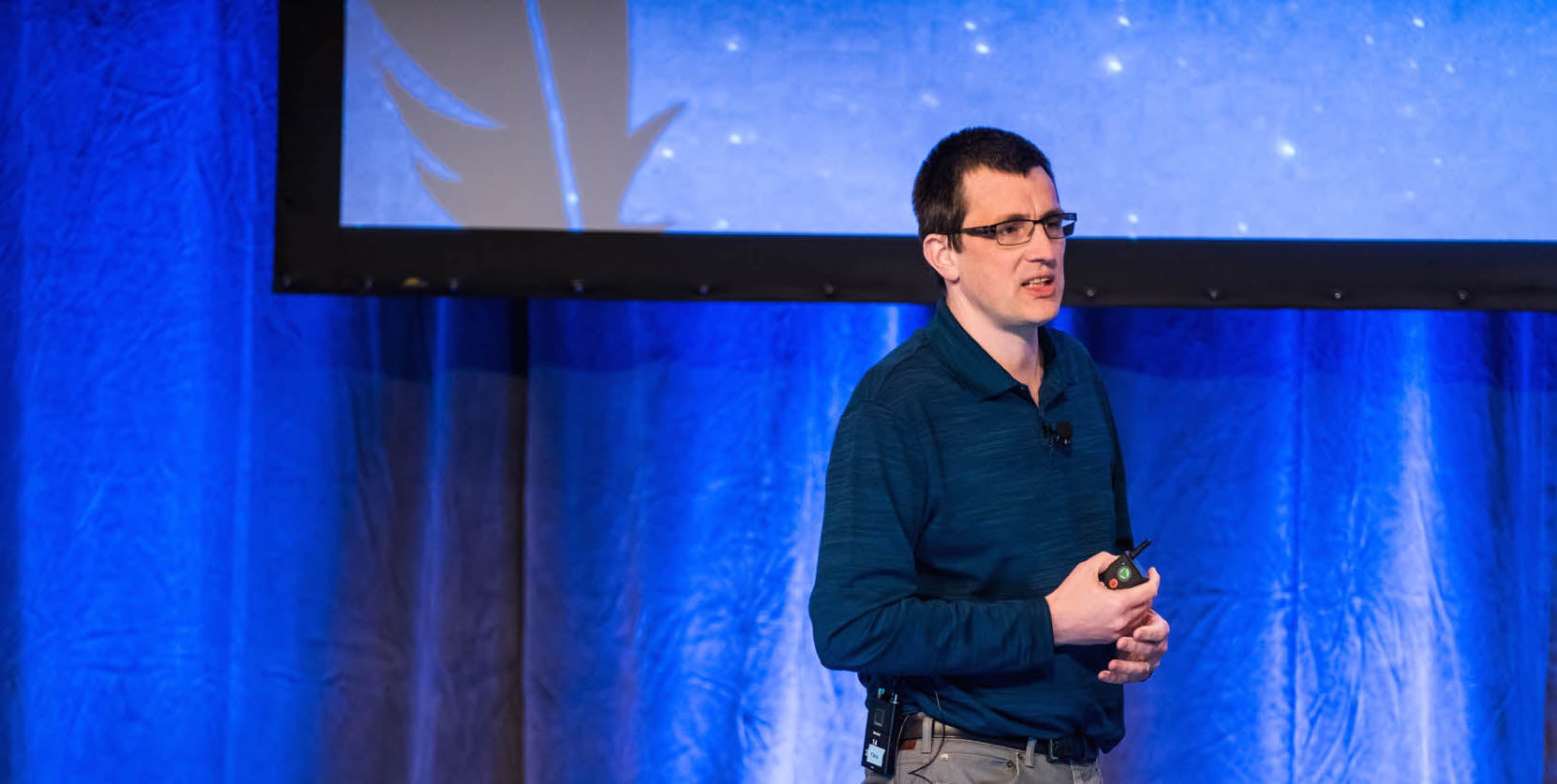
That was the message Ross Gardler, president of the Apache Software Foundation, delivered in his opening keynote at ApacheCon North America 2016 in Vancouver in May. Gardler pointed to yet another year of expansion in projects, committers, and communities, and he praised the progress as what can happen when people come together to solve problems for the public good.

“Why do we keep growing? I would boil it down to this one thing: we’re not defined by some potentially temporary alliance of business leadership,” said Gardner. “We’re not defined by what the market says needs to happen. We’re not defined by any artificial gathering of people. We’re defined by us, the people who are actually doing the work, the people who need to solve a problem.”

Gardler, who described his role as president as “just another member of the community” — apparently there isn’t even an official sash — had the numbers to prove that the Apache Software Foundation is growing in every metric it deems important.

From April 2015 to April 2016, the ASF:

  • Added 9 new project committees, for a total of 174, which are managing 289 projects.

  • Added 17 active podlings in the project incubator, for a total of 54.

  • Saw 698 new daily committers join the projects, for a total of 5,478.

Gardler said that growth in projects is always a good sign, but it’s the growth in the communities that really drives the success of the foundation. And, although committing code is a crucial part of the overall success of Apache’s several projects, Gardler pointed out that the ASF’s communities need more than software engineers and developers.

“All contributions to an Apache project earn merit,” Gardler said. “We don’t just write code; we build communities. So bring [other skills like marketing or technical documentation] to our projects. Bring all the expertise you can to our projects, and create an environment that’s a healthy community that leads the way in industry, that innovates and drives industry forward.”

Gardler announced that the ASF has recently published a new site that holds 21 years of project documentation — some 30 million emails — at lists.apache.org, making it searchable and more easily browsed. It’s updated daily.

“It’s a really good way to understand what’s going on,” he said. “It’s our history; it’s our collective memory.”

Gardler thanked the ASF’s sponsor partners for their cash contributions — cash is nice and helpful — but said the most important contributions were not money, but the time and expertise to help drive a project forward.

“Non-cash contributions are what make the Apache Software Foundation’s communities successful, far more than anything else,” Gardler said. “Any kind of contribution — it doesn’t matter what your skill — is important.”

Watch the complete keynote presentation below:

https://www.youtube.com/watch?v=sOZnf8Nn3Fo?list=PLGeM09tlguZTvqV5g7KwFhxDlWi4njK6n

linux-com_ctas_apache_052316_452x121.png?itok=eJwyR2ye

Stale Data, or How We (Mis-)manage Modern Caches by Mark Rutland

https://www.youtube.com/watch?v=F0SlIMHRnLk

Much of what you think you know about the subject is probably wrong. It turns out that software — and computer education curricula — have not always kept up with new developments in hardware. “Cache behavior is surprisingly complex, and caches behave in subtly different ways across SoCs,” Mark Rutland said in his presentation at the Embedded Linux Conference.

State of the Feather – Ross Gardler, President, Apache Software Foundation

https://www.youtube.com/watch?v=sOZnf8Nn3Fo?list=PLGeM09tlguZTvqV5g7KwFhxDlWi4njK6n

In his opening keynote at ApacheCon North America 2016, Ross Gardler, president of the Apache Software Foundation, pointed to yet another year of expansion in projects, committers, and communities, and he praised the progress as what can happen when people come together to solve problems for the public good.

The Life of a Serverless Microservice on AWS

Microservices have specific lifecycles, too — read on to learn how to manage them.

In this post, I will demonstrate how you can develop, test, deploy, and operate a production-ready serverless microservice using the AWS ecosystem. The combination of AWS Lambda and Amazon API Gateway allows us to operate a REST endpoint without the need of any virtual machines. We will use Amazon DynamoDB as our database, Amazon CloudWatch for metrics and logs, and AWS CodeCommit and AWS CodePipeline as our delivery pipeline. In the end, you will know how to wire together a bunch of AWS services to run a system in production.

Read more at DZone