Today we will see how to set Sticky Bit in Linux. This is next to SGID in our ongoing File and Folder permissions series in Linux. We already discussed about CHMOD, UMASK, CHOWN,CHGRP, SGID and SUID file and folder permissions etc in our previous posts. In this post we will see
What is Sticky Bit?
Why we require Sticky Bit?
Where we are going to implement Sticky Bit?
How to implement Sticky Bit in Linux?
What is Sticky Bit?
Sticky Bit is mainly used on folders in order to avoid deletion of a folder and its content by other users though they having write permissions on the folder contents. If Sticky bit is enabled on a folder, the folder contents are deleted by only owner who created them and the root user. No one else can delete other users data in this folder(Where sticky bit is set). This is a security measure to avoid deletion of critical folders and their content(sub-folders and files), though other users have full permissions
The Linux Kernel 4.4.2 is now available for the users, announced Linus Torvalds. This Linux Kernel version comes with plenty of fixes and improvements. This article will guide you to install or upgrade to Linux Kernel 4.4.2 in your Ubuntu or Linux Mint system.
Example 3: How about creating 1 to 20 files, ie creating multiple files with one command. Its bit tedious job for an admin. Don’t worry Linux provide us with some useful option with “Flower braces†to do expansion. Instead of writing below command
In the first part, I presented the fundamental ideas behind Docker containers and how exactly they work. In this second part, we will proceed with the installation of Docker and its management as a service in our system. We will prepare our system so that in the next part we can create a personal notepad using the WordPress content management system (CMS) or the Dokuwiki which is a wiki software that doesn’t require a database.
This week in Linux news, Linus Torvalds speaks about collaboration and communication at TED2016, a Russian cyberespionage group attacks Linux systems with a simple Trojan program, and more! Get up to speed on the latest Linux headlines:
1) Linus Torvalds’ talk at TED2016 emphasizes the importance of collaboration and communication.
Linux is such a unique beast. The flagship open source platform does things no other operating system can do. Case in point…the live distribution. What is a live distribution? Simple. By running completely from RAM, a live Linux distribution allows you to run a full instance of the operating system (from either CD/DVD or USB) without making changes to your current system.
Netrunner Linux
What does this mean to you? It means you can either use a live distribution to test whether Linux is right for you, or you can carry around a Linux distribution to use at your discretion. Don’t want to boot into a Windows computer? Fine. Pull out your trusty live Linux USB drive and boot up your distribution of choice.
But, which distributions make for the best live experience? That’s a challenging question, and one that is clearly susceptible to bias. One user’s favorite distribution is another’s most hated. What I have done is collect the five distributions I believe show off the idea of live Linux best. These are not intended to be live distributions for administrators (like, for example, PartedMagic, Clonezilla, or SystemRescueCD). This list is all about booting into a full-fledged Linux desktop that can serve your needs and serve them well.
With that said, here are my top five Linux distributions that work well in a live format.
Ubuntu
Ubuntu heads up my list of Live distros for several reasons. The main reason is easy—Ubuntu, as a live distribution, makes an incredible tool for showing off what Linux can do, and this idea actually goes beyond the individual to serve as a means for spreading the word. Ubuntu is one of the best distributions for hardware detection and support, so you know when you boot that Ubuntu USB into live mode, everything is going to work and work well. On top of that, you wind up with a gorgeous desktop that is as user-friendly as any other.
Along with the hardware support and the modern desktop, Ubuntu also comes with everything you need right out of the box: browser, office suite, email, multimedia — the things every average user requires to get the job done.
You might also be questioning my choice of including a larger-footprint distribution. The reason for this is simple: Nearly every modern computer has the horsepower to run even the likes of Ubuntu, as a live distribution, flawlessly. So, why not take advantage of that power and boot up a distribution that has everything you need.
Netrunner
Netrunner Linux focuses on the KDE Plasma environment and comes preinstalled with several surprising tools. On top of the standard fare, you’ll also find the likes of Skype, Wine, Gimp, VLC, Steam, and VirtualBox (Note: Steam and VirtualBox cannot effectively run from a live environment), and much more.
Netrunner comes in two different flavors: A standard release and a rolling release. The standard release is based on Debian package management and the rolling release centers around Arch package management. One reason I chose Netrunner over another KDE-based distribution is that they’ve successfully managed to optimize KWin to run on lower-powered machines (making it ideal for a live distribution). Netrunner also adds a handy side panel (along with the standard KDE panel) to give you access to multimedia controls. You’ll find plenty of themes and customizations available in Netrunner that you won’t find in other, standard, KDE distributions.
BunsenLabs Linux
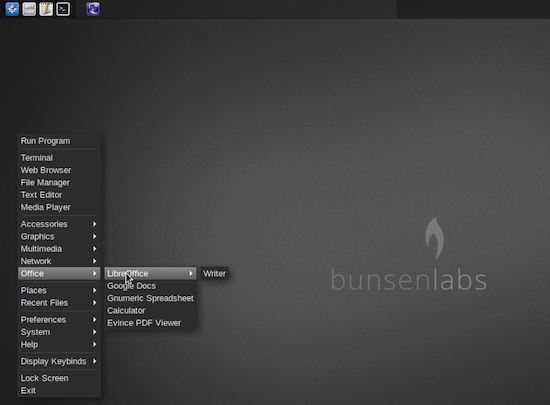
Remember CrunchBang Linux? Well, that project is dead. Fortunately, the project was picked up and given life as BunsenLabs Linux. What is this distribution all about? BunsenLabs Linux is built on Debian Jessie and uses the Openbox window manager (with the addition of the tint2 panel and Conky system monitor).
What is great about BunsenLabs Linux is that it’s a tinkerer’s dream. It comes complete with plenty of themes and Conky configurations so you can make the desktop look and feel exactly how you want…all the while not dragging your machine to a slow, grinding halt. You’ll find plenty of ideas for customization in the BunsenLabs user forums. BunsenLabs Linux can run on 32-bit, 64-bit, and even ARM-based machines!
BunsenLabs Linux
Porteus
Porteus is a unique take on the small footprint Linux distribution (it’s under 300 MB), in that it is modular in nature. Unlike most Linux distributions that work with a package manager, Porteus uses precompiled modules that can be quickly inserted into the running operating system. When you’re done with a module, you can deactivate it, so it is then removed from the directory structure. With this system, you only use what you need and nothing else can bog down the platform. You can download modules and store them locally, to be used when needed. Porteus is also stored in a squashed format, so it decompresses very quickly. Additionally, all of the boot scripts have been retooled to greatly increase startup and shutdown speeds, so you have the makings for an ideal live Linux experience.
AV Linux
First, let me warn you that AV Linux is not currently available. The developer has removed version 6.0.4 and is getting ready to release AV Linux 2016. It will be worth the wait. Even though I said I wasn’t including task-specific Linux distributions, this one is a bit different. AV Linux is a distribution specifically designed to be, as you might have guessed, an audio/video/graphics content creation platform.
AV Linux is not your usual distribution. Instead, it is a preconfigured snapshot of the Debian testing distribution (the current testing Debian release is called Stretch). With this distribution, you’ll find an Xfce 4 desktop and all the software you’ll need to create audio and video (including a custom Linux “RT” kernel and the Jack Audio Connection Kit, for low-latency). Among the multimedia-centric software offerings, you will find: Ardour, Audacity, Blender, Cinelerra, Handbrake, Hydrogen, Kdenlive, MuseScore, OpenShot, and VLC Media Player. I hope we’ll see AV Linux 2016 release very soon. If you’re of the creative sort, you owe it to yourself to check out AV Linux.
And there you have it; five Linux distributions that make for an outstanding live experience. Download one (or all of these) and create a portable, live Linux drive that will ensure you have your desktop of choice with you at all times.
The new functionality includes native support for automating network infrastructure devices over Secure Shell (SSH), the command line interface (CLI) and the application program interface (API) to help customers orchestrate new categories of workloads, including heterogeneous network devices, without having to invest in multiple tools or weave them together.
The network support has been a user-led effort that’s been brewing at Ansible for the past six months, according to Tim Cramer, senior director of engineering at Ansible.
After a short limited preview, Google today announced the public beta of its Cloud Vision API — a service that allows developers to easily build image recognition and classification features into their applications.
Google’s technology do basic things like extracting text from images, but its real power is in actually recognizing the objects in an image. This is the same technology that powers the image search in Google Photos and it can recognize anything from flowers, food and animals to local landmarks. Google says it has trained the algorithm to recognize “thousands†of different objects.
Gravitational waves might be the cause of two new live image, spin off projects released today by members of the openSUSE community.
The release of Argon, which is a live installable image based on openSUSE Leap, and Krypton, which is a live installable image based on openSUSE Tumbleweed, offer packages built for KDE Git using stable and tested openSUSE technologies to track the latest development state of KDE software.
Users have a choice on how they get up-to-date packages of Qt and other additional cutting-edge offerings from KDE through the Argon and Krypton live installable images, built directly from the latest sources in KDE git through the Open Build Service. Argon and Krypton can be either used as live images, without changing an already installed system, or they can be installed, providing a full-stack KDE software environment.
Dustin Kirkland writes: We at Canonical have conducted a legal review, including discussion with the industry’s leading software freedom legal counsel, of the licenses that apply to the Linux kernel and to ZFS. And in doing so, we have concluded that we are acting within the rights granted and in compliance with their terms of both of those licenses.
While the CDDL and GPLv2 are both “copyleft” licenses, they have different scope. The CDDL applies to all files under the CDDL, while the GPLv2 applies to derivative works. The CDDL cannot apply to the Linux kernel because zfs.ko is a self-contained file system module — the kernel itself is quite obviously not a derivative work of this new file system.

 This week in Linux news, Linus Torvalds speaks about collaboration and communication at TED2016, a Russian cyberespionage group attacks Linux systems with a simple Trojan program, and more! Get up to speed on the latest Linux headlines: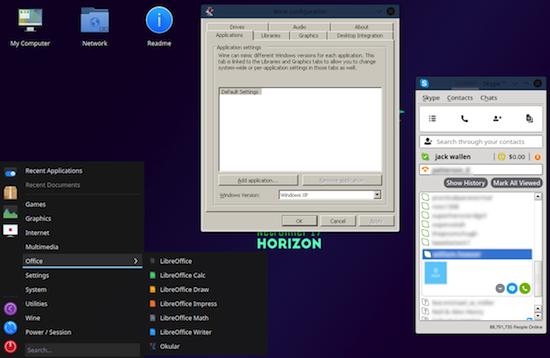
 Red Hat is extended the