Home Blog Page 936

Ubuntu 16.04 (Xenial Xerus) No Longer Has Online Search for Unity 7

Canonical is making good on its promises, and it has started to disable the online search functionality in Unity’s dash, for Ubuntu 16.04 (Xenial Xerus).

The Ubuntu community has received very well the news that searches in Unity’s dash will no longer trigger online searches. The possibility of turning off this feature has been around for a long time, and it has been done with a single switch from the settings. This didn’t really make Ubuntu users happy, but at least people were no longer upset about this feature.

Google’s Project Zero Uncovers Critical Flaw in FireEye Products

The remote code execution flaws impacted on a range of the cybersecurity firm’s products. 

Google’s Project Zero security team have uncovered security flaws in FireEye products which could lead to remote code execution and the compromise of full computer systems.

Tavis Ormandy from the Google Project Zero vulnerability disclosure team said on Tuesday the flaws were serious enough for FireEye to ask for time to fix the problem, which had the potential to allow remote code execution to take place via a wide range of products.

Read more at ZDNet News

Zero-Day GRUB2 Vulnerability Hits Linux Users, Patch Available for Ubuntu, RHEL

According to Canonical’a latest Ubuntu Security Notice, it would appear that there’s a zero-day security vulnerability in the GRUB2 (GNU GRand Unified Bootloader) packages, affecting all GNU/Linux distributions running 2.02 Beta.

The security flaw was discovered by developers Ismael Ripoll and Hector Marco in the upstream GRUB2 packages, which did not correctly handled the backspace key when the bootloader was configured to use password-protected authentication, thus allowing a local attacker to bypass GRUB’s password protection.

Android Phone and Tablet Dev Kits Tap New Snapdragon 820

intrinsyc openq820 kit angle-smIntrinsyc has launched three Android 6.0 dev kits — phone, tablet, and board — for Qualcomm’s 14nm Snapdragon 820, with four Cortex-A72-like cores. Qualcomm announced its Snapdragon 820 system-on-chip in November with a promise that more than 60 phones and tablets will ship with it in 2016. This quad-core, Cortex-A72 like design with cutting edge 14nm fabrication process will also be available for high-end embedded devices ranging from automotive computers to robots to computer vision devices. 

Read more at LinuxGizmos

The Companies That Support Linux: Autodesk

Guy Martin, Director of Open Source Strategy at Autodesk.
Autodesk, a design and fabrication software company best known for AutoCAD, has more than 150 specialized programs for visual effects, BIM (Building Information Modeling), simulation, 3D printing and subtractive manufacturing. The company is also active in the maker community with its Dynamo project (open source graphical programming for design) and Ember 3D printer.

As the desktop software industry moves to the cloud, Autodesk is in a unique position to bridge the gap between traditional design customers and the growing Maker Movement. 

“Autodesk has been working to democratize access to design and fabrication software as part of our effort to support the newly emerging future of making things,” said Guy Martin, Director, Open Source Strategy at Autodesk. “Open source is an important component of this effort, and we’re excited to join the Linux Foundation to accelerate our participation in this critical ecosystem.”

Autodesk recently joined The Linux Foundation as a new corporate member along with Concurrent Computer Corporation and DataKinetics. Here, Martin tells us more about Autodesk; how and why they use Linux and open source; why they joined The Linux Foundation; and how they are innovating with Linux and open source.

What does Autodesk do?

Guy Martin: Autodesk’s mission is to help people imagine, design and create a better world. Our customer base of designers, engineers, architects, visual artists, makers and students use our software to unlock their creativity and solve important challenges. We’re probably best known for AutoCAD, which has been a key tool of in all sorts of design professions for 30+ years.

But we now have more than 150 specialized software offerings for visual effects, BIM (Building Information Modeling), simulation, 3D printing and subtractive manufacturing. We also have consumer mobile apps like Sketchbook and Tinkercad. Increasingly, our tools are available as subscription-based cloud and mobile services, and all of our software is free to students, schools and educators worldwide.

How and why do you use Linux and open source?

Martin: We’re at an interesting point in our corporate history – a majority of our core products were conceived in the desktop software era for designers, architects and other creative professionals. However, as the entire industry is seeing, the shift to Cloud changes a lot of fundamental assumptions, including those of a traditional desktop software company like Autodesk.

We are seeing the potential for new (and existing) customers to adopt Cloud-based systems to enable new levels of collaboration across the imagine, design, and create/fabricate cycle, as well as solve problems (such as city-scale simulations) that traditional desktop software simply can’t handle. We use Linux in our Cloud infrastructure, but also
rely on (and create) a lot of open source. You can see our projects from across the company at http://autodesk.github.io.

Why did you join the Linux Foundation?

Martin: With the shift to Cloud comes a fundamental dependency on open source. This affects everything from how our software is constructed to the talent pool we need to recruit from. Our domain expertise in architecture, BIM, 3D design/printing, and other product areas needs to be focused on building value, not reinventing infrastructure or other common components. Because of this, there is a renewed interest at Autodesk in being a better open source consumer, collaborator, and creator. We think the Linux Foundation is an excellent avenue for us not only to be part of this critical ecosystem, but also a place for us to share and learn from other member companies.

What interesting or innovative trends in your industry are you witnessing and what role do Linux and open source play in them?

Martin: The whole ‘Maker Culture’ is a disruptive force in the design and fabrication industry. Open source certainly plays a role here, but the larger collaborative nature of this movement, in everything from hardware to democratization of and access to design tools, is huge! Clearly, the collaborative development model of Linux and open source has sown seeds in these areas, and we are seeing a ton of innovation happening as a result of things like easy access to affordable 3D printing and design tools.

How is your company participating in that innovation?

Martin: Fostering the Maker Community is one of the major ways we participate in the innovation in our industry. We’re active participants in this community, and are trying to help stimulate it by open sourcing important pieces of technology such as our Dynamo project (open source graphical programming for design), as well as the mechanical designs, resin formulas and firmware for our Ember 3D printer. We also partner with hardware incubators and have a $100 million Spark Investment Fund to support start-ups that are helping advance the overall 3D printing ecosystem.

That being said, there are still a lot of corporate customers who use our tools, and helping them take advantage of this innovation and collaborative energy is also a priority. We are uniquely positioned to help bridge the gap between traditional design customers and this growing Maker Movement.

What other future technologies or industries do you think Linux and open source will increasingly become important in and why?

Martin: Is there an industry that Linux (or open source for that matter) hasn’t already touched? I think that synthetic biology and nano-scale design is probably the next frontier in terms of where the ‘open ethos’ will become critical. We’re already seeing this with the intersection of open source and 3D printing of human tissues, not to mention creating affordable prosthesis for patients in developing nations. Building and designing sustainable products is also another important area where the notions of open and collaborative development need to take off.

The reason why this is important is pretty clear – to quote Kenneth Blanchard: “None of us is as smart as all of us.” These are big and important problems, and tackling them will require the kind of collaborative energy that only the open ethos brings to the table.

Anything else important or upcoming that you’d like to share?

Martin: My role at Autodesk is very new (< 6 months) and represents a fundamental shift by the company towards doing a better job of both open and inner source. So, I’d just like to ask folks for some patience and understanding as we become a better open and collaborative citizen of this community. I’m more than happy to discuss our efforts or answer questions, so please feel free to reach out to me directly. Thanks!

Interested in becoming a corporate member of the Linux Foundation? Join now!

Using Open Source to Distribute Big Data from the Large Hadron Collider

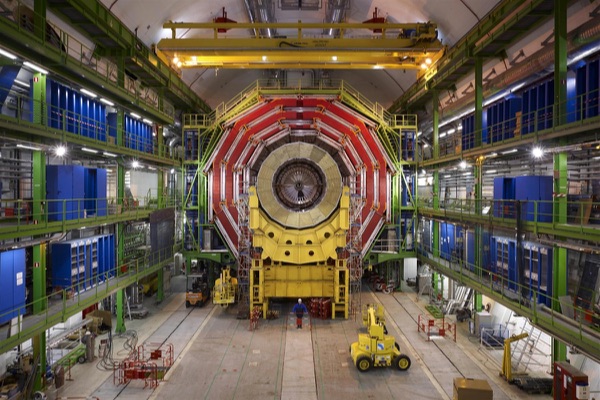
CERN large hadron collider

The high energy physics team at California Institute of Technology (Caltech) are part of a vast global network of researchers who are performing experiments with the Large Hadron Collider (LHC) at CERN in Switzerland and France – the world’s biggest machine – to make new discoveries about how our universe evolves, and they’re using Linux and open source software. This includes a search for the Higgs Boson, extra dimensions, supersymmetry, and particles that could make up dark matter.

LHC experiments output an enormous amount of data – over 200 petabytes – that is then shared with the global research community to review and analyze. That data is dispersed throughout a network consisting of 13 Tier 1 sites,160 Tier 2 sites and 300+ Tier 3 sites and crosses a range of service provider and geographic boundaries with different bandwidths and capabilities.

An international team of high energy physicists, computer scientists, and network engineers have been exploring Software-Defined Networking (SDN) as a means of sharing the LHC’s data output quickly and efficiently with the global research community. The project is led by Caltech, SPRACE Sao Paulo, and University of Michigan, with teams from FIU and Vanderbilt.

We met with the Caltech team to understand how they’re using the OpenDaylight open source SDN platform and the OpenFlow protocol to create a highly intelligent software-defined network. Not only will their work have implications for the LHC, but also for any enterprise, telecommunications provider or service provider being faced with ever-increasing data volumes.

https://www.youtube.com/watch?v=rSLaEha85Dw” frameborder=”0


Red Hat Launches Dedicated OpenShift PaaS Platform

OpenShift-DedicatedRed Hat Inc. is targeting developers with a new dedicated cloud platform for coders. The new service isn’t exactly cheap, which suggests it’s aimed at squarely at the larger enterprises. The new platform costs $48,000 a year, and provides companies with a high-availability cluster featuring 48TB of bandwidth, five nodes, four application nodes, premium support and 100GB of data. Additional nodes are available at $12,000 each, with an extra 500GB of data available for $3,000.

Red Hat is calling the new service OpenShift Dedicated, and it becomes the third platform available under the OpenShift banner

Read more at Silicon Angle

Getting Started with Docker

cowsayDocker is the excellent new container application that is generating much buzz and many silly stock photos of shipping containers. Containers are not new; so, what’s so great about Docker? Docker is built on Linux Containers (LXC). It runs on Linux, is easy to use, and is resource-efficient.

Docker containers are commonly compared with virtual machines. Virtual machines carry all the overhead of virtualized hardware running multiple operating systems. Docker containers, however, dump all that and share only the operating system. Docker can replace virtual machines in some use cases; for example, I now use Docker in my test lab to spin up various Linux distributions, instead of VirtualBox. It’s a lot faster, and it’s considerably lighter on system resources.

Docker is great for datacenters, as they can run many times more containers on the same hardware than virtual machines. It makes packaging and distributing software a lot easier:

Docker containers wrap up a piece of software in a complete filesystem that contains everything it needs to run: code, runtime, system tools, system libraries — anything you can install on a server. This guarantees that it will always run the same, regardless of the environment it is running in.”

Docker runs natively on Linux, and in virtualized environments on Mac OS X and MS Windows. The good Docker people have made installation very easy on all three platforms.

Installing Docker

That’s enough gasbagging; let’s open a terminal and have some fun. The best way to install Docker is with the Docker installer, which is amazingly thorough. Note how it detects my Linux distro version and pulls in dependencies. The output is abbreviated to show the commands that the installer runs:

$ wget -qO- https://get.docker.com/ | sh
You're using 'linuxmint' version 'rebecca'.
Upstream release is 'ubuntu' version 'trusty'.
apparmor is enabled in the kernel, but apparmor_parser missing
+ sudo -E sh -c sleep 3; apt-get update
+ sudo -E sh -c sleep 3; apt-get install -y -q apparmor
+ sudo -E sh -c apt-key adv --keyserver hkp://p80.pool.sks-keyservers.net:80
 --recv-keys 58118E89F3A912897C070ADBF76221572C52609D
+ sudo -E sh -c mkdir -p /etc/apt/sources.list.d
+ sudo -E sh -c echo deb https://apt.dockerproject.org/repo ubuntu-trusty main > /etc/apt/sources.list.d/docker.list
+ sudo -E sh -c sleep 3; apt-get update; apt-get install -y -q docker-e
The following NEW packages will be installed:
 docker-engine

As you can see, it uses standard Linux commands. When it’s finished, you should add yourself to the docker group so that you can run it without root permissions. (Remember to log out and then back in to activate your new group membership.)

Hello World!

We can run a Hello World example to test that Docker is installed correctly:

$ docker run hello-world
Unable to find image 'hello-world:latest' locally
latest: Pulling from library/hello-world
[snip]
Hello from Docker.
This message shows that your installation appears to be working correctly.

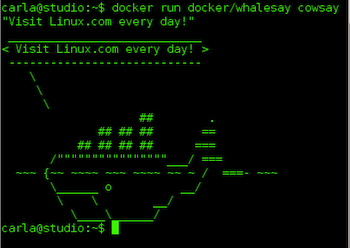
This downloads and runs the hello-world image from the Docker Hub. This contains a library of Docker images, which you can access with a simple registration. You can also upload and share your own images. Docker provides a fun test image to play with, Whalesay. Whalesay is an adaption of Cowsay that draws the Docker whale instead of a cow (see Figure 1 above).

$ docker run docker/whalesay cowsay "Visit Linux.com every day!"

The first time you run a new image from Docker Hub, it gets downloaded to your computer. Then, after that Docker uses your local copy. You can see which images are installed on your system.

$ docker images
REPOSITORY       TAG      IMAGE ID      CREATED       VIRTUAL SIZE
hello-world      latest   0a6ba66e537a  7 weeks ago   960 B
docker/whalesay  latest   ded5e192a685  6 months ago  247 MB

So, where, exactly, are these images stored? Look in /var/lib/docker.

Build a Docker Image

Now let’s build our own Docker image. Docker Hub has a lot of prefab images to play with (Figure 2), and that’s the best way to start because building one from scratch is a fair bit of work. (There is even an empty scratch image for building your image from the ground up.) There are many distro images, such as Ubuntu, CentOS, Arch Linux, and Debian.
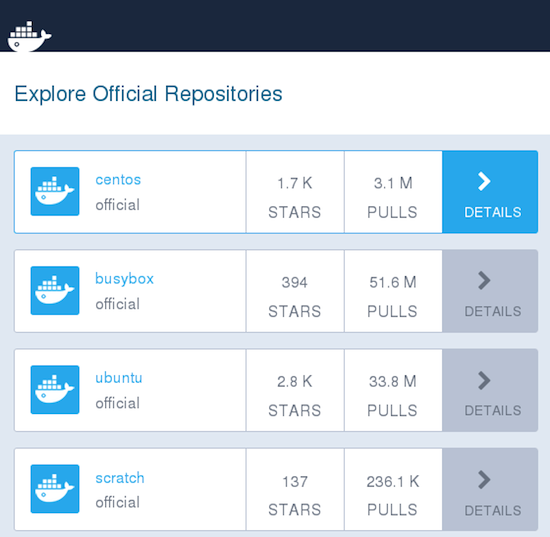
docker-hub
We’ll start with a plain Ubuntu image. Create a directory for your Docker project, change to it, and create a new Dockerfile with your favorite text editor.

$ mkdir dockerstuff
$ cd dockerstuff
$ nano Dockerfile

Enter a single line in your Dockerfile:

FROM ubuntu

Now build your new image and give it a name. In this example the name is testproj. Make sure to include the trailing dot:

$ docker build -t testproj .
Sending build context to Docker daemon 2.048 kB
Step 1 : FROM ubuntu
---> 89d5d8e8bafb
Successfully built 89d5d8e8bafb

Now you can run your new Ubuntu image interactively:

$ docker run -it ubuntu
root@fc21879c961d:/#

And there you are at the root prompt of your image, which in this example is a minimal Ubuntu installation that you can run just like any Ubuntu system. You can see all of your local images:

$ docker images
REPOSITORY       TAG       IMAGE ID        CREATED        VIRTUAL SIZE
testproj         latest    89d5d8e8bafb    6 hours ago    187.9 MB
ubuntu           latest    89d5d8e8bafb    6 hours ago    187.9 MB
hello-world      latest    0a6ba66e537a    8 weeks ago    960 B
docker/whalesay  latest    ded5e192a685    6 months ago   247 MB

The real power of Docker lies in creating Dockerfiles that allow you to create customized images and quickly replicate them whenever you want. This simple example shows how to create a bare-bones Apache server. First, create a new directory, change to it, and start a new Dockerfile that includes the following lines.

FROM ubuntu

MAINTAINER DockerFan version 1.0

ENV DEBIAN_FRONTEND noninteractive

ENV APACHE_RUN_USER www-data
ENV APACHE_RUN_GROUP www-data
ENV APACHE_LOG_DIR /var/log/apache2
ENV APACHE_LOCK_DIR /var/lock/apache2
ENV APACHE_PID_FILE /var/run/apache2.pid

RUN apt-get update && apt-get install -y apache2

EXPOSE 8080

CMD ["/usr/sbin/apache2ctl", "-D", "FOREGROUND"]

Now build your new project:

$ docker build -t apacheserver  .

This will take a little while as it downloads and installs the Apache packages. You’ll see a lot of output on your screen, and when you see “Successfully built 538fea9dda79” (but with a different number, of course) then your image built successfully. Now you can run it. This runs it in the background:

$ docker run -d  apacheserver
8defbf68cc7926053a848bfe7b55ef507a05d471fb5f3f68da5c9aede8d75137

List your running containers:

$ docker ps
CONTAINER ID  IMAGE        COMMAND                 CREATED            
8defbf68cc79  apacheserver "/usr/sbin/apache2ctl"  34 seconds ago

And kill your running container:

$ docker kill 8defbf68cc79

You might want to run it interactively for testing and debugging:

$ docker run -it  apacheserver /bin/bash
root@495b998c031c:/# ps ax
 PID TTY      STAT   TIME COMMAND
   1 ?        Ss     0:00 /bin/bash
  14 ?        R+     0:00 ps ax
root@495b998c031c:/# apachectl start
AH00558: apache2: Could not reliably determine the server's fully qualified
domain name, using 172.17.0.3. Set the 'ServerName' directive globally to
suppress this message
root@495b998c031c:/#

A more comprehensive Dockerfile could install a complete LAMP stack, load Apache modules, configuration files, and everything you need to launch a complete Web server with a single command.

We have come to the end of this introduction to Docker, but don’t stop now. Visit docs.docker.com to study the excellent documentation and try a little Web searching for Dockerfile examples. There are thousands of them, all free and easy to try.


IBM Adds to Watson IoT Arsenal with New APIs, “Experience Centers”

ibm-sign-100625227-primary.idgeStrengthening its push into the Internet of Things, IBM is making a range of application programming interfaces (APIs) available through its Watson IoT unit and opening up new facilities for the group. The unit, formed earlier this year with a US$3 billion investment into IoT, will have its global headquarters in Munch, IBM announced Tuesday. 

IoT will soon be the largest source of data in the world but, IBM officials point out, almost 90 percent of that information is never acted on — at least not yet. Many vendors are jumping on the IoT bandwagon and IBM faces a variety of competitors,…

Read more at IT World

AMD Embraces Open Source to Take On Nvidia’s GameWorks

AMD’s position in the graphics market continues to be a tricky one. Although the company has important design wins in the console space—both the PlayStation 4 and Xbox One are built around AMD CPUs with integrated AMD GPUs—its position in the PC space is a little more precarious. Nvidia currently has the outright performance lead, and perhaps more problematically, many games are to a greater or lesser extent optimized for Nvidia GPUs. One of the chief culprits here is Nvidia’s GameWorks software, a proprietary library of useful tools for game development…

To combat this, AMD is today announcing GPUOpen, a comparable set of tools to GameWorks. As the name would suggest, however, there’s a key difference between GPUOpen and GameWorks: GPUOpen will, when it is published in January, be open source. 

Read more at Ars Technica