Home Blog Page 659

Speak at The Linux Foundation’s Invite-Only Open Source Leadership Summit

The Linux Foundation Open Source Leadership Summit (formerly known as Collaboration Summit) is where the world’s thought leaders in open source software and collaborative development convene to share best practices and learn how to create and advance the open source infrastructure that runs our lives.

The Linux Foundation is now seeking executives, business and technical leaders, open source program office leaders, and open source foundation and project leaders to share your knowledge, best practices and strategies with fellow leaders at OSLS, to be held Feb. 14-16, 2017, in Lake Tahoe, CA.

Submit your speaking proposal now! The deadline for submissions is Dec. 14.

The invitation-only event offers sessions covering topics from project sustainability to licensing and compliance, open source business strategy, consuming and contributing to open source, and much more. It is a forum for education and collaboration that includes the brightest minds in open source who are shaping strategy and implementation.

Some suggested topics for 2017 speakers include:

  • Consuming and Contributing to Open Source

  • Cultivating Open Source Leadership

  • Driving Participation and Inclusiveness in Open Source Projects

  • How to Run a Business that Relies on Open Source

  • How to Vet the Viability of OS Projects

  • Legal + Compliance

  • Managing Competing Corporate Interests While Driving Coherent Communities

  • Monetizing Open Source & Innovators Dilemma

  • New Frontiers for Open Source in FinTech and Health Care

  • Open Source vs Open Governance

  • Open Source Project Case Studies & Success Stories

  • Successfully Working Upstream & Downstream

  • Sustainability of open source projects

For more ideas, check out the full list of topics or watch video recordings from last year’s event.

Not looking to speak at OSLS, but want to attend? Request an invitation.

The Urgency of Protecting Your Online Data With Let’s Encrypt

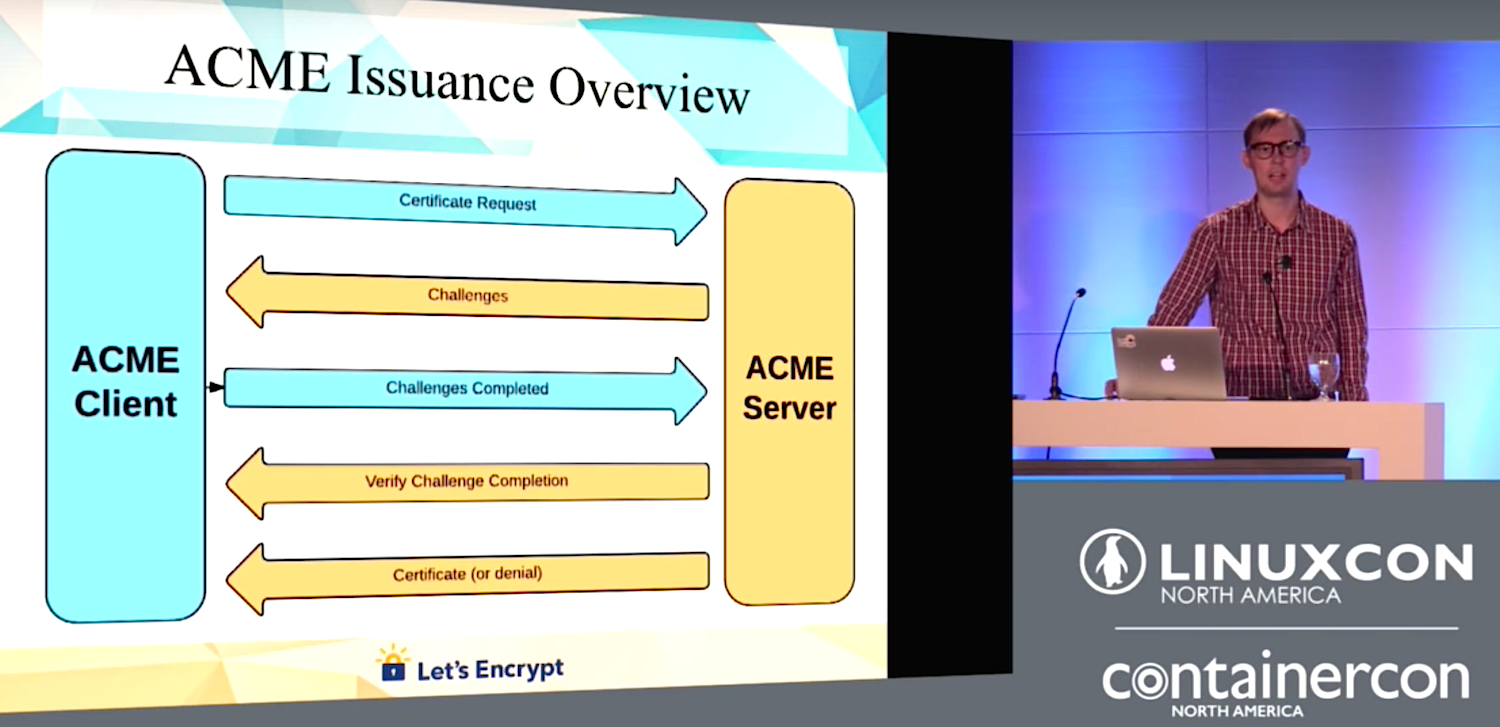
We understand that online security is a necessity, so why is only 48.5% of online traffic encrypted? Josh Aas, co-founder of Let’s Encrypt, gives us a simple answer: it’s too difficult. So what do we do about it? Aas has answers for that as well in his LinuxCon North America presentation.

Aas explains how the Achilles heel of managing Web encryption is not encryption itself, but authentication, which requires trusted third parties, and secure mechanisms for managing the trust chain. He says, “The encryption part is relatively easy. It’s a software stack…it comes on most operating systems by default. It just needs to be configured. Most Web servers tie into it directly and take care of things for you. Your biggest challenge is protecting your private key. The authentication part is a bit of a nightmare, and it has been for a while, so if you want to authenticate, the way this works on the web is you need to get a certificate from a certificate authority, and it’s complicated, even for really smart people like my friend Colin here at Cisco.”

Another roadblock is the expense and overhead of selecting and purchasing certificates from trusted vendors. “You need to figure out what kind of certificate you need, and of course the certificate authorities have come up with a million different marketing buzzwords for the different types of certificates. The super-secure and security plus and blah blah blah. Good luck figuring that out. You’ve got to figure out how to request a certificate…You’ve got to figure out how to install your cert, and of course that’s server specific, so you’ve got to have particular knowledge about a server and how this works, and you’ve got to remember to renew it on time. I’m sure everyone’s run into a site with an expired cert just because people forgot.”

There are other technical considerations that make the current system overly difficult, but new standards will take 10 years or more to be established, so Aas came to the conclusion that he had to create his own brand-new certificate authority to encourage encryption and to improve the process of obtaining and managing certificates. Perhaps only a madman would come to this conclusion, but Aas and Eric Rescorla — a friend and colleague from Mozilla — made it happen, and now we have Let’s Encrypt.

Let’s Encrypt is built on four cornerstones:

  • Automated.
  • Free.
  • Transparent and open.
  • Global.

A certificate authority must be trusted by other CAs, bundled into all Web browsers, and meet all manner of compliance rules. Sponsorship with key industry bigwigs including Akamai, Mozilla, the Electronic Frontier Foundation, and Cisco got them off the ground. Then the Linux Foundation came on board to ease the pain of organizational issues. Let’s Encrypt has been in operation for about a year and manages more than 16 million active certificates.

Watch the complete talk (below) to learn technical details, the challenges of meeting demand, dealing with censorship, and future plans. Currently, the Let’s Encrypt project is running a fund-raising campaign, and your generosity can help make the web more secure. Learn more.

LinuxCon videos

Pitfalls to Avoid When Implementing Node.js and Containers

The use of containers and Node.js are on the rise as the two technologies are a good match for effectively developing and deploying microservice architectures. In a recent survey from the Node.js Foundation, the project found that 45 percent of developers that responded to the survey were using Node.js with this technology.

As more enterprises and startups alike look to implement these two technologies together, there are key questions that they need to ask before they begin their process and common pitfalls they want to avoid.

In advance of Node.js Interactive, to be held Nov. 29 through Dec. 2 in Austin, we talked with Ross Kukulinski, Product Manager at NodeSource, about the common pitfalls when implement Node.js with containers, how to avoid them, and what the future holds for both of these technologies.

Linux.com: Why is Node.js a good technology to use within next-generation architectures?

Ross Kukulinski: Node.js is an excellent technology to use within next-generation applications because it enables technical innovation through rapid development, microservice architectures, and flexible horizontal scaling.

Cloud computing and cloud-native applications have accelerated through the use of open source software, and Node.js is particularly well suited to thrive in this environment due to the extensive open-source npm package ecosystem that allows it to quickly build complex applications.

From a containerization standpoint, Node.js and containers both excel in three key areas: performance, packaging, and scalability.

Node.js has low-overhead and is a highly performant web application development platform that can handle large-scale traffic with ease. Developers build with joy and can own the entire application deployment lifecycle when they are enabled with DevOps methodologies, such as continuous integration and continuous deployment.

For packaging, Node.js has a dependency manifest definition (package.json) that leverages the extensive module ecosystem to snap-together functional building blocks. Similarly, containers have a build-once-run-anywhere nature that is defined by an explicit definition file (Dockerfile). Pairing these two together helps to eliminate the “it runs on my machine, so it’s not my fault that it doesn’t work in production” problem.

Finally, and perhaps most importantly, Node.js and containers can handle an impressive request load through the use of horizontal scaling. Both scale at the process level and are fast-to-boot, which means that operations teams can automatically scale up/down applications independently to handle today’s dynamic workloads.

Linux.com: What are some common pitfalls that users experience when getting started with Node.js and Docker and Kubernetes?

Ross Kukulinski: By far, the most common pitfall I see is people abusing containers by treating them like virtual machines. I routinely see teams with Node.js Dockerfiles with the kitchen sink installed: ubuntu, nginx, pm2, nodejs, monit, supervisord, redis, etc., which causes numerous problems. This results in HUGE container image sizes — often over a gigabyte when they should be ~50-200MB. Large image sizes translate to slow deploys and frustrated developers.

In addition, these kitchen sink containers facilitate anti-patterns, which can cause problems later down the road. A prime example would be the use of a process manager (e.g., supervisord, pm2, etc.) inside of a container.

In the event that your Node.js application crashes — you want it to automatically restart. On traditional Linux systems, this is done using a process manager. Running a process manager within a container will correctly restart your Node.js application if it crashes. The problem is, the container runtime (e.g. Docker) does not have visibility to the internal process manager.  So, the container runtime does not know that your application is crashing or having problems.  

When your team inspects the system to see what’s running, by using docker ps or kubectl get pods, for example, the container runtime will report that everything is up and running when in fact your application is crashing.

Finally, shoving everything into one container defeats one of the important features of containers: scaling at the process or application level. In other words, teams should be able to scale any one process type independently of the others. In our example above, we should be able to scale the nginx proxy/cache separately from the Node.js process depending on where our current performance bottleneck is. One of the underlying premises of cloud-native architectures is to enable flexible horizontal scaling.

Linux.com How best can you avoid these pitfalls?

Ross Kukulinski: Before starting down the containerization process, be sure to understand what your business, technology, and process goals are. You should also be thinking about what comes after you containerize your applications.  

A Docker image is just the first step — how do you run, manage, secure, and scale your containers? Is your release process automated with continuous integration and/or continuous deployment? These are all questions that you need to be thinking about while you’re working through the containerization process.

From an organizational point of view, I would encourage management and decision makers to look beyond just “containerizing-all-the-things” and take a holistic approach to their software development, QA, release, and culture.

For developers and operations teams, remember that containers are NOT virtual machines.  If you’re looking for best-practices when containerizing Node.js, I highly recommend reviewing these resources:

Linux.com: What do you think is in store for the future of containers and Node.js? Any new interesting tech on the horizon that you think will further help these technologies?

Ross Kukulinski: I think we’ll continue to see healthy competition and increased feature parity between the major container providers. While they certainly are competing for market share, each of the major container technology ecosystems (Docker, Kubernetes, Nomad, and Mesos) have a core focus. For example, Docker has focused heavily on the developer story, while Kubernetes has nailed the production-grade deployment & scaling aspects. To that end, I think it’s important for businesses looking to adopt these technologies to find the right tool for them.

In terms of Node.js, I think we’ll continue to see increased adoption of containerized Node.js — especially as more and more companies embrace release patterns that allow them to deliver software quicker and more efficiently at scale. Node.js as a development platform enables rapid, iterative development and great scalability while also leveraging the most popular programming language in the world: JavaScript. I do think we will see an increasingly number of polyglot architectures, so expect to see Node.js paired with languages like Go to deliver a comprehensive tool set.

While I’m always experimenting with new technologies and tracking industry trends, I think the one I’m most intrigued by is the so-called “Serverless” paradigm. I’ve certainly heard plenty of horror-stories, especially relating to poor developer workflows, debugging tools, and monitoring systems. As this tooling ecosystem improves, however, I expect we’ll see Node.js used increasingly often in Serverless deployments for certain technological needs.

Where companies will get into trouble, however, is if they go all-in on Serverless. As with most things, Serverless is will not be a silver bullet that solves all of our problems.

View the full schedule to learn more about this marquee event for Node.js developers, companies that rely on Node.js, and vendors. Or register now for Node.js Interactive.

4 Ways to Open Up your Project’s Infrastructure

Open source isn’t just about opening up your code—it’s also about building a supporting infrastructure that invites people to contribute. In order to create a vibrant, growing, and exciting project, the community needs to be able to participate in the governance, the documentation, the code, and the actual structures that keep the project alive. If the overall “hive” is doing well, it attracts more individuals with diverse skills to the project.

Although many projects strive for “open everything,” infrastructure is often closed to contribution. Usually, only a few people run the infrastructure and keep the lights on. They’re sometimes unable to recruit help because, well, you can’t really give the keys to the kingdom to everyone. 

Read more at OpenSource.com

The End of the General Purpose Operating System

As interesting chat on Twitter today reminded me that not everyone is probably aware that we’re seeing a concerted attempt to dislodge the general purpose operating system from our servers.

I gave a talk about some of this nearly two years ago and I though a blog post looking at what I got right, what I got wrong and what’s actually happening would be of interest to folks. The talk was written only a few months after I joined Puppet. With a bunch more time working for a software vendor there are some bits I missed in my original discussion…

Read more at More Than Seven

Best Open Source Management Tools

Open source software provides an attractive alternative to more costly commercial products, but can open source products deliver enterprise-grade results? To answer this question we tested four open source products: OpenNMS, Pandora FMS, NetXMS and Zabbix. All four products were surprisingly good. We liked Pandora FMS for its ease of installation and modern user interface. In general, we found configuration to be easier and more intuitive with Pandora than the other contenders. 

Read more at CIO

Nothing Good Is Free: How Linux and Open Source Companies Make Money

We all know how popular and helpful Linux and open source products are, but since most of them are available for free, how do the companies that produce them make any money to pay their bills? As it turns out, lots of ways.

HOW DEMAND FUELS COMMERCIAL SOFTWARE DEVELOPMENT

Let’s start with the issue of demand. The more specialized a type of software is, the fewer users there will be. Generally, the fewer users, the smaller the market opportunity. The smaller the market opportunity, the fewer the number of companies that will invest in developing applications of that type. 

There’s actually a bit of a bell curve in the demand/developer ratio for commercial products. Usage areas with very few users have very few developers who are willing to invest. But applications like office suites, which are dominated by a few incredibly powerful players, also have very few companies creating them …

Read more at ZDNet

Linus Torvalds Announces the Sixth RC of Linux Kernel 4.9, Only Two More to Go

That’s right, the sixth RC of Linux kernel 4.9 is now ready for public testing, and, according to Linus Torvalds, it’s a fairly normal patch and things have stayed pretty calm since last week’s RC4 milestone. As for the changes, Linux kernel 4.9 RC6 ships with RDMA updates, GPU fixes, minor build and tooling improvements, several arch updates (ARM, PowerPC, x86, Xtensa), and other small changes here and there.

“We’re getting further in the rc series, and while things have stayed pretty calm, I’m not sure if we’re quite there yet. There’s a few outstanding issues that just shouldn’t be issues at rc6 time, so we’ll just have to see. This may be one of those releases that have an rc8, which considering the size of 4.9 is perhaps not that unusual,” wrote Linus Torvalds…

Read more at Softpedia

This Week in Open Source: Microsoft Expands Open Source Love, 498/500 Supercomputers Run Linux, and More

This week in Linux and OSS news, Microsoft joins the Linux Foundation as a Platinum Member; a powerful move that signifies its commitment to open source, 498 out of 500 supercomputers run Linux, and more! This week was a big one for open source. Make sure you’re caught up with our weekly digest.

1) Microsoft has joined The Linux Foundation as a Platinum Member, ushering in a new era of open source community building.

Microsoft Goes Linux Platinum, Welcomes Google To .NET Foundation– Forbes

Microsoft—Yes, Microsoft—Joins The Linux Foundation– Ars Technica

2) “With 498 out of 500 supercomputers running Linux, it is evident that this operating system provides the capability and security such machines direly need.”

Nearly Every Top 500 Supercomputer Runs On Linux– The Merkle

3) The Core Infrastructure Initiative renews financial support for The Reproducible 

Builds Project, which ensures binaries produced from open source software projects are tamper-free.

Linux Foundation Doubles Down on Support for Tamper-Free Software– InfoWorld

4) Beyond it’s cost-effectiveness, officials around the world view it as a means of speeding up innovation in the public sector.

Open Source in Government IT: It’s About Savings But That’s Not the Whole Story– ZDNet

5) Enter key vulnerability reveals “major Linux security hole gaps.”

Press the Enter Key For 70 Seconds To Bypass Linux Disk Encryption Authentication– TechWorm

Go Beyond Local with Secure Shell

If you have high hopes of becoming a Linux administrator, there are plenty of tools you’ll need to know and know well. Some of those tools are limited to actions taken locally on the machine with which you are working: tools like iptables, make, top, diff, tail, and many more. These tools, isolated to the local machine, are invaluable to your task of managing those Linux servers and desktops. And even though GUI tools are available to help you with those tasks, understanding the command line is tantamount to understanding Linux.

But what about when you need to venture outside of 127.0.0.1 (aka, your local machine)? Administering a remote server cannot be accomplished with tools that do not contain the ability to reach beyond the local. That’s where the likes of ssh and scp come in handy. With these tools, you can easily work with remote machines to make your admin life considerably easier.

I want to introduce you to these two commands so that you can take advantage of what many would consider must-have Linux networking tools.

The need for more security

Secure Shell (otherwise known as ssh) is one of the first tools admins reach for when they must connect to a remote Linux server. By definition (from the ssh man page):

ssh (SSH client) is a program for logging into a remote machine and for executing commands on a remote machine.  It is intended to provide secure encrypted communications between two untrusted hosts over an insecure network. X11 connections, arbitrary TCP ports and UNIX-domain sockets can also be forwarded over the secure channel.

The most important element of ssh is that of security. Where telnet and ftp allow you to do the same tasks as ssh and scp, they do so at the expense of security. If you value the precious information housed on your Linux machines, you full-well understand that telnet and ftp are to be shunned in favor of their more secure counterparts. With the likes of secure shell and secure copy, administrators can easily connect to their remote servers with an acceptable level of security.

So, how do we use these tools? Believe it or not, they are quite simple. Let’s start with the tool that will get your securely logged into your remote servers.

Ssh

The ssh command is quite simple to master. The format of the command looks like this:

ssh remote_host

where remote_host is either the IP address or URL of the remote server. The above command would work fine if you’re attempting to connect to a remote server with the same user being used on the local machine.

In other words, if I am on a local machine, logged in as olivia and I want to log onto olivia’s account on another Linux machine at 192.168.1.166, I can issue the command ssh 192.168.1.166. I would be prompted for the password associated with user olivia and, once I’ve authenticated, I will be presented with the bash prompt on the remote machine.

But what if I’m logged in on the local machine as nathan and need to connect to the remote machine as a olivia? Simple, I alter the command in the following way:

ssh -l olivia 192.168.1.166

That same action can be handled with a different form of the command, like so:

ssh olivia@192.168.1.166

Either way, I will be prompted for olivia’s password. Once authenticated, I will be logged into the remote machine as user olivia.

I prefer to have ssh output a bit more information as it makes a connection. For that, I employ the verbose option like so:

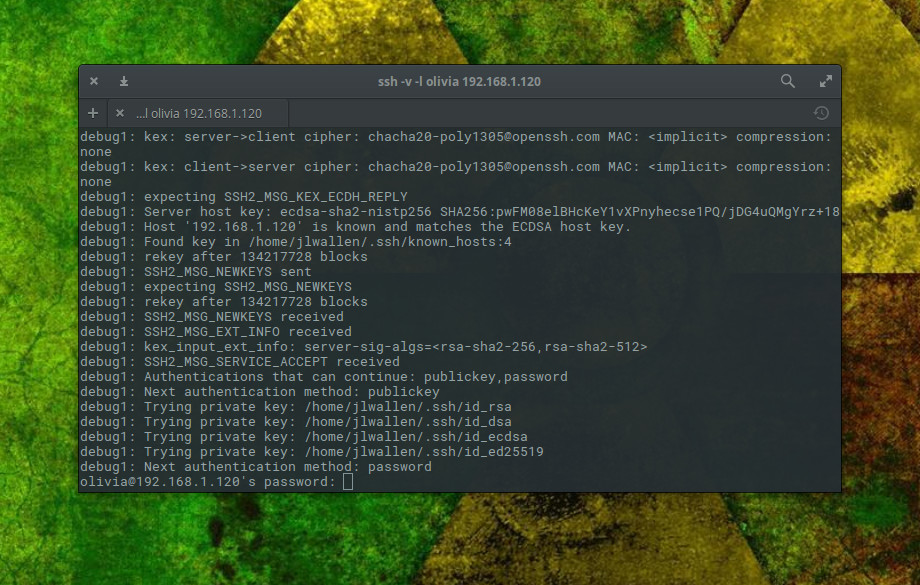
ssh -v -l olivia 192.168.1.166 

When I do that, the ssh command will output information relative to making the connection (Figure 1).

Figure 1: Secure Shell making a connection between hosts.

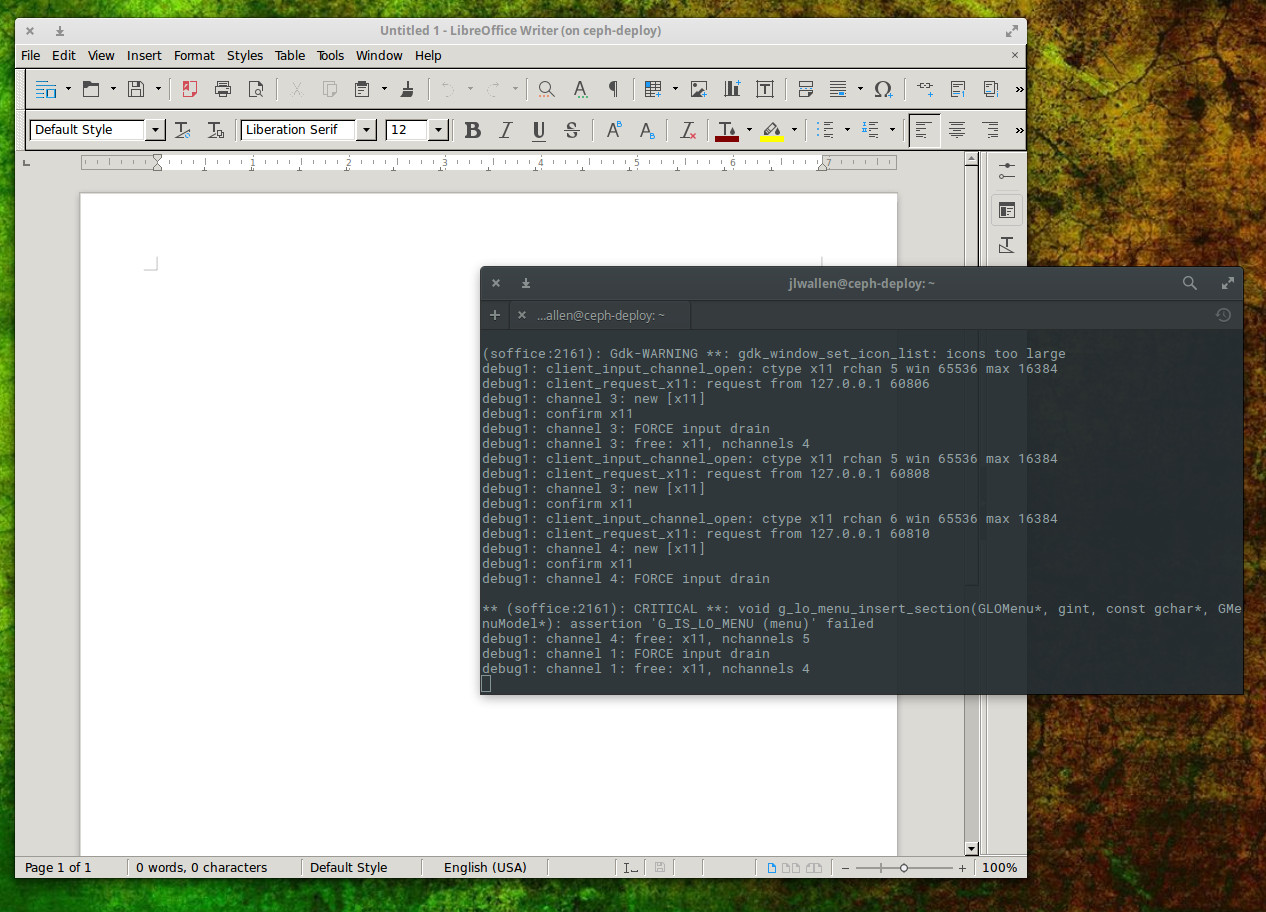
Secure Shell has several other tricks up its sleeve. One trick that many like to take advantage of is tunnelling X. This allows you to log into a remote machine and run the GUI tools from that machine on the local machine. Anything you do with that GUI tool will be reflected on the remote machine (not the local). To do this, you only have to add a simple switch like so:

ssh -l olivia -X 192.168.1.166

You can then issue a command to start a GUI application and have it run on the local machine (Figure 2).

Figure 2: Running a remote instance of LibreOffice Writer, from a remote machine.

What happens when you need to move files from a local machine to a remote machine? There’s a command for that.

Secure Copy

The secure shell command also happens to come with a protocol for handling the copying of files. Once upon a time, the standard tool for such a task was ftp. The ftp command is still heavily in use, but for those that prefer a much more secure method of transferring files, scp is what you want. With a structure similar to that of ssh, scp makes short work of moving files securely from one host to another.

With the scp command, you can send file to a remote host or copy them from a remote host. The syntax of the command can be a bit tricky, but once you understand it, it’s second nature.

Let’s first send a local file to a remote host. The structure of that command is:

scp filename username@remote_host:/some/remote/directory

Say we want to copy the file myfile to the Documents directory of remote user olivia on machine 192.168.166. Here’s how that command would look:

scp myfile olivia@192.168.1.166:/home/olivia/Documents

Enter olivia’s password, when prompted, and myfile will be securely copied to the directory /home/olivia/Documents/ on the machine at IP address 192.168.1.158.

Now, say you want to securely copy that same file from 192.168.1.158 into the Documents directory on the local machine. Do that, the command would now look like:

scp olivia@192.168.1.158:/home/olivia/Documents/myfile /home/olivia/Documents

You can now securely move files from one machine to another.

RTFM

As with any command, once you have the basics down, it is imperative that you (with a nod to Battlestar Galactica) Read The Frakking Manual (RTFM). For Secure Shell, issue the command man ssh and for Secure Copy, issue the command man scp. Both of these man pages will give you more information than you could possibly imagine about their respective commands.

If you’re looking for a secure route to working with remote machines, look no further than ssh and scp. Once you’ve mastered these two commands, you’ll be able to remotely (and securely) administer beyond the 127.0.0.1 address.

Advance your career in system administration! Check out the Essentials of System Administration course from The Linux Foundation.