
Home Blog Page 666

Enabling the Digital Revolution: SDN and Beyond

The promise of software-defined networking and solutions for its wider adoption were explored in depth at VMware’s inaugural future:net event.

To cope with the many challenges of the new digital business, data centers are undergoing a once-in-a-generation architectural shift, from hardware- to software-centric models. Just as virtual machines supplanted physical servers as the fundamental element of modern server applications, software-defined networking (SDN) is now emerging as a more flexible, manageable way to organize a data center’s network needs.

SDN can create far greater manageability by enabling network managers and developers to access network resources at a programmatic level, treating network resources in much the way they treat other computing resources such as central processing units (CPUs) and memory. It can enable networks to become easier to scale up or down, shorten setup time, increase security, and reduce costs. 

Read more at Technology Review

SUSE, Microsoft, Linux and Containers: Open Source Continues Its Enterprise March

Open source has risen to become a truly viable option for enterprises due to the cost savings that can be achieved, the often faster production cycles, and the ability to tap into a growing community of highly skilled workers.

While open source adoption may still face its challenges, it has seen a growing number of companies move to embrace it, such as Microsoft.

Given the growing importance of open source to enterprises, CBR looks at the latest releases from some of the major open source players.

Read more at CBR

GitLab, Consumer Driven Contracts, Helm and Kubernetes

Previously I wrote about the different type of services you can run in a Kubernetes cluster.

This article will focus on building a workflow driven by Continuous Integration and Continuous Delivery for deploying the services on Kubernetes.

We’ll develop and deliver an Application with two different services that communicate with each other. One service is internal and the other will be accessible from the outside world via Traefik. We’ll want to develop, deploy and evolve each service independently of the rest.

Read more at Alberto García L.

Hyperledger Bids to Bridge Blockchain Divide in China Push

If blockchain is done right, borders will begin to disappear. Immutable, shared ledgers of transactions and goods could come to serve as a reminder that everything we grow, build, buy and sell comes from the same tiny planet.

But this future is far from guaranteed, and the various blockchain developer groups competing to bring it to life have so far struggled to involve talent from all over the world in this global vision.

Blockchain consortium Hyperledger, for example, was initially founded with support from companies in almost exclusively Western nations. Yet, the consortium has grown this year to include more than 20 members headquartered in China and 10 from Japan and South Korea, with a spattering of members from other nations represented as well.

With that success, Hyperledger executive director Brian Behlendorf has faced a new challenge, creating a system that allows information to flow between its multilingual members as seamlessly as data on a blockchain.

Read more at CoinDesk

New IBM Platform Brings Watson to IoT

IBM unveiled today an experimental platform that allows developers to embed Watson functions and cognitive technology into various devices. The platform, dubbed Project Intu, can be accessed through the Watson Developer Cloud, Intu Gateway, and GitHub.

More specifically, the goal is to simplify the process for developers that want to create cognitive experiences in robots or other Internet of Things (IoT) devices. These cognitive experiences even extend into the physical world.

Read more at SDx Central

Vagrant Provisioning with Puppet

Automating software installations is an important part of deploying virtual machines with Vagrant. This process is called provisioning and can be integrated with DevOps tools, such as Puppet. Let’s see how to do that.

Vagrantfile Configuration

The configuration for any Vagrant virtual machine is in the Vagrantfile. This is where we will instruct Vagrant to use Puppet to install software or execute commands:

Read complete article at DevX

Apple Is Doubling Down on Open Source

Apple has been getting religion on open source, but more than code the industry needs its voice.  

Apple may be the most secretive tech company on the planet, but it’s finally starting to open up to open source. While the company has yet to issue its own open source report card, Google style, an Apple software engineer recently noted “at Apple we are doubling down on open source.”

That’s progress, and follows on the heels of the company acknowledging its use of Apache Mesos, as well as updating its open source page to proclaim, “Open source software is at the heart of Apple platforms and developer tools.”

Is it enough?

Read more at Tech Republic

BackSlash Linux – A new Cool Looking Distro in the Community

Screenshot of BackSlash Linux Anna 

BackSlash Linux ​is an Indian Linux Distribution based on Ubuntu and Debian and uses a Modified version of Cinnamon as it’s Default Desktop Environment. It also includes many Drivers and applications pre-installed out of the box.

The Latest Release for the Operating System is BackSlash Linux “Anna”. The name “Anna” is taken from the character Anna in Disney’s Movie Frozen. The motto of the Operating System is “Change needs Courage”. As stated on the main page of the Operating System’s website, “With out of the box Office Productivity Suite, Video and Audio calling, full device driver support and Security, BackSlash Anna also delivers awesome looks and new experiences”.

Features

  • Out-of-the box Support for almost all drivers.
  • Reliable Security of Canonical’s Ubuntu
  • Out of the box installation of WPS Office, Skype, and other productive apps.
  • Support for Windows Applications natively.

System Requirements
​BackSlash is low on system Requirements and needs only a Core2Duo processor with 1 GB RAM to run flawlessly. A video memory of 128 MB is recommended for Visual Effects.

Desktop Environment and Variants

​BackSlash has it’s own desktop environment which is a heavily modified version of Linux Mint’s Cinnamon Desktop Environment. Here is a screenshot of BackSlash Anna’s Desktop:
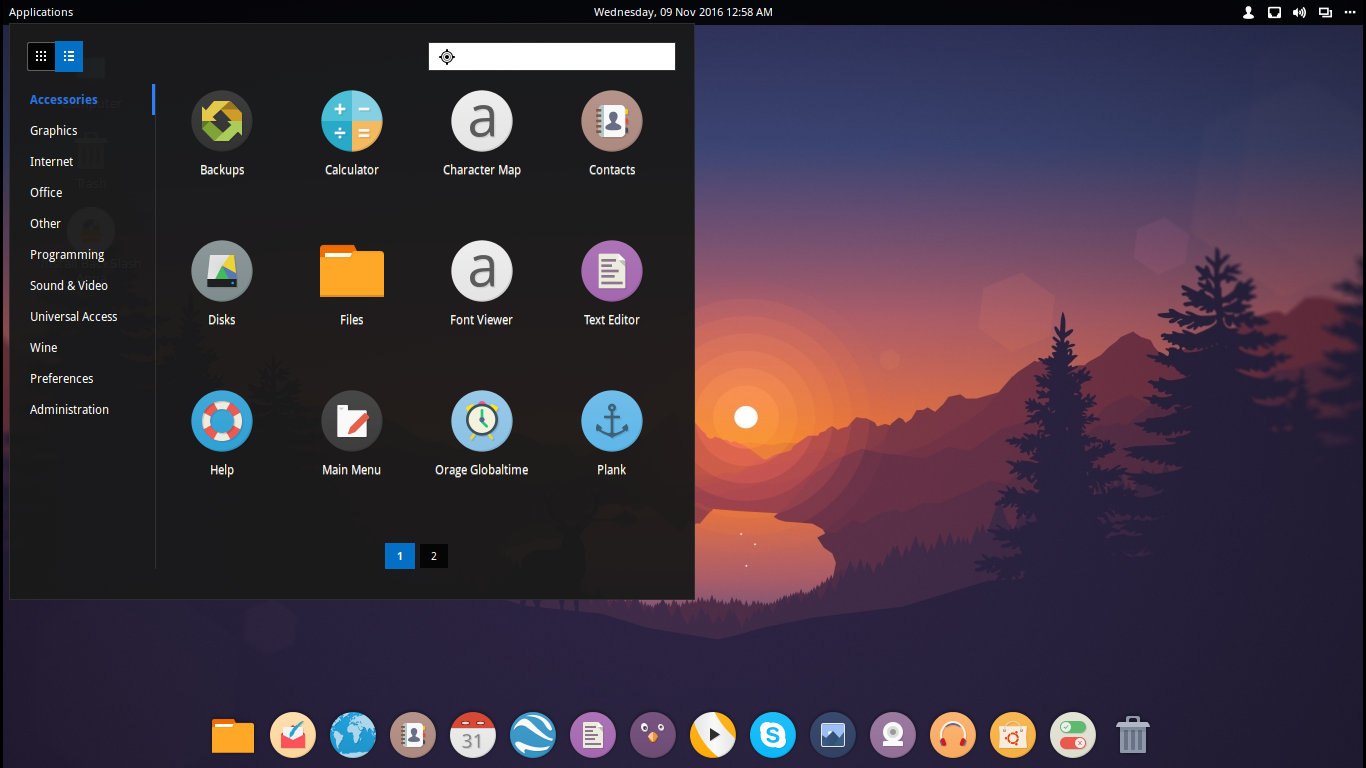
BackSlash DE

The Application menu has both List view and Category View, as noticed on most of the Linux Distros and the Dock is Transparent giving a clear look. The icons are round making the look amazing and the Distro is highly stable and it didnot report any error after a use of 72 hours.

As of Variants the Distro doesn’t ship with multiple variants but it includes Unity and Gnome (Flashback and Compiz) as extra Desktop Environments along with the default one.

The development rate of BackSlash Linux is very fast and new releases are released after every month or so and is very fast at fixing bugs.

​Final Verdict

​The Operating System is a great start to used with Office or Personal use with almost everything included in it and is surely a thing to try out. But, it cannot be seen as a replacement Distro as the Distro is still young and needs to mature.

Official Website:​ www.backslashlinux.in

Learn The Future of Node.js From Industry and Community Experts at Node.js Interactive

With almost five million users a month and adoption across numerous industries, Node.js is a universal platform for web applications, IoT development, enterprise application development, and microservice architectures. Its liberal contribution policies have allowed the platform to increase the number of contributors working on the project by a sustained 100% year-over-year growth for the last several years.

To help spread Node.js best practices and take a look what the future holds for the platform, the Node.js Foundation is hosting Node.js Interactive to bring together developers, enterprise users and the Node.js community for collaboration, education, and more from November 29 – December 2 in Austin.

The conference will feature two full days of talks, workshops and keynotes focused on skill-building and knowledge-sharing in several key areas: performance, DevOps, debugging, security, machine learning, IoT, and more. A few key talks include:

Node.js State of the Union – Rod Vagg

Rod, Technical Steering Director of the Node.js Foundation and Chief Node Officer at NodeSource, will discuss progress Node.js has made in the last year as well as key technologies and focus areas for Node.js Core and the Node.js Project teams in 2017.

Express State of the Union – Doug Wilson

You’ve likely used an app built with Express. With 53+ million downloads in the last two years, Express has become one of the key toolkits for building web applications. Express underpins some of the most significant projects that support Node.js and is heavily used by enterprises; the popular blogging framework Ghost; Loopback, a Node.js API framework, and many more. Doug Wilson, the rock of the Express community, will be talking about the progress that Express has made over the last year and showcase what is in store for future versions.

JavaScript Will Let Your Site Work Without JavaScript – Sarah Meyer of Buzzfeed

Is your site heavy and slow, especially on mobile devices? You might want to look into isomorphic JavaScript with Node.js. Any industry that demands superior customer satisfaction with their website, which is pretty much all industries, should know about isomorphic JavaScript. It has certainly helped with Rent the Runway. Sarah Meyer, now a software engineer at Buzzfeed, will provide an overview of how isomorphic JavaScript can be used to better users’ experiences on web pages, and subsequently make a developer’s life a lot easier.

Shedding Light on the Darknet – Dr. Nwokedi Idika of Google

What does the darknet really mean? Dr. Nwokedi Idika, software engineer at Google, asked this very question, and after multiple interviews, he came out with the same conclusion: confusion. His presentation will help right the common misconceptions about the darknet from concepts to technologies.

Slaying Monoliths with Docker and Node.js – Yunong Xiao of Netflix

At the heart of nearly every request from subscribers is Netflix’s data access platform. It enables Netflix’s innovative UIs to communicate efficiently with its bevy of backend services while also maintaining a large and ever growing subscriber base, which currently stands at 75 million members.

How does Netflix continue to grow with this monolithic platform? During Node.js Interactive, Yunong Xiao, senior Node.js software engineer at Netflix.com, will discuss a new container-based data access platform that the Netflix team is building to replace its monolith, and how they are using Node.js to instrument it all.

The third day of the conference will kick off with Code & Learn. If you are interested in learning how to contribute to Node.js, this is the right event for you. Code & Learn provides hands-on workshops and encourages new developers to tackle real problems in the code base – all with live, in-person support from mentors who attend Node.js conferences.

During the afternoon of December 1 through December 2, the Node.js Foundation will host a Collaboration Summit, which will feature un-conference sessions to discuss the present and future direction of Node.js. Have an interest in helping shape the future of Node.js? Join the Collaboration Summit.

View the full schedule to learn more about this marquee event for Node.js developers, companies that rely on Node.js, and vendors. Or register now for Node.js Interactive.


Getting Started With Kubernetes Is Easy With Minikube

Getting started with any distributed system that has several components expected to run on different servers can be challenging. Often developers and system administrators want to be able to take a new system for a spin before diving straight into a full-fledged deployment on a cluster.

All in one installations are a good remedy to this challenge. They provide a quick way to test a new technology by getting a working setup on a local machine. They can be used by developers in their local workflow and by system administrators to learn the basics of the deployment setup and configuration of various components.

Typically, all-in-one installs are provided as a virtual machine. Vagrant has been a great tool for this. For example, OpenShift Origin provides an all-in-one VM, and OpenStack has DevStack.

To get started with Kubernetes easily, we now have an all-in-one solution: minikube.

Minikube will start a virtual machine locally and run the necessary Kubernetes components. The VM will get configured with Docker and Kubernetes via a single binary called localkube. The end result will be a local Kubernetes endpoint that you can use with the Kubernetes client kubectl.

This is very similar to Docker’s docker-machine with one main difference being that minikube only starts local virtual machines, it does not interact with public Cloud Providers.

Setup

For clarity, I will skip over the very few requirements (e.g., VirtualBox setup or another hypervisor) and go straight into “minikube” installation.

While you can build from source by grabbing it on GitHub, the easiest is to grab the released binary for your platform (packaging should come shortly). For example, on Linux:


```

$ curl -Lo minikube https://storage.googleapis.com/minikube/releases/v0.8.0/minikube-linux-amd64

$ chmod +x minikube

$ sudo mv minikube /usr/local/bin/

```

With minikube now on your machine, you will be able to create a local Kubernetes endpoint. But if you are totally new to Kubernetes, you should also download the Kubernetes client kubectl. This client will interact with the Kubernetes API to manage your containers.

Get kubectl:


```

$ curl -Lo kubectl http://storage.googleapis.com/kubernetes-release/release/v1.3.0/bin/linux/amd64/kubectl

$ chmod +x kubectl

$ sudo mv kubectl /usr/local/bin/


```

You are now ready to use minikube. Just typing minikube at your shell prompt will return the usage. The first command to use, however, is the start command. This will boot the virtual machine that will run Kubernetes. Let’s do it:

```

$ minikube start

Starting local Kubernetes cluster...

Kubectl is now configured to use the cluster.

```

You can check the status of your minikube VM with the status command.

```

$ minikube status

Running

```

To see the kubectl is configured to talk to the minikube VM, try to list the nodes in your Kubernetes cluster. It should return a single node with the name minikubevm.

```

$ kubectl get nodes

NAME         STATUS    AGE

minikubevm   Ready     1h

```

And, to finish checking that everything is running, open your VirtualBox UI and see the minikube VM running.

Application Example

You are now all set with this all-in-one local Kubernetes install. You can use it to discover the API, explore the dashboard and start writing your first containerized applications that will easily migrate to a full Kubernetes cluster.

Explaining how an application is containerized and what are the various resources in Kubernetes is beyond the scope of this blog. But, to showcase minikube, we are going to create the canonical guestbook application. This application is made of a Redis cluster and a PHP front end. Containers are created via a Kubernetes resource called Deployments and exposed to each other via another Kubernetes primitive called a Service.

Let’s create the guestbook application on minikube. To do this, we will use the kubectl client and create all required resources by pointing at the YAML file that describes them in the examples folder of the Kubernetes source code.


```

$ kubectl create -f https://raw.githubusercontent.com/kubernetes/kubernetes/master/examples/guestbook/all-in-one/guestbook-all-in-one.yaml

service "redis-master" created

deployment "redis-master" created

service "redis-slave" created

deployment "redis-slave" created

service "frontend" created

deployment "frontend" created

```

The CLI tells you that it created three services and three deployments.

You can now open the Kubernetes dashboard automatically, and you will see all sorts of resources that have been created and that we will discuss in a later post.

```

$ minikube dashboard

```

Below is a snapshot of the Dashboard.

dashboard.png

To access the application front end, the quickest way in development setup like this one is to run a local proxy. This is due to the fact that a default Kubernetes service is not reachable outside the cluster.

```

$ kubectl proxy

```

The frontend service will now be accessible locally. Open it in your browser and enjoy the guestbook application.

```

$ open http://localhost:8001/api/v1/proxy/namespaces/default/services/frontend

```

Here is a snapshot of the guestbook application:

guestbook.png

Additional minikube commands

If you want to learn what is actually happening inside the minikube VM, you can SSH into it with the minikube ssh command.

Because Kubernetes uses the Docker engine to run the containers, you can also use minikube as a Docker host with the minikube docker-env command.

As a developer you might also be interested to test different versions of Kubernetes. Minikube allows you to do this. Check what versions are available to test with minikube get-k8s-versions and use the –kubernetes-version= flag in minikube start to set a specific version.

Finally, you can stop and delete the minikube VM with intuitive commands like minikube stop and minikube delete.

In conclusion, the minikube binary is by far the easiest and quickest way to get Kubernetes for a spin. It will allow you to learn the Kubernetes API, resource objects as well as how to interact with it with the kubectl client.

Read the next articles in this series: 

Rolling Updates and Rollbacks using Kubernetes Deployments

Helm: The Kubernetes Package Manager

Federating Your Kubernetes Clusters — The New Road to Hybrid Clouds

Enjoy Kubernetes with Python

Want to learn more about Kubernetes? Check out the new, online, self-paced Kubernetes Fundamentals course from The Linux Foundation. Sign Up Now!

Sebastien Goasguen (@sebgoa) is a long time open source contributor. Member of the Apache Software Foundation, member of the Kubernetes organization, he is also the author of the O’Reilly Docker cookbook. He recently founded skippbox, which offers solutions, services and training for Kubernetes.