Time tracking software is a type of computer software that records time spent on tasks. This category of software can enable users to run billing reports, and prepare invoices for clients.
The deployment of this software offers a new level of productivity to organisations, as it provides management with information on what time is spent by employees on different activities such as projects and tasks. This can help to measure productivity over time. This software is commonly used by professionals that charge clients by the hour such as accountants, solicitors, and freelancers. The generation of automatic invoices with minimal or no data entry removes the inconvenience of billing and invoicing clients, and improves efficiency.
using RDO MItaka trunks results hanging on `openstack undercloud install`, wheh it attempts to start openstack-nova-compute on undercloud. Nova-compute.log report failure to connect 127.0.0.1:5672. Verification via `netstat -antp | grep 5672` reports
port 5672 bind only to 192.0.2.1 ( ctlplane IP address ).
See also https://www.redhat.com/archives/rdo-list/2016-March/msg00171.html
Quoting ( complaints are not mine) :- By the way, I’d love to see and help to have an complete installation guide for TripleO powered by RDO on the RDO site (the instack virt setup without quickstart . . . .
Container technology is rapidly transforming the way enterprises develop and deliver applications, and adoption is set to ramp up spectacularly in the next year, even as obstacles towards adoption persist.
A new report from the Cloud Foundry Foundation, Hope Versus Reality: Containers in 2016, shows that 16 percent of all organizations are already using containers in production. But research firm ClearPath Strategies, which carried out the survey on behalf of the Cloud Foundry Foundation, said we’re only now just starting to see the shift in those looking to move into production.
“Another 64 percent [of organizations] are expecting to move into production in the next year,” said Abby Kearns, vice president of Industry Strategy at the Cloud Foundry Foundation, in a statement to Datamation.
Cloud Foundry Foundation, home of the industry-standard multi-cloud platform, today announced findings from the most comprehensive global survey ever conducted on the adoption of containers. More than half of companies surveyed said they were either evaluating or using containers while a full 64% anticipate mainstreaming their use within a year. Notably, 84% of users say that “managing containers without a cloud application platform would be a challenge.”
The Cloud Foundry Foundation Container Report summarizes the broadest and deepest survey to date on containers, providing new insights into how and why they are being used, and key challenges to their adoption.
5) Hewlett Packard Enterprise (HPE) announces it’s providing open access to developer tools and libraries to facilitate cross-collaboration between HPE and the open source community on The Machine.
Open source knowledge is very valuable in today’s job market. The 2016Open Source Jobs Reportfrom The Linux Foundation clearly showed that hiring managers are placing much value on open source cloud, networking, and security skills. It also showed that DevOps is emerging as a red hot job category.
The good news is that there are fast tracks emerging for gaining valuable skills with open source skills. Some of these options can lead directly to rewarding employment opportunities. Here are some possibilities to consider:
Hack Reactor and App Academy
The12-week code bootcamp that Hack Reactor offers has made enough waves that it wasone of the topics at a recent conference headed up by President Obama. Leaders at Hack Reactor claim a 98 percent hiring rate for its graduates, with the average graduate salary at $104,000 per year.
“I came to Hack Reactor with a strong web design background and came out with mastery of the full stack,” said recent graduate Elle Beal, who is now employed at Nodeprime. You can apply for Hack Reactor’s programhere, and the program includes building fully realized applications and leveraging open source tools and platforms.
The Code Bootcamp offered byApp Academy is similar to Hack Reactor’s program, but consider this difference: App Academy does not charge you for its educational program until you are hired. “Your success is our success” is the company’s motto.
From Ruby to JavaScript, App Academy’s 12-week program emphasizes in-demand tools and platforms, many of which are open source. Average graduate salaries in San Francisco are pegged at $105,000 per year, according to App Academy.
Linux Foundation Training
The Linux Foundation offers very doable training offerings that can equip you with open source skills that are currently highly valued in the job market. According to The Linux Foundation’s 2016 Open Source Jobs Report, more than half of surveyed hiring managers say knowledge of the OpenStack cloud platform has a big impact on hiring decisions.
At the recent OpenStack Summit, The OpenStack Foundation announced the availability of a Certified OpenStack Administrator (COA) exam. Developed in partnership with The Linux Foundation, the exam is performance-based and available anytime, anywhere. It allows professionals to demonstrate their OpenStack skills and helps employers gain confidence that new hires are ready to work.
The Linux Foundation also offers an OpenStack Administration Fundamentals course, which serves as preparation for the certification. The foundation also offers comprehensive Linux training and other classes. You can explore optionshere. Additionally, Red Hat and Mirantis offer very popular OpenStack training options.
Take the Big Data Path
The Big Data trend stretches as far as the eye can see, and picking up skills with open source data analytics tools can line you up for promising jobs.
The Apache Kafka project is making such a difference in the Big Data space that it is being aimed at cutting-edge streaming data analytics efforts. It is a Top-Level project at Apache and is being leveraged along with Apache Spark in many streaming scenarios. The engineers who created Kafka at LinkedIn also created Confluent, which focuses on Kafka. Confluent University offers training courses for Kafka developers, and for operators/administrators.
Hadoop, of course, is one of the kings of the hill in open source data analytics, and you can find many good options for Hadoop training.Hortonworks, a spin-off of Yahoo, has been providing many kinds of Hadoop training for a long time now and runsHortonworks University, which focuses on teaching beginning to advanced Hadoop skills.
Meanwhile, Cloudera has been providing Hadoop training for years, and there is very likely a class near you. Check theCloudera sitefor details. Cloudera’s training ranges from architectural instruction to fundamentals of MapReduce and powerful analytics. The company also offers certification.
Additionally, take a look at MapR’s free Hadoop training offerings, as describedhere. The company has attracted tens of thousands of students to its online classes.
Companies like IBM are pouring billions of dollars into Apache Spark initiatives, and you can find very accessible Spark training, too. MapR offersfree Spark training options, and Cloudera also has an expandedApacheSpark training curriculum, although many of its classes are available for small fees. For more information about the courses on Spark and to register for a class, visituniversity.cloudera.com.
Also, on the Spark front,Databricks, which is the company founded by the team that created Apache Spark, has announced theGeneral Availability of Databricks Community Edition (DCE), a free version of a just-in-time data platform built on top of Apache Spark. It comes with access to free, online courses that can arm you with top-notch Spark skills.
The open source Git distributed version control system, the cornerstone of the GitHub code-sharing site, has been upgraded with faster submodules and improvements for diffs and testing. Version 2.9, released this week, expands options for submodules, which enable users to keep another Git repository in a subdirectory of a repository. The submodule improvements focus on speed and flexibility.
Although the Linux kernel is a highly secure layer in the ecosystem, the same cannot be said of every application that runs atop it. You might have an in-house application that has not been vetted for security (yet must be used), you might have found an app on a third-party download site, or you might be running applications on a machine that must retain the highest level of security. To that end, what do you do?
One thing that is available with Linux is the ability to sandbox applications. Sandboxing is an approach to running untrusted applications by limiting the environment in which they run. The app is run inside the “sandbox,” where it is provided a tightly controlled set of resources for the guest application to use.
Sound complicated? Believe it or not, there’s a piece of software available that makes sandboxing quite simple on Linux. The app is called Firejail and serves as an SUID (Set owner User ID upon execution) that reduces the risks of security breaches. Firejail can sandbox any type of process, be it a server or desktop application. It includes security profiles for a vast number of Linux applications and allows you to create your own, app-specific, profiles.
There is even a GUI application for Firejail, called Firetools, that offers system tray launcher for sandboxed apps; sandbox editing, management, and statistics. NOTE: The Firetools system tray integration may not work with every desktop environment.
With that said, I’ll show how to install and use both Firejail and Firetools.
Installing the Software
I will be demonstrating the installation of Firejail and Firetools on Ubuntu GNOME 16.04. This process should work fine on any Ubuntu-based distribution. To install the applications on another distribution, you will have to make minor modifications to the steps (such as using dnf as opposed to apt-get). First, let’s install Firejail. Because the software is found in the standard repositories, installation is very simple. Follow these steps:
Open up a terminal window
Issue the command sudo apt-get install firejail
Type your sudo password and hit Enter
If prompted, type y to allow the installation to continue
Allow the installation to complete
Now let’s install Firetools. You won’t find this app in the standard repositories. However, the developer has made official .debs available. To install one of the .deb files, follow these steps:
Download the file associated with your architecture (either 32- or 64-bit)
Open a terminal window
Change into the Downloads directory with the command cd ~/Downloads
Issue the command sudo dpkg -i firetools*.deb
Type your sudopassword and hit Enter
Allow the installation to complete
The installation very well may error out with dependency issues. If that’s the case, enter the command sudo apt-get install -f,to resolve the dependencies, and Firetools will be ready to use.
Using Firejail
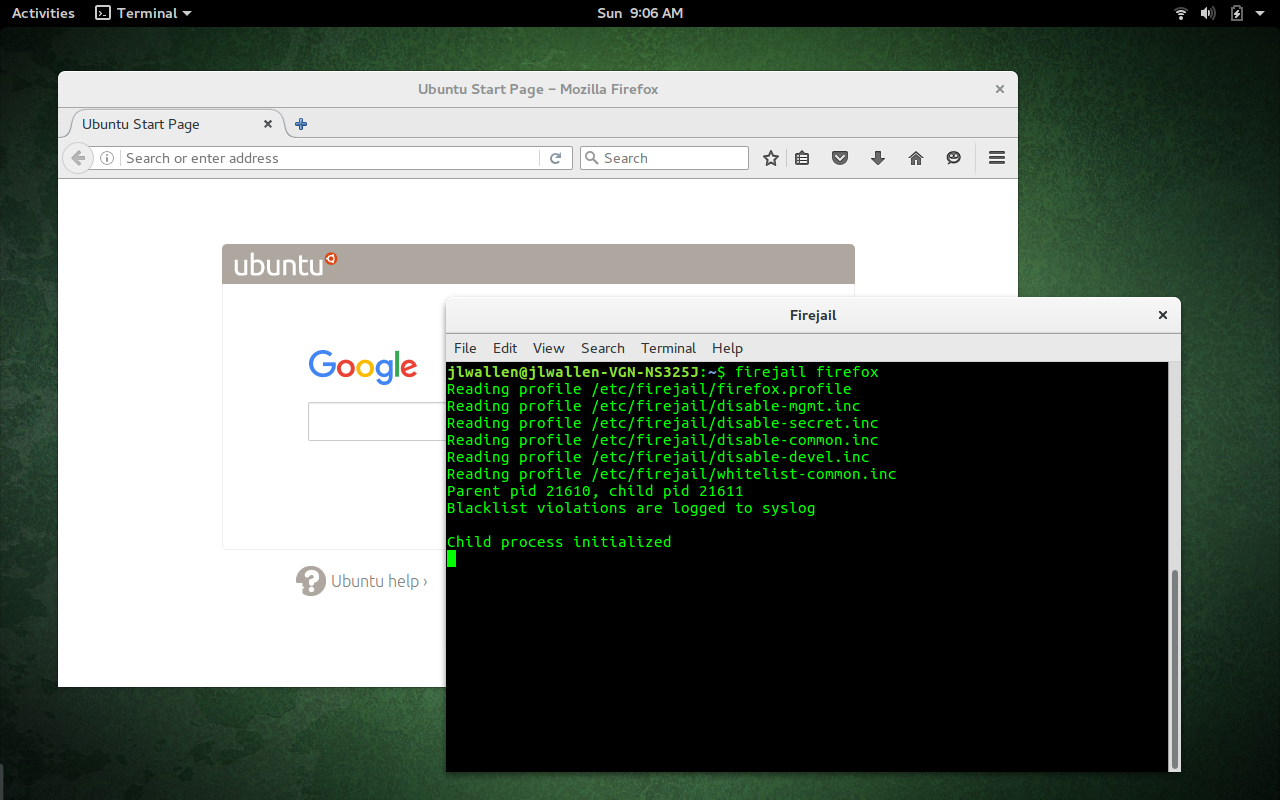
Let’s first work with the Firejail command line. The developers have made it incredibly easy to use. Say, for example, you want to run Firefox within a Firejail. To do this, open up a terminal and issue the command firejail firefox. When you run the application, you will see that Firejail has initiated the child process and Firefox will open—running within its own sandbox (Figure 1).
How simple is that?
Figure 1: Firefox running inside of a Firejail.
One thing you will notice, however, is that applications run with Firejail will not have access to all of your files (this is by design). For example, if you run Firefox with Firejail, and you attempt to upload a file from, say, your Pictures directory, you will not be able to do so. Any application run in a sandbox has limited access to files and folders. To close an application running in a Firejail, simply close it as you normally would.
Firejail works with profiles. It includes profiles for a number of popular applications, as well as a very restrictive default profile. If Firejail does not find a profile for an executed command, it will run the application with the default profile. You can create a custom profile for an application with the following steps:
Open up a terminal window
Issue the command mkdir -p ~/.config/firejail
Change into the newly created directory
Copy the default profile into the newly created directory with the command cp /etc/firejail/generic.profile ~/.config/firejail/APPNAME.profile(where APPNAME is the name of the app to be used)
Say, for example, you wanted to prevent that application from accessing your user Documents directory. To do this, you would add the following to the newly created profile:
blacklist ${HOME}/Documents
NOTE: You can also write that out with the explicit path to the directory, like so:
blacklist /home/USERNAME/Documents
where USERNAME is the actual name of the user.
Now, suppose an app needs access to a particular directory, but you want to limit it to read onlyaccess. You can enable this in the profile with the line:
read-only ${HOME}/Documents
To find out more of what you can do with the newly created profile, issue the command man firejail-profile. This will show you a complete description of what other restrictions you can apply to the new profile.
Using Firetools
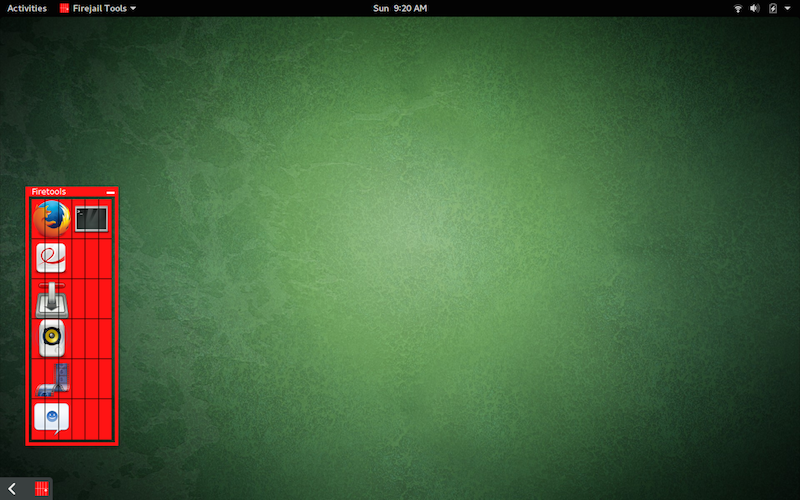
Let’s take a look at how the Firejail GUI, Firetools, works. From a terminal window, issue the commandfiretools & to start up the tool. You should see two things: The Firetools window and an indicator for the running app in the system tray. In GNOME 3, you’ll notice, at the bottom left corner, a slideout app that you can call up at any time to reveal access to the Firetools GUI (Figure 2).
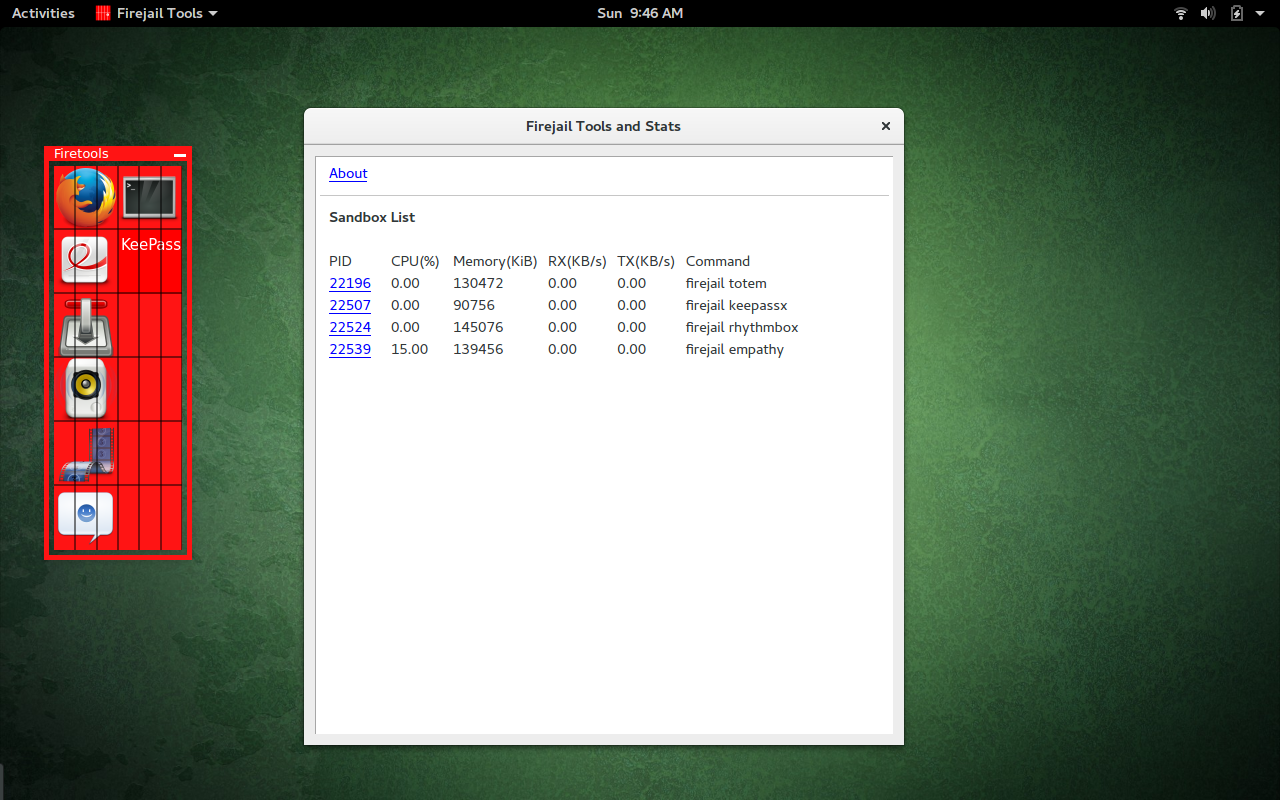
Figure 2: Firetools running and the GNOME 3 system tray access.You fill find a few apps already included with Firetools. To start one, you can either double-click the app launcher or right-click the launcher and select Run. Firetools includes a monitor you can run to see which apps are running within a firejail. To open this, unminimize Firetool, right-click anywhere in the GUI, and select Tools. When the monitor opens, you’ll see all of the running firejailed apps listed (Figure 3).
Figure 3: PIDs, names, and stats of all running firejailed apps.
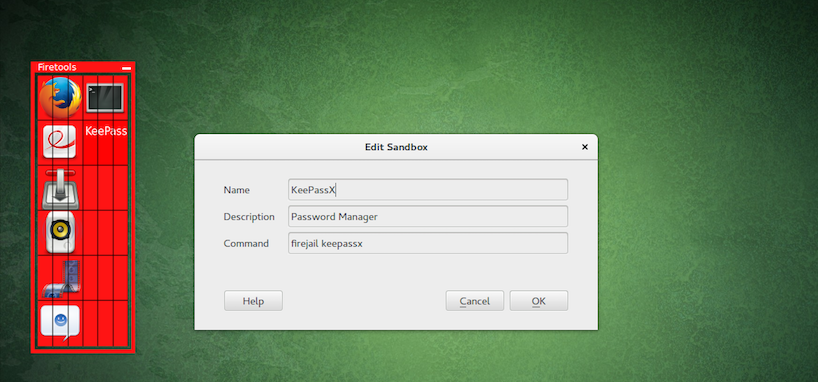
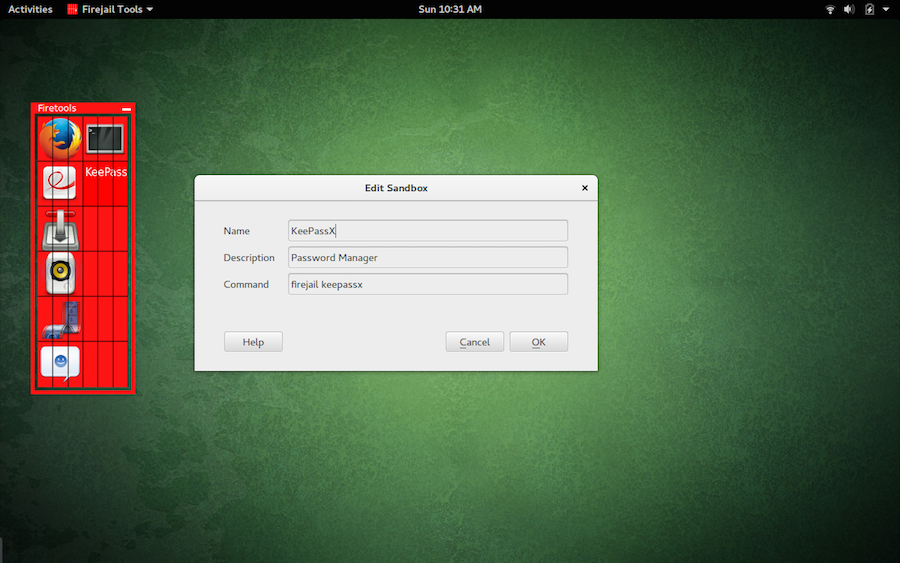
To add a new app to Firetools, right-click the GUI and click Edit. In the new window (Figure 4), fill out the details for the app. In the Command section, you must include firejail. If you want to add an entry for KeePassX, the Command section will be firejail keepassx.
Figure 4: Adding a new entry to the Firetools GUI.
A Must-Use for the Security Minded
If you want to be able to run standard apps in a sandboxed environment, using Firejail is one of the easiest ways to achieve this task. Firejail is user-friendly and ready to help prevent untrusted apps from gaining access to sensitive data on your system. Give it a try and see if it doesn’t help you find peace of mind with those third-party Linux apps.
Storage researchers are looking to innovations like 3D NAND, erasure coding, and utilizing DNA to provide greater data density, faster performance, and low cost.
According to IDC estimates, the amount of data stored in the world’s computer systems is doubling every two years, and is likely to continue increasing at that rate into the next decade. In order to deal with that data volume, manufacturers are looking for ways to increase storage density, or to store more information in less space.
In order to meet the demands for greater density, faster performance, and low cost, researchers have proposed several innovative new technologies. We look at nine innovations that could drastically affect the storage industry in the near future. Some are already on the market, while others are still on their way to general availability.
A Computer Numerical Control (CNC) machine interprets a series of commands and creates a physical object for you. The object can be as simple as a few holes in a panel for lights or as complex as a large engine. At the simpler end of the spectrum, you might like to create a control panel with buttons at set distances from each other, or perhaps you also want a square hole for a display. Instead of measuring this out and using a drill press, you can attach your control panel to the cutting area of a CNC and have the machine create it for you.
CNC Machines
Hobby CNC machines look a bit like 3D printers, with the ability to move in at least X, Y, and Z dimensions, but instead of extruding plastic to create things, they have many cutting bits that let you slice away material to expose the final object you want.
A CNC can remove just a small amount of material, create holes right through something, or use a cutting head to engrave something on a panel. This is a big advantage if you want to create some button holes in a panel. The CNC can also engrave what the button does right next to the hole that it has created.
You control a CNC machine using a G-code file, which has commands that tell the machine where to move the cutting head. It also controls whether the head should be turned on and off and other things. A G-code file might tell the machine to move to an X=100 and Y=0 position from the current location, while not “cutting.” The CNC might interpret that command by accelerating the cutting head up to a maximum speed and then decelerating as it gets closer to the destination. The cutting distinction is useful because the CNC can move faster if it knows it is not meant to be cutting anything when moving the position of the cutter.
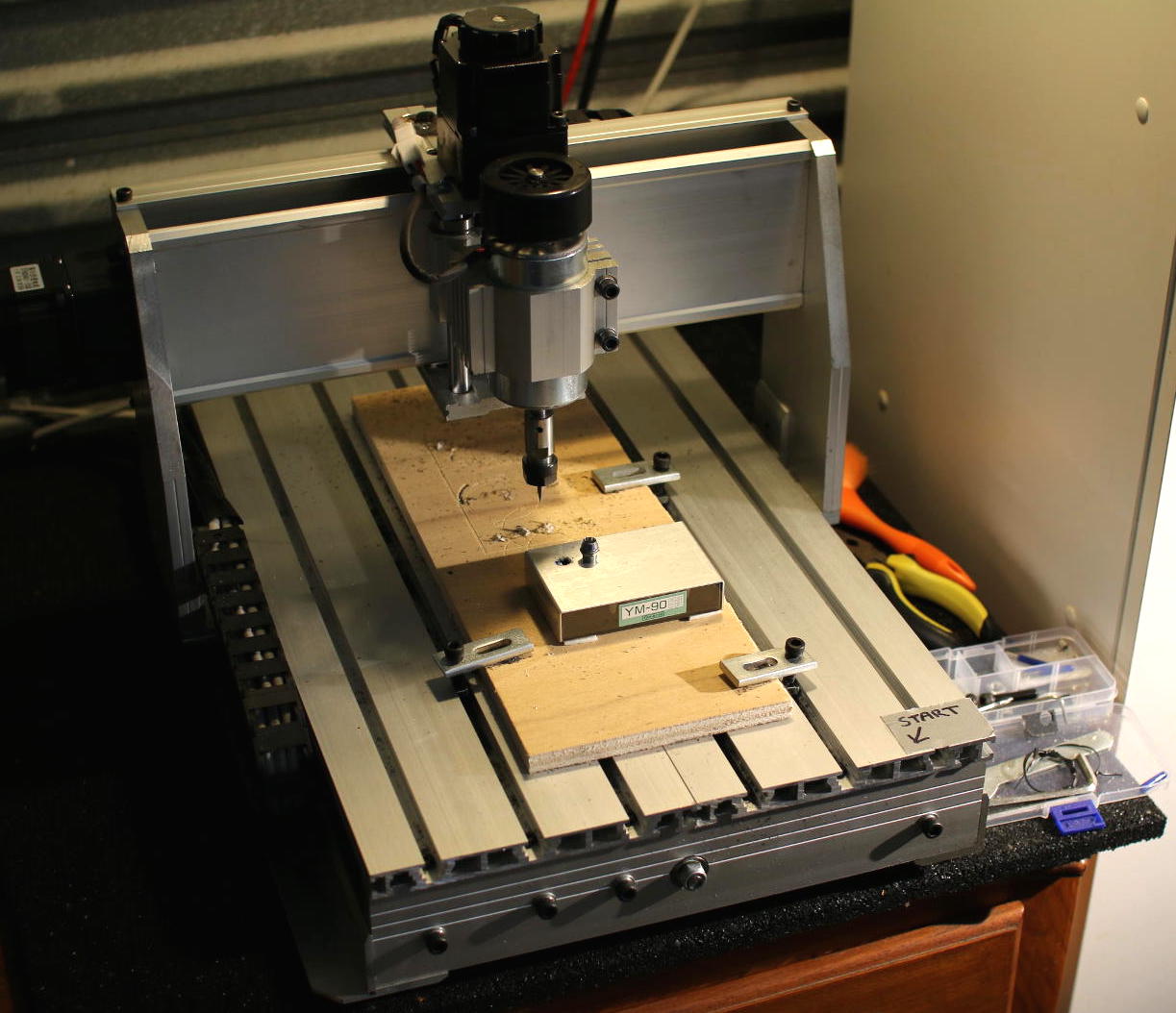
Hobby CNC machines are available for around a thousand dollars or less. Options range from the Shapeoko kit and X-Carve through to the “3040 CNC” machines from China (Figure 1), which can be found on eBay. The 3040 number indicates the size of the bed that might be serviced by the cutting tool (30×40 cm), although you are likely to get slightly less than that in each dimension.
Figure 1: 3040 CNC machine.
A big disadvantage of the 3040 CNC is that, by default, it is controlled over a parallel port. One issue here is that true parallel ports are difficult to find on modern PCs. The expectation is that you will have a dedicated PC with a parallel port and use something like LinuxCNC to control the CNC. If you are handy with a soldering iron, you might want to replace the controller board that comes with the 3040 with a Smoothieboard.
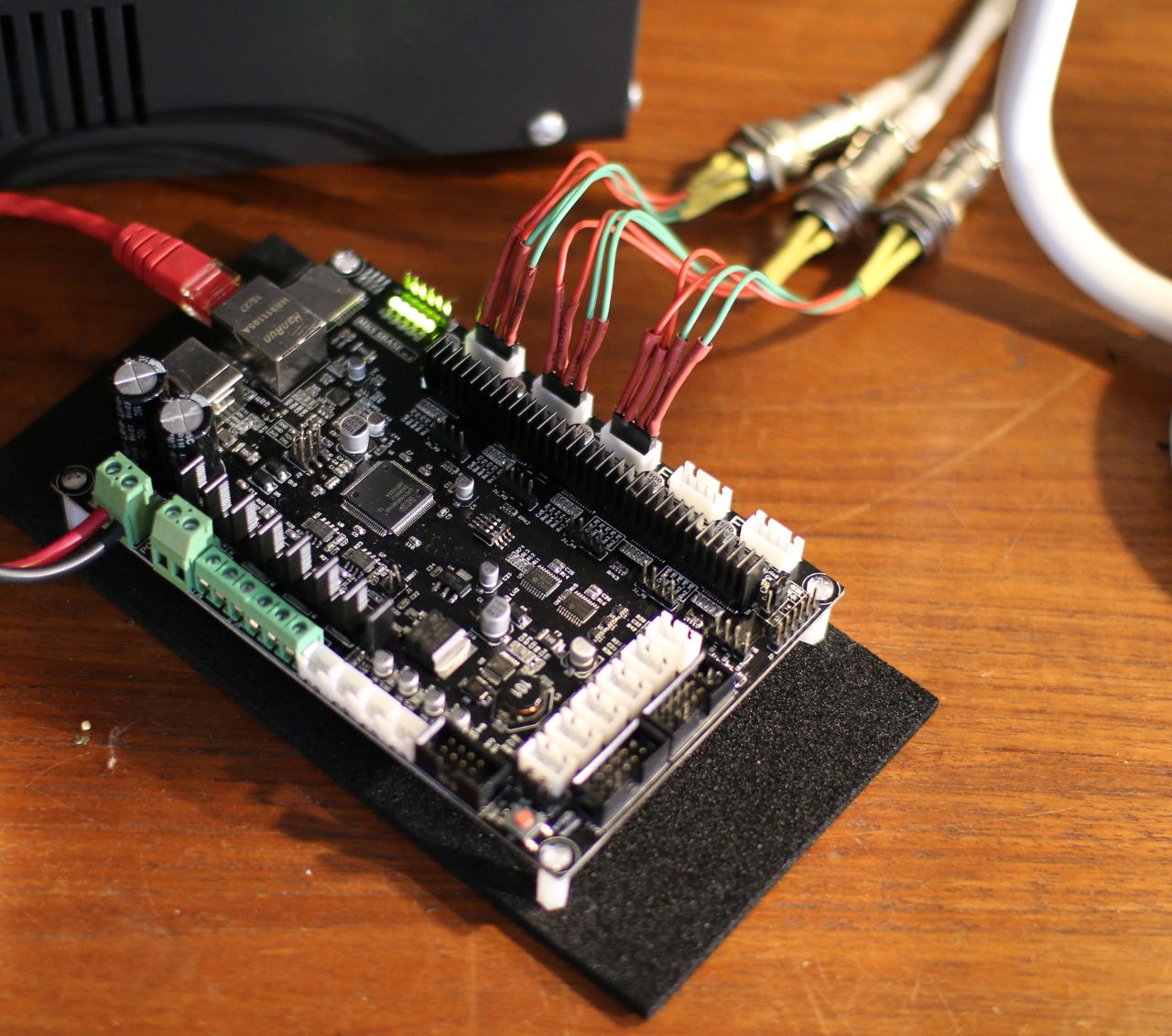
The Smoothieboard has an Ethernet port and a 100Mhz microcontroller to read your G-code and tell the stepper motors on the CNC machine where to move to cut out your design. Using the Smoothieboard, you do not have to bring a PC close to the CNC to use it, and you can interact with the Smoothieboard from any machine over the network. Because the Smoothieboard is also open hardware, you can find many suppliers of compatible boards depending on your needs.
Figure 2: Smoothieboard.
Figure 2 shows a Smoothieboard compatible board. The three stepper motors are connected to the X, Y, and Z connectors along the top of the board. The Ethernet cable is on the top left, and the DC power is connected to the left side of the board. The cutting spindle is on the left under the control of the original board and power supply.
The First Cut
It can be a little intimidating working out how to create G-code files and the process to start creating things with a CNC. A good place to start is with engraving and 2.5D milling. An introductory approach to doing 2.5D is to cut out a 2D pattern and then home the X, Y, Z to have the Z axis 0.1mm lower and recut the same design. This way you can move through 1mm thick material in multiple passes and keep a close eye on things as you go through the process the first time.
An example workflow for 2.5D milling starts with using Inkscape to lay out where you want to make your cuts. The first thing I normally do is open the “File/Document Properties” dialog and set the units to mm and the page size to the approximate size of the area I intend to cut. This helps to avoid surprises later, such as running over the edge of your material. A circle drawn in Inkscape can be used to create a hole in your material.
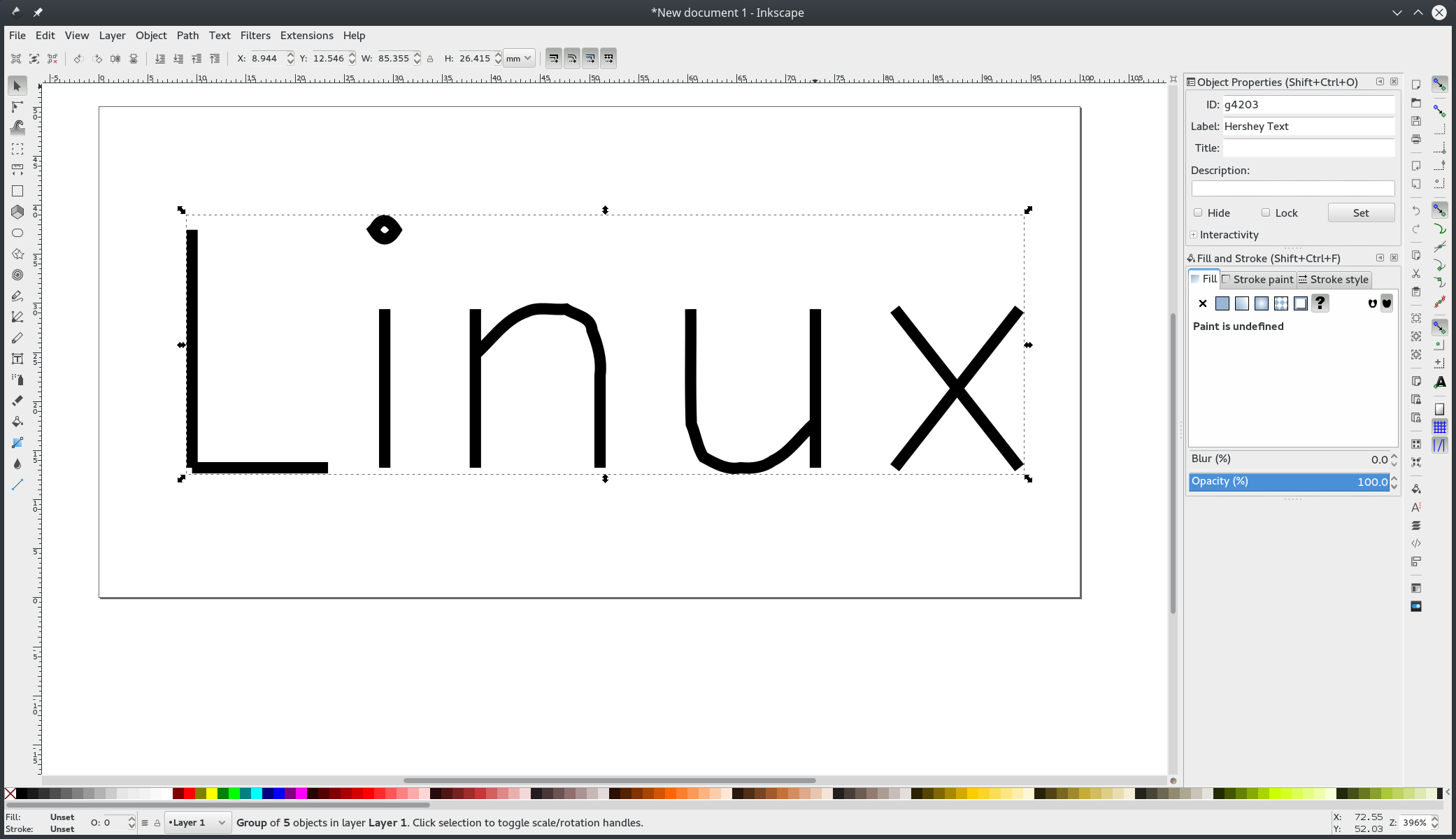
If you want to engrave some text, you might like to consider using the Hershey Text Inkscape plugin (Figure 3). The advantage of Hershey Text is that it is designed to be created on physical objects using a small number of passes of the cutting tool. If you are using an OpenType font by placing a normal text object in Inkscape, the cutting tool might have to perform many passes to remove all the material before you get something resembling what is on screen.
Figure 3: Hershey Text.
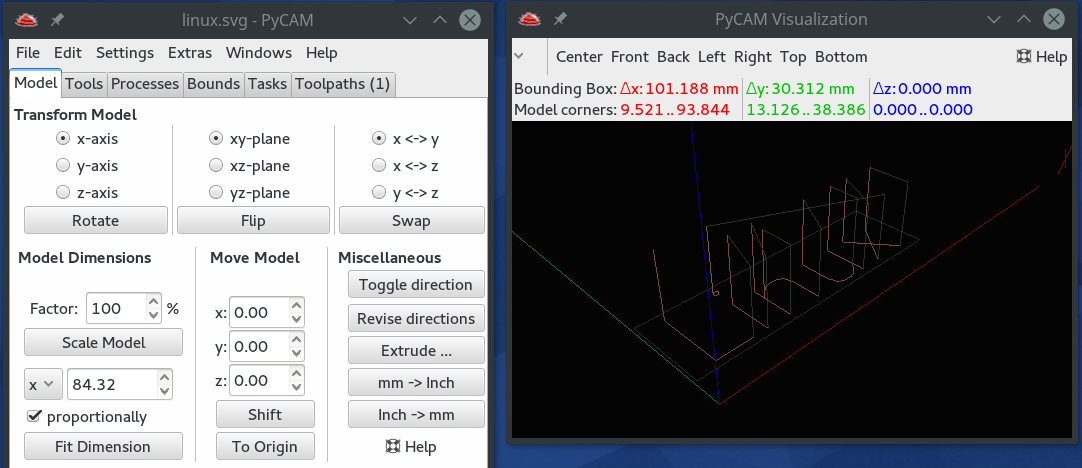
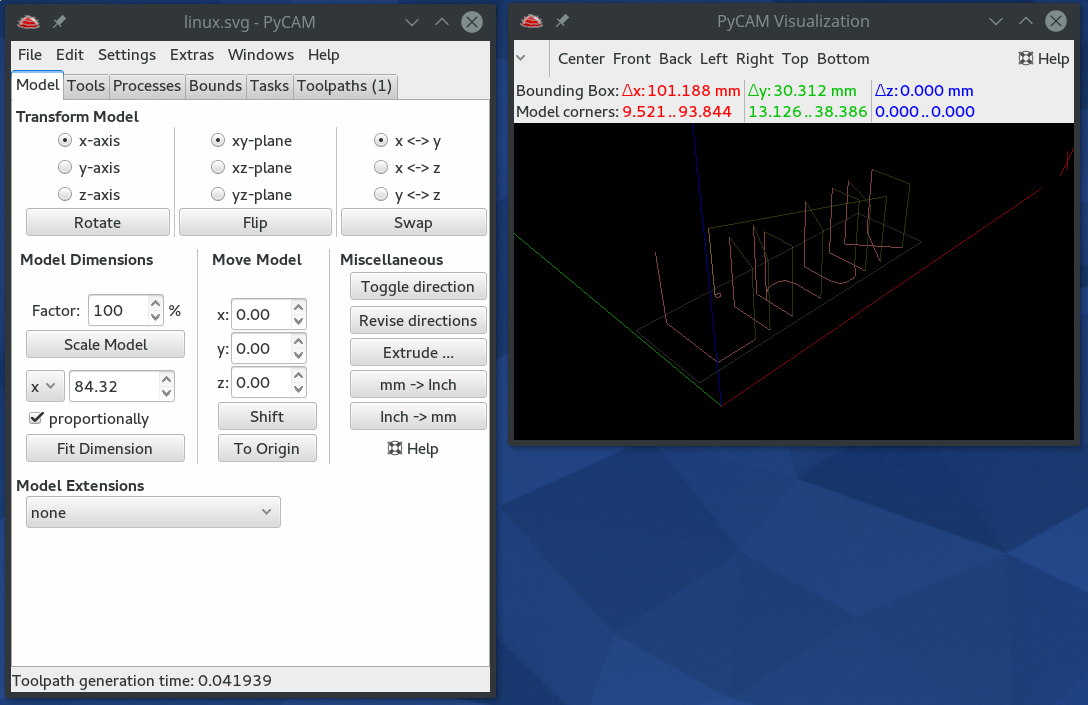
Once you have a design in Inkscape that you want to test, you can save that as an svg file and open it in PyCAM to generate your G-code (Figure 4). Once PyCAM is open, you should check a few things in the “Settings/Preferences” window. Make sure the General/Unit is set to the same measuring units you are using — mm in this case. In the G-code tab, there is the Safety Height setting, which is how far PyCAM will move the cutting bit upward before moving to another area. This setting helps you set enough clearance to avoid accidentally hitting the bolts that hold your material on the cutting tray. If there’s nothing to avoid, you can make the Safety height smaller.
Figure 4: PyCAM.
To generate the G-code that will make an engraving of “Linux” in this example, move to the Tasks tab in the main PyCAM window and select Gravure and then click the Generate Toolpath button. A new Toolpaths tab should appear. Going to the Toolpaths tab, you should be able to click the Gravure path and then click on Simulate to see how the CNC will move the cutting head to create this engraving. If this seems reasonable, click Export and save the G-code file.
Now that you have a G-code file, you need to upload it to the CNC machine and start a cutting job using that file. The Smoothieboard firmware should present an interface that resembles the pronterface tool used for 3D printing. There will also be a space allowing you to upload your firmware to the SD card of the CNC machine.
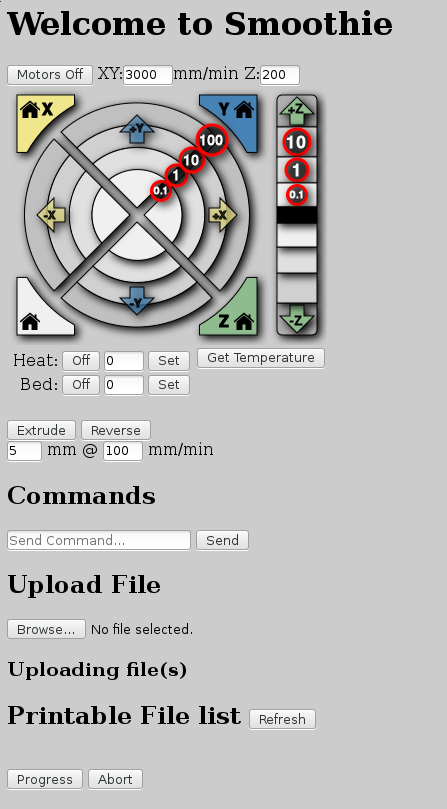
Before using the file you uploaded to engrave, it is very useful to have an idea of where the engraving is going to happen. You can adjust the location of the cutting head to one corner of the “page” that you used in Inkscape using the X, Y, and Z movement controls of the Smoothieboard web interface (Figure 5).
Figure 5: Smoothieboard web interface.
Which corner of the page you are homing depends on how you have configured the Smoothieboard config file. An easy way to see what will happen here is to set the Z height to much higher than the material you want to engrave on and run the G-code file “in air” to see what would happen. This way, you can see which corner of the page you home the cutting head on and mark that down near the CNC for later reference.
The telnet interface to the Smoothieboard can also execute G-code directly and has a collection of commands to allow you to look around the SD card and start or abort a CNC job. The below “G92” G-code command will set the X, Y, and Z home position to the current location of the cutting head. If you set the Z height to well above your material, you can tell Smoothieboard that that is the “top” of the material by telling it that it is at Z0. In the example, I have set the home position and then used “ls” to see the location of linux.ngc and “play” to start running that G-code file.
 > G92 X0 Y0 Z0

 > ls sd
 linux.ngc
 > play sd/linux.ngc
If cutting through the air looked good, you can lower the cutting head close to the material you are planning to cut and run the G92 command again. If you don’t want to cut into the corner of the material, you can set Z0.2 to tell the Smoothieboard that you are currently slightly above the Z home height. Then, when playing back the sd/linux.ngc file, the Smoothieboard will know that Z=0 is 0.2mm lower and should start at that lower height for the CNC job. It might take a few attempts to get the cutting head at just the right height to make some slicing into your material. It’s always best to cut too high a few times rather than cutting too low and potentially breaking the piece.
Final Words
The availability of fairly affordable CNC machines and replacement controller boards with fast microcontrollers and network connectivity makes it a great time to get into CNC. Many options are available including basing your CNC on a 3040 from China or using open source software and open hardware to run the show, perhaps starting out with with a Shapeoko. Depending on the material you are planning to cut, you might also have to retrofit a water-cooled spindle and some method to deliver cutting fluid to the cutting area.
I hope to cover more advanced CNC techniques in a future article — moving from 2.5D to full 3D CNC and 4D CNC, where you can also rotate the object you are cutting. Another great use for these machines is creation of custom PCBs. Prototyping speed is much greater without having to wait for slow shipping.