It seems lately you can’t have a discussion around new and disruptive technologies without the word “blockchain” entering the conversation. Blockchain technology, at its basic, is a distributed ledger. In an earlier post, I discussed that while blockchain has close association with bitcoin, it is also being looked at for a variety of situations well beyond digital currencies.
Hype around blockchain is definitely high. There was a recent article that even suggested blockchain could clean up American politics. While I have my doubts about that, there is no question blockchain has the potential as a disruptive technology to impact many businesses in a positive fashion. How to research and investigate the usage of the technology to a deep enough level in a cost-effective fashion has become the challenge for many businesses.
Recently adopted by the Cloud Native Computing Foundation, Prometheus is an open-source systems monitoring and alerting toolkit, focused on supporting the operation of microservices and containers. Like any open source project, it can be augmented with additional capabilities.
Contributing to Prometheus is no different than most other open source endeavors, which, like many projects, welcomes community contributions. Let’s gain better familiarity with the process by augmenting Prometheus’ Alert Manager with a new “history” view.
The first step, naturally, is to check out the contributing guidelines for the specific repository (in this case, Alert Manager‘s).
When electing to contribute to any open source project, you’ll want to ensure that you are capable of wielding the technologies used with the project — in this case, those are Go, AngularJS, SQL, etc.
The AlertManager component handles alerts sent by client applications such as the Prometheus server, carefully de-duplicating, correlating, and routing their notifications to their appropriate receiver (e.g. email, webhook, etc.). Current behavior of this component is only to display actively firing alerts.
Tails is a Linux distribution most famously used by Edward Snowden. Boot Tails from a live DVD, USB drive, or SD card and it will turn any PC into a more private and anonymous system. Tails forces all network activity to go through the Tor network, preserving anonymity and bypassing Internet censorship. Shut down your computer and the memory will be wiped, with no trace of the Tails activity left on the system.
This important Linux distribution has been advancing steadily with release after release since I last covered it with the release of Tails 1.4. The project just releasedTails 2.4 on June 7, 2016.
Ever since system administrators have been in charge of managing servers and groups of machines, tools like monitoring applications have been their best friends. You will probably be familiar with tools like Nagios, Zabbix,…
[[ This is a content summary only. Visit my website for full links, other content, and more! ]]
Application testing is key for a properly functioning web application. It will help you ensure that already tested scenarios keep running properly whenever newer features are added to your project. There are many ways to test your application, but we will focus here on the essential unit tests and see how we can integrate Docker in the process. We will use the online Travis-ci platform to automate the process of running those units tests.
Requirements
You will not need more software installed on your workstation than what you already used in part one.
I will follow the spirit of the other tutorials I wrote and keep using platforms, like Docker, that offer free plans for public projects.
Please register an account on the Travis testing platform, preferably using your GitHub account so that your repository can be automatically linked into your Travis account.
Create and run unit tests locally with Docker
Of course, before running your tests on Travis, you will first want to run then locally to ensure they function properly.
Let’s see how you can achieve such a thing by adding a few basic units tests to your project and run them using the Docker image.
In your app folder, create a file called test_app.py containing the following test code for your application:
from app import app
import unittest

class FlaskAppTests(unittest.TestCase):

    @classmethod
    def setUpClass(cls):
        pass

    @classmethod
    def tearDownClass(cls):
        pass

    def setUp(self):
        # creates a test client
        self.app = app.test_client()
        # propagate the exceptions to the test client
        self.app.testing = True

    def tearDown(self):
        pass

    def test_home_status_code(self):
        # sends HTTP GET request to the application
        # on the specified path
        result = self.app.get('/')

        # assert the status code of the response
        self.assertEqual(result.status_code, 200)

    def test_home_data(self):
        # sends HTTP GET request to the application
        # on the specified path
        result = self.app.get('/')

        # assert the response data
        self.assertEqual(result.data, "Hi ! I'm a Flask application.")
You should see the positive results of your testing:
----------------------------------------------------------------------
Ran 2 tests in 0.009s

OK
You’ve just run your first tests locally and successfully! Let’s see how you can have this task run automatically for you everytime a new commit is done to your code repository.
Using Travis continuous integration platform to perform tests automatically
In the second part of the tutorial you are going to use the SaaS version of travis-ci, one of the most popular continuous integration platforms out there. Of course what you are going to do would apply perfectly to your own installation of Travis-ci.
Login to Travis-ci with your GitHub account and switch the build of your project on, in my case:
Configuring Travis, requires nothing more than a simple file in your repository. This file will contain the different instructions to have Travis-ci run your unit tests.
Create a file named .travis.yml with the following content:
The process is pretty straighforward and mimics what you just did locally before. Travis will first be building your image, then runnning it, and finally executing a command inside the container to run the tests.
Now simply add your file to your repository:
git add .travis.yml
git commit -m "Initial commit of travis test instructions" .travis.yml
git push
By default Travis will run your tests each time a new commit or a pull request is done to your repository. As you’ve just done this by adding our .travis.yml, your project should already be building.
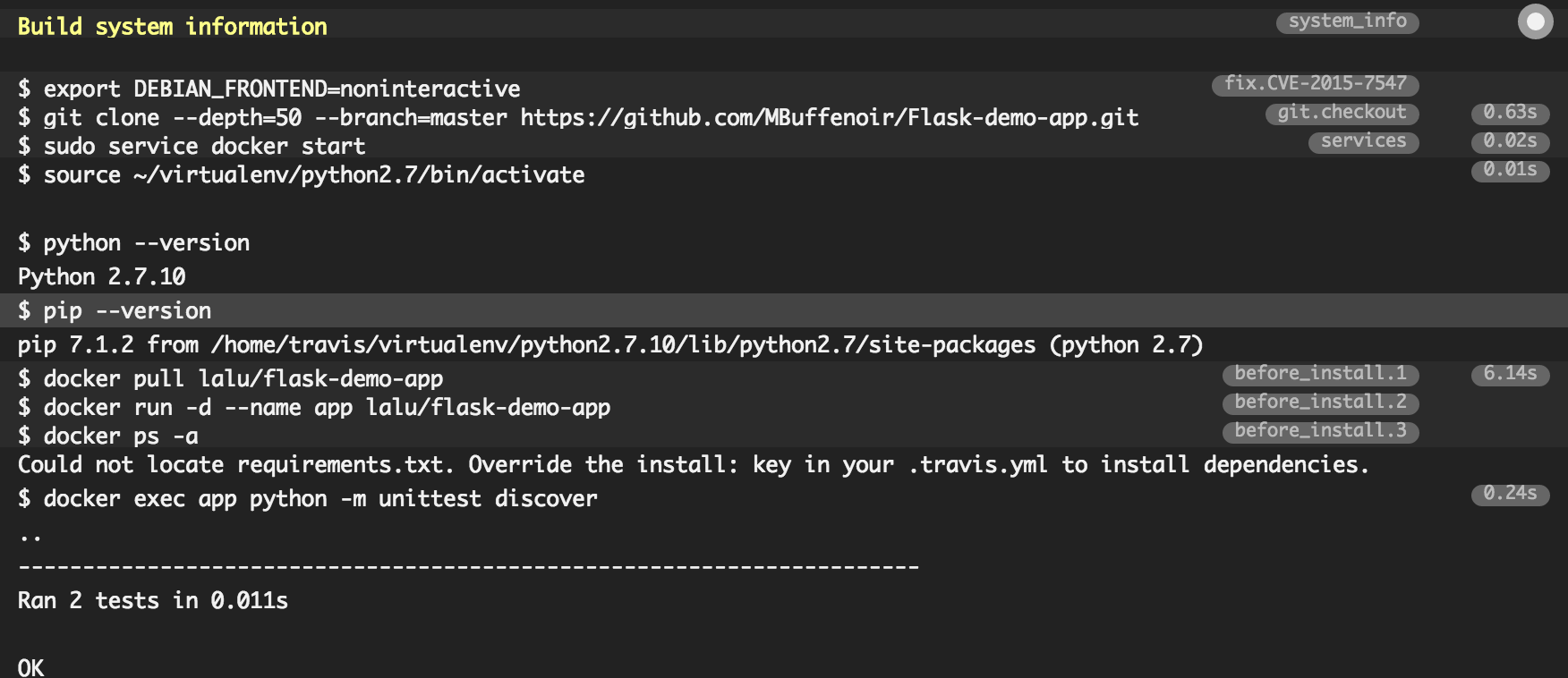
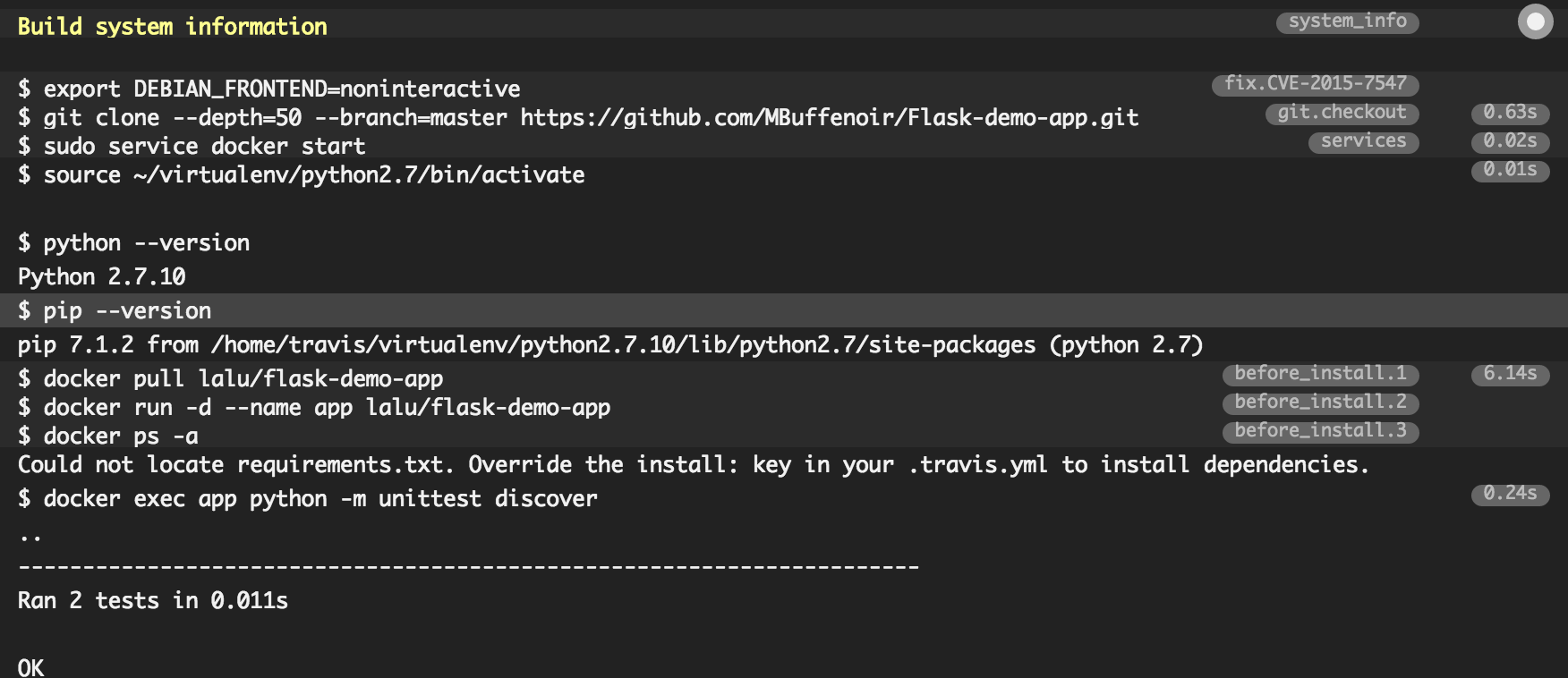
Click on the little wheel next to your project name to see your build details. You should see here the result of the latest build:
Viewing build details in Travis.
Et voila ! Now you simply have to keep up with providing well-tested code to your project, Travis will automatically run those tests for you.
It is easy to add the state of the latest build to your app Readme.md using the code 
To go further, have a look at the Travis-ci documentation. For example, it is easy to add notifications about the state of the latest build. Connectors exists for mail, chat applications, etc …
Next time, we are going to have a look on how to use Travis and docker-compose to deploy your application!
We’ve said it before, and we’ll say it again: the DevOps mode of software development is fast becoming one of the new big forces in the channel. Here’s a look at some of the key projects and products in the open source DevOps space, and an explanation of how each one will change the way organizations create and VARs integrate software.
Docker, with its containerized technology, is leaping into the enterprise with its Hewlett Packard Enterprise (HPE) partnership.
This strategic alliance, the first at this scale for Docker, includes sales, engineering, support, and knowledge sharing for HPE data-center customers. At the heart of this alliance is HPE’s Docker-ready server program. HPE servers will be bundled with the Linux-based Docker Engine and support. This will enable customers to create containerized applications, which will be portable across all of HPE’s servers….
Ben Golub, Docker’s CEO, added, “Our commercial end-to-end platform, Docker Datacenter, provides HPE customers with a comprehensive solution that covers all of their requirements over time. Enterprises leveraging this joint solution can achieve immediate efficiencies while focusing on existing applications, which can include a 20X optimization on their infrastructure, while shipping their applications 13X faster.”
What this means is that HPE and Docker will deliver, through all of HPE channels, the following container and hardware packages.
Open source IoT platforms are starting to emerge as an attractive options for organizations embarking in the IoT journey. In an extremely nascent and crowded market like enterprise IoT, organizations are trying to rely more and more on open platforms and control their own destiny. Although we are still in the first generation of open source IoT technologies we can already see how this model can become dominant in the enterprise.
Some of the initial IoT platforms that have gained traction in the enterprise come from the traditional IT school that favors closed source, commercial distribution models. Cloud IoT platforms are also a great fit for enterprises in these early days given that they removed many of the complexities associated with an IoT infrastructure. However, as the enterprise requirements evolves, we think open source IoT platforms will become more and more relevant in the enterprise.
If you’re a Cloud Foundry applications developer, how well do you test the performance of your work before you deploy it to production? A CI/CD framework may help you run a battery of automated tests on your code in a sandboxed system. But does it enable you to do unit testing?
“The process of testing in Cloud Foundry,” reads the platform’s documentation, “starts with running unit tests against the smallest points of contract in the system (i.e., method calls in each system component). Following successful execution of unit tests, integration tests are run to validate the behavior of interacting components as part of a single coherent software system running on a single box (e.g., a VM or bare metal).”
If you’re testing your software the way Cloud Foundry’s principal contributors would prefer you did, you’re testing individual functions in isolation. Or, as many developer shops are discovering, they think they are. Or, perhaps they’re performing a series of steps that seem second-nature enough that they may as well be called unit tests, for all anyone knows.
The Linux Foundation, the body promoting the open source software ecosystem, has introduced a new online training course for engineers who want to move into networking, with the skills necessary to manage a software-defined network (SDN) deployment.
The Linux Foundation believes there is a growing need for SDN skills and it says that open source is “leading the charge in the growth of SDN and virtualization”.
LFS265 Software-Defined Networking (SDN) aims to provide the knowledge required to maintain an SDN deployment in a virtual networking environment. Application developers may also be interested in this course, as most are familiar with virtualization due to use of the cloud, but they lack an understanding of how to deploy applications in an SDN framework.